In order to set the day of week:
1. Press and hold the button until the
icon is displayed, informing that the
regulator has entered the day of week
setting mode and one of the digits
representing days of week starts
flashing.
2. Using the‚ buttons, set the
desired day of week.
3. Confirm the setting with the
or button.
[1-7]
[set]
[updo]
[okok]
[1-7]
14
Setting the clock
Setting the day of week
...
In order to set the clock:
1. Press the button until the
icon is displayed, informing that the
regulator has entered the time setting
mode, and the hour field starts flashing.
2. Using the‚ buttons, set the
desired hour value.
3. Then press the or button
again, and when the minute field starts
flashing, set ( ) the desired
minute value.
4. Confirm the setting with the
or button.
[cl] SET_z
[updo]
[OKOK] [cl]
up dow
[OKOK]
[clo]
LO / HI temperature
If the surrounding temperature is lower than 5°C,
the display shows “LO”.
If the surrounding temperature is higher than
35 °C, the display shows “HI”.
15
The memory of the regulator allows for saving up to eight programs for
weekdays, eight programs for Saturday and the same for Sunday.
This allows for exceptionally precise planning of temperature in the building
depending on the time of day.
PROGRAMMING
Factory programs (for modification)
Weekdays Saturday Sunday
Prog.
6:00
8:30
15:00
23:00
21°C
20°C
21°C
19°C
Start
time
Temperature
Prog.
6:00
23:00
21°C
19°C
Start
time
Temperature
Prog.
6:00
23:00
21°C
19°C
Start
time
Temperature
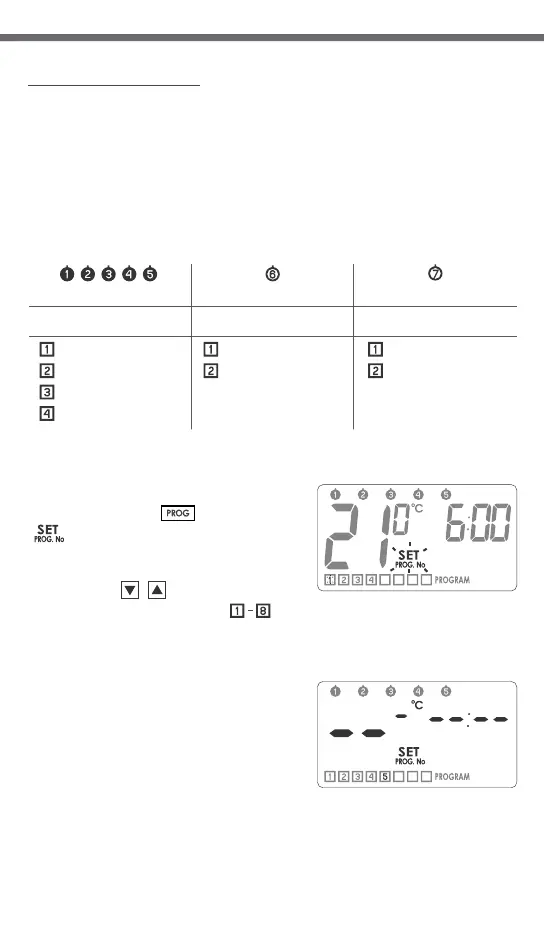
In order to start programming:
Press and hold the button until the
flashing icon is displayed.
1. Selecting a program:
Using the‚ buttons, select the
desired program number to
which you will assign the following
parameters:
- temperature setpoint,
- day of week it applies to,
- starting time.
Dashes are displayed on positions
corresponding to temperature and time
until the program is set.
[PROG]
[SET]
[updo]
[ 1-8 ]


 To Next Page