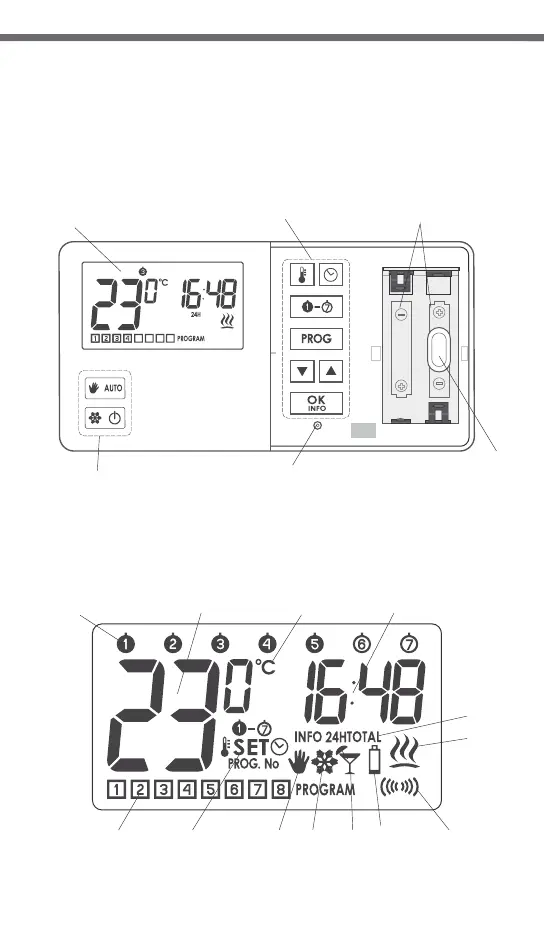
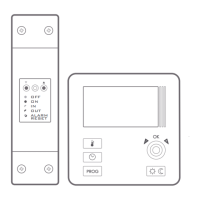
Description of the AURATON 2030
and 2030 RTH temperature regulator
battery holder
(AA LR6 1.5 V)
LCD display
programming
buttons
operating modeselection
buttons
RESET
button
fastening
hole
On the right side of the front panel of the regulator you will find a sliding
cover. There are buttons under the cover. You can replace batteries by
removing the cover completely.
4
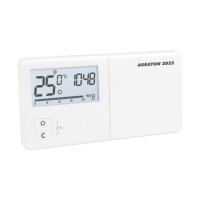
Display
1
2
3
4
12
5 6 7 8 9
10 11
13
1. Day of week ( )
Indicates the current day of week. Every day is assigned a number.
2. Temperature
In the normal mode of operation, the regulator displays the temperature in
the room it is installed in.
3. Temperature unit
Informs that the temperature is displayed in degrees Celsius (°C).
4. Clock
Time is displayed in the 24-hour format.
5. Program number ( )
Shows the total number of user-defined programs saved on the regulator.
6. Setting mode indicator ( )
The word SET appears when the user changes one of the following settings
of the thermostat:
- temperature - time
- day of week - program
7. Manual control indicator ( )
Appears when leaving the program-based mode of operation.
8. Anti-freeze mode indicator ( )
Indicates that the regulator operates in the anti-freeze mode.
9. Vacation mode indicator ( )
Indicates that the regulator operates in the vacation mode.
(See chapters: “Temperature programming” and “Vacation mode”).
10. Low battery ( )
This indicator will be visible when the battery voltage drops below the
minimal allowable level. In such an event, replace the batteries as soon as
possible.
NOTE: In order to preserve the parameters programmed, duration of the
replacement operation must not to exceed 30 seconds.
11. Transmission symbol ( ) – AURATON 2030 RTH only
Indicates ongoing communication with the RTH receiver.
12. Relay activation indicator ( )
A segment informing about the operating state of the controlled device.
Visible when the controlled device is turned on (e.g. a heater).
13. Information about operation of the regulator ( INFO )
- current program settings
- relay operating time during the last 24 hours,
- total operating time of the relay since the start of the regulator.
NOTE: “RESET” causes both operating time counters to be set to zero
(INFO 24H, INFO TOTAL).
5


 To Next Page