18
Manual control
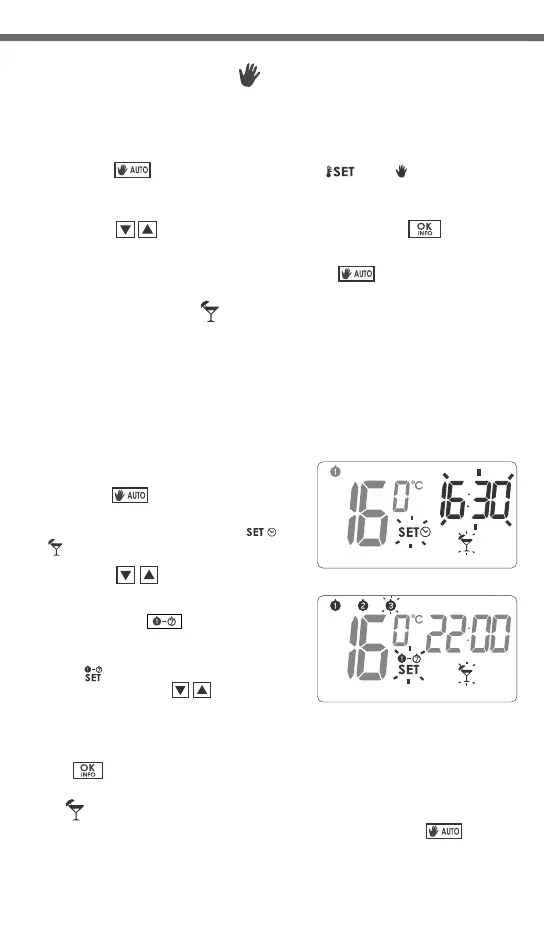
When, for any reason, you would like to suspend execution of the program for
a certain period of time, the temperature can be set manually for a specified
time. In such a case you have to:
1. Press the button. This will cause the and icons to appear
flashing on the display. The temperature field will become editable, with
the previously programmed value set as default.
Use the‚ buttons to edit the value, and the button to
confirm settings.
2. To leave the manual control mode, press the button.
[auto] [set.] [ha]
[updow] [okok]
[auto]
Vacation mode
Should there be a need for suspending execution of the programs for
a prolonged time, the vacation mode can be used.
When this option is active, the regulator executes only the “vacation
temperature” (see chapter: “Temperature programming”).
Maximal duration of operation in vacation mode is 6 days, 23 hours and 59
minutes.
In order to enter the vacation mode:
1. Press the button and hold it for
3 seconds.
This will cause flashing of the and
icons as well as the field time.
2. Using the‚ buttons, set the time
when the vacation mode should end.
3. By pressing the button you can set
the day when the vacation mode should
end.
The icon will start flashing on the
display. Using the, buttons, set
the day when the vacation mode should
end.
4. Confirm the setting by pressing
the button.
[auto]
[set]
[dri]
[updow]
[1-7]
[set ]
[updo]
[okok]
Switching off the receiver for a period of time
Pressing the button and holding it for 5 seconds causes switching off
the thermostat relay, setting the temperature in the receiver to 4°C and
putting out all elements on the display except for current temperature, time
and day of week.
To restore normal operation of all functions of the regulator, press
the button.
[powe]
[powe]
19
Anti-freeze mode
The regulator is equipped with a setpoint for the anti-freeze temperature.
This setpoint can be set within the range from 4 to 10°C. (Factory set at 7°C)
The anti-freeze mode is used during a prolonged period of absence or outside
the heating season and is designed to prevent water in the heating system
from freezing.
1. To enter the anti-freeze mode, press the button. The “ ” icon
will appear on the display.
2. To leave the anti-freeze mode press the or button.
[powe] sno
[auto] [powe]
The “ ” symbol will be displayed on the screen while the vacation mode is
active. You can leave the vacation mode earlier by pressing the button. [auto]
Viewing the currently active program
Pressing the button in the normal operation mode causes the INFO
segment and all the parameters of the currently executed program
(day of week, temperature and ending time) to flash for 10 seconds
on the display.
To restore the regulator back to normal operation, press the button
again.
[okoko]
[okok]
Relay operating time counter
Pressing the button and holding it for 3 seconds activates
the INFO 24H function that counts the relay operating time during the last 24
hours.
Pressing the button again causes the INFO TOTAL segment to appear,
corresponding to the function of counting the accumulated number of days
of relay operation.
To restore the regulator back to normal operation, press the button
again.
NOTE: To reset the total counter of days of relay operation to zero, press
the button and hold it for 5 seconds, while in the INFO TOTAL
mode.
NOTE: “RESET” causes both operating time counters to be et to zero.
[okok]
[okoko]
[okoko]
[okoko]


 To Next Page