10 ENGLISH
•Positioncreditcardorsmallpieceof
paperoverthecreditcardsectionofthe
Feeder(centerposition).
•Tryagain.
Shredder does not feed or shred credit card or small piece of paper
Warning: DO NOT USE ANY
SPRAY CANS OR AEROSOLS.
!
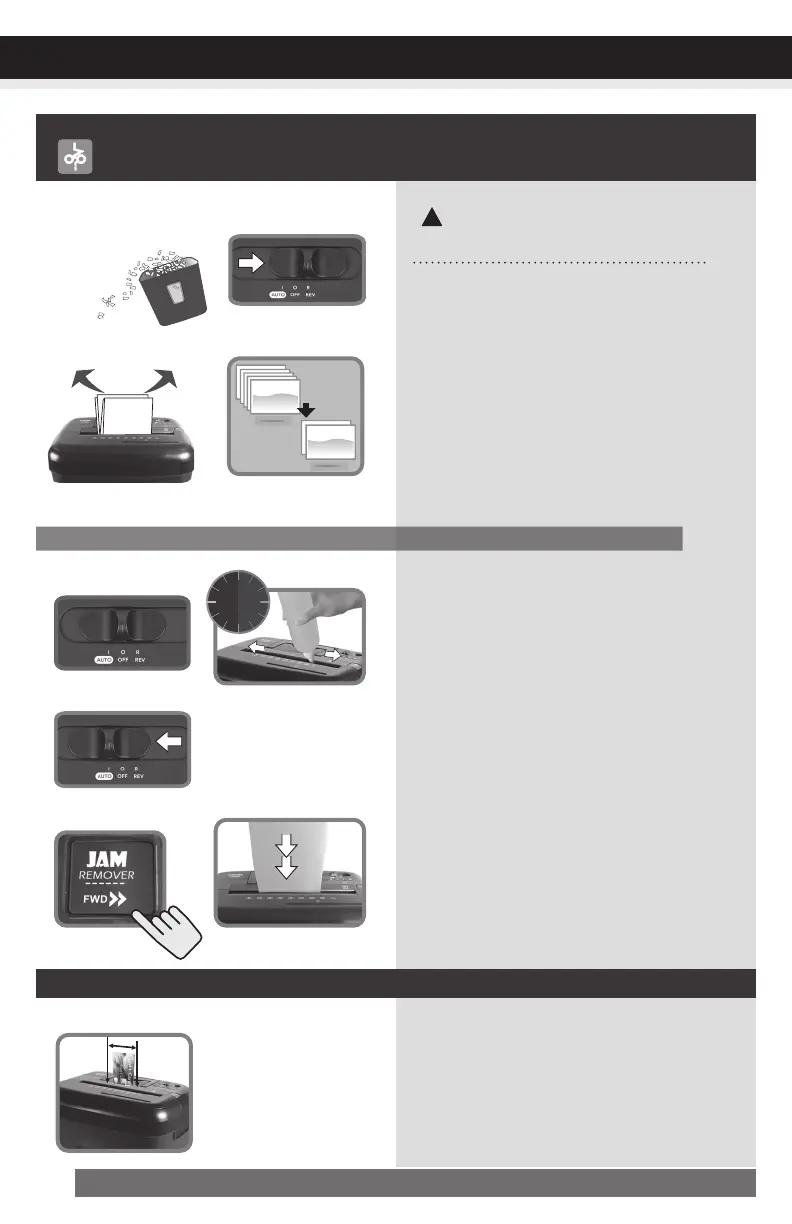
Shredder is jammed and runs in “Reverse” mode only /
Overload icon is lit in red
1) Emptyifbasketfull.
Carefullyremove
paperonshredderheadbottom.
2) Setswitchtoreversefor5sec.
3) Turn off shredder then pull paper side
tosidetoremovejammedpaper(as
muchaspossible).
4) Reducethenumberofsheetsbeing
fed(countpagestobesurenottoex-
ceedthemaximumsheetcount).
1) Turn off shredder.
2) Applyshredderoiltothefeedslot
(shredderoilnotincluded).Letoilsoak
intopaperandmachinefor30minutes.
3) SetthecontrolswitchtoAuto/On.
4) Press“Jam-remover”button(FWD>>)
orusethickpaperstock/greetingcard
tomanuallyactivatetheshredderinto
cuttingmodeopushthejamthrough.
5) Reducethenumberofsheetsbeing
fed(countpagestobesurenottoex-
ceedthemaximumsheetcount).Refeed
the paper.
Reversefor5sec
PowerOffthenpull
paper side to side
Turn off shredder
Press“Clog-remover”
SetswitchtoAuto
Reduce sheets
Applyshredderoiland
waitfor30min.
Usethickpapertopush
jamthrough
Min
30
Feed in the center
With stubborn situations where the reverse function does not help, follow the steps below:
Or
TROUBLESHOOTING
Emptyifbinfull.
Carefullyremovepaper
on shredder head
bottom


 To Next Page