6 ENGLISH
CONTINUED NEXT PAGE
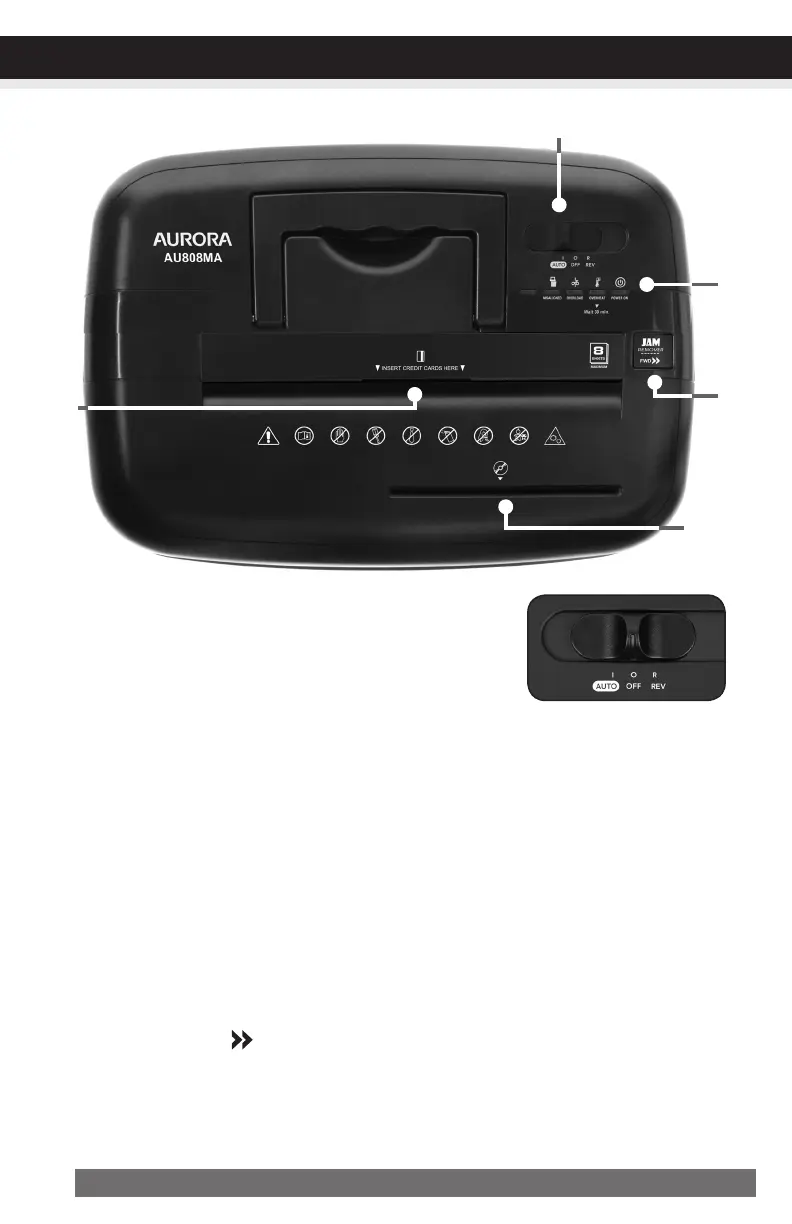
Control Switch
Usingtheswitchlocatedontheunit,selectoneofthefollowing
settingsbyslidingtheswitcheitherleftorright.(FIGURE2)
I AUTO:
Thissettingallowstheshreddertobeautomaticallystartedbyinsertingpaperintothefeedslot.
Alwaysfeedthepaperinasstraightaspossible.Whenthepaperhaspassedthrough,theshred-
derwillautomaticallystop.
O OFF:
Thissettingturnsoffallfeaturesoftheshredder.Forsafetyreasons,werecommendthatyouleave
theshredderinthe“Off”positionwhenevertheshredderisunattendedornotinuse.
R REV (REVERSE):
Intheunlikelyeventofapaperjam,thereversesettingcanbeusedtohelpclearthecuttersof
paperthatdidnotpassthrough.Neverattempttoclearajambyusingthereversefunctionuntil
youhaveemptiedthewastebasket.
Jam Remover / FWD
:
Theforwardsettingcanalsobeusedtohelpclearthecuttersintheeventofapaperjam.
Thisallowstomanuallyactivatetheshredderintocuttingmode.
FIGURE 2
OPERATION OPERATION


 To Next Page