7ENGLISH
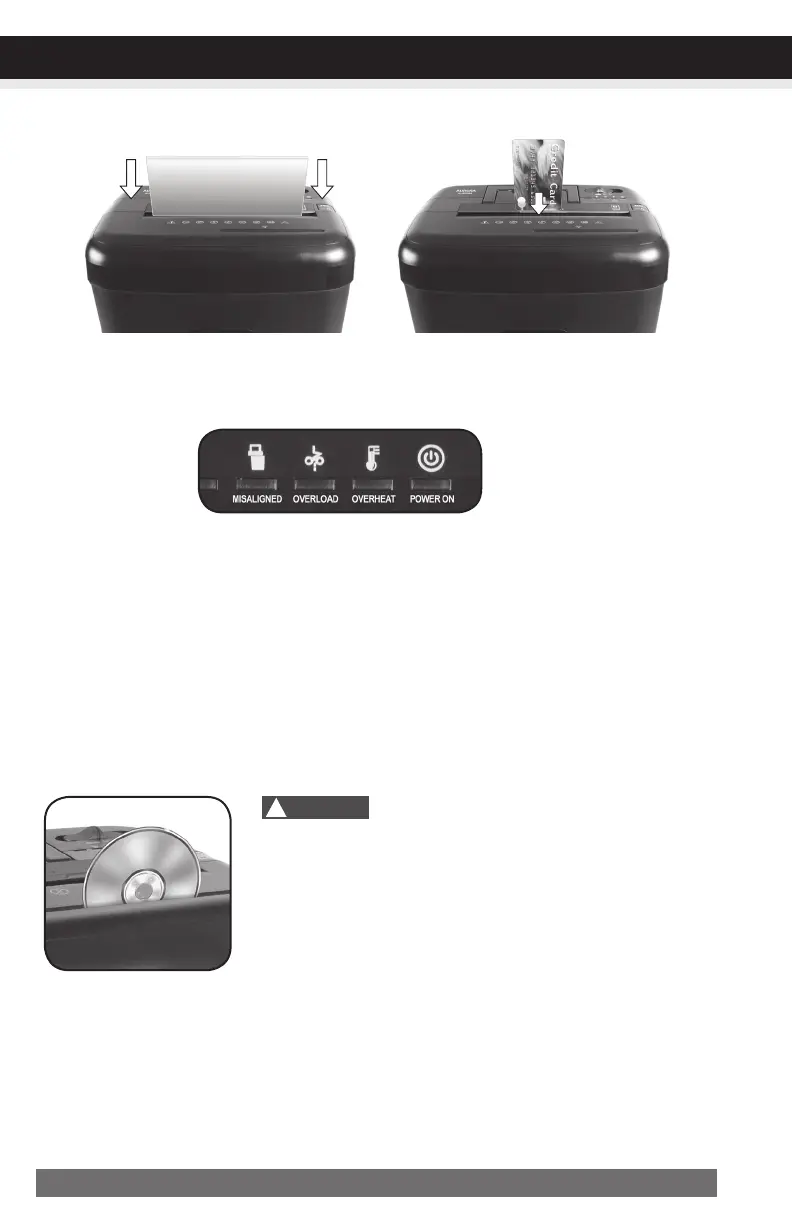
Paper / Credit Card Entry:
Note:
•Alwaysturnoffandunplugtheshredderwhennotinuse.
•Thisshredderwillshredstaplesandsmallpaperclips.Itisrecommendedthatyouremovepaper
clipswheneverpossibletoextendthelifespanofyourshredder.
•Onlyshredcreditcardsbyfeedingthemverticallyintothemiddleofthefeedslot,releasingwhen
shreddingbegins.Neverfeedmorethanonecreditcardatatime.
LED Status
Indicators:
Misaligned / Overload
Overheat / Power On
• Power On:TheGreenLEDlightindicatestheshredderis“On”andreadytooperatewhenpaper
is inserted.
• Overheat:TheRedLEDlightindicatestheshredderhasshredcontinuouslybeyondthemaximum
runningtimeandoverheating,theunitwillautomaticallyshutoff.Ifthishappens,switchtheshredder
Offfor30minutesorlongerbeforeresumingnormaloperation.
• Overload:TheRedLEDlightindicateswhentoomuchpaperisinserted.Usethe"Reverse"
modetobackupandreducenumberofsheets.
• Misaligned:Mounttheshreddersecurelytotherimofthewastebasket.
Features a CD/DVD destroyer:
Do not hold CD/DVD with finger through the
center ring while feeding into the shredder.
Serious injury may occur.
NeverfeedmorethanonecreditcardorCD/DVDatatime.
1)HoldtheCD/DVDbytheedgeandfeedoneatatime,releasing
whenshreddingbegins.
2)Shredderwillstopwhentheentiredischasbeendestroyed.
!
Caution:
OPERATION
Makesureyoudonotexceedsheet
countperpass(8sheetsmax).
Insert paper as straight as pos-
sible into feed slot and release.
Insertonecreditcardatatimeinto
themiddleofthefeedslot.


 To Next Page