9ENGLISH
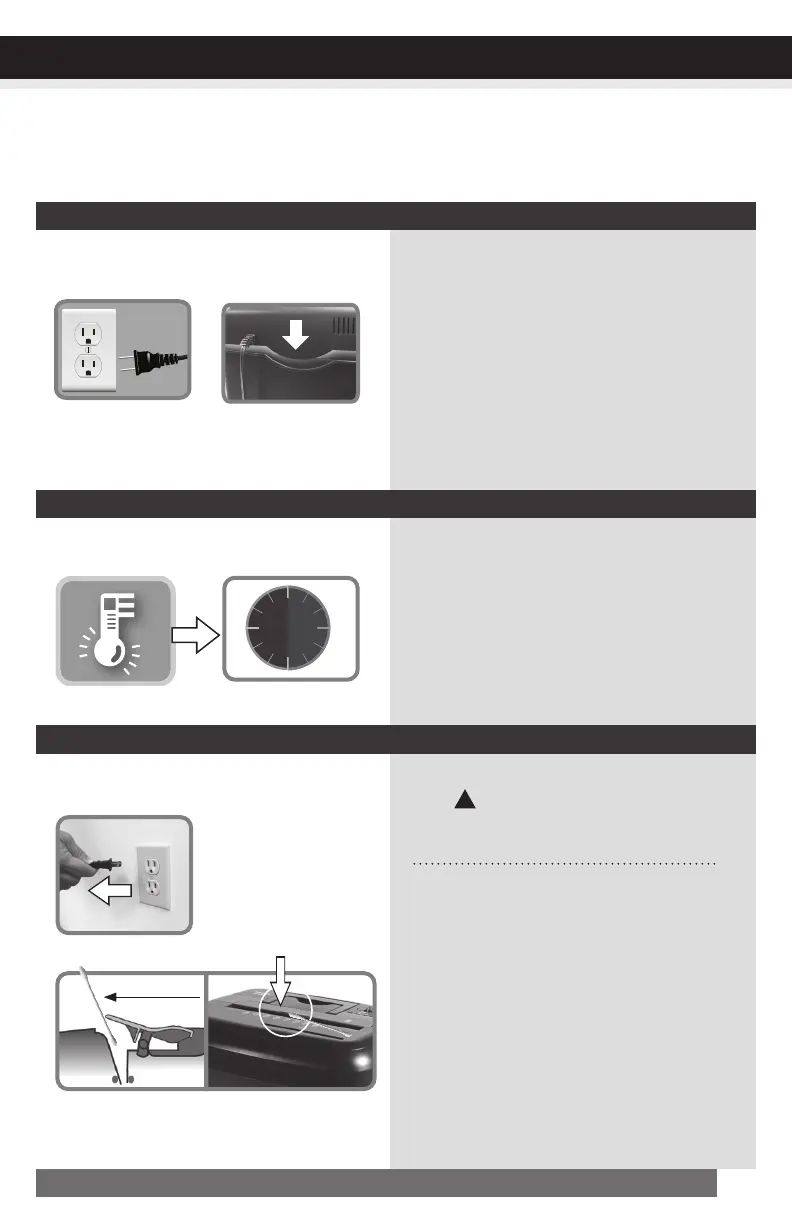
1) Makesurepowercordispluggedintoa
functioning120Vstandardhousehold
poweroutlet.
Or,tryusingadifferentworkingoutlet.
2) Checkiftheheadunitportionofthe
shredderiscorrectlyseatedontothe
includedwastebasket.
No-power to the shredder
IfOverheatlightislitinred,turnshredder
offandletitcooldownfor30minutes.Turn
shredderon,checkOverheatlightagain,
andrestartshreddingonlywhenlightis
not lit.
1) Unplugthemachinefromthewallsocket.
2) •Findtheactivationsensorinthecenterof
the feed slot.
•Useacottonswabtogentlywipeaway
anydustordebristhathascollectedon
the sensor.
Warning: DO NOT
USE CANNED AIR.
!
Shredder runs continuously
Shredder does not feed or shred paper
Checkpoweroutlet
Shredder head
correctlyinstalled
Overheat Cooldown
Cottonswab
Unplugpower
Clean sensor
TROUBLESHOOTING
CONTINUED NEXT PAGE
Ifthereisaproblemwithyourshredder,checkbelowforthesymptomsandstepstoresolve.Ifyoucontinue
tohaveproblems,contactcustomersupportatourServiceCenter1-800-327-8508. DO NOT ATTEMPT
TO REPAIR BY OPENING THE SHREDDER HEAD. This will completely void the product warranty.


 To Next Page