13
NOTE
There is a protector on the back designed to protect the Micro-USB
Port and Remote Control Pairing Button/Pairing Indicator.
Remember to put it back in place before flying the aircraft.
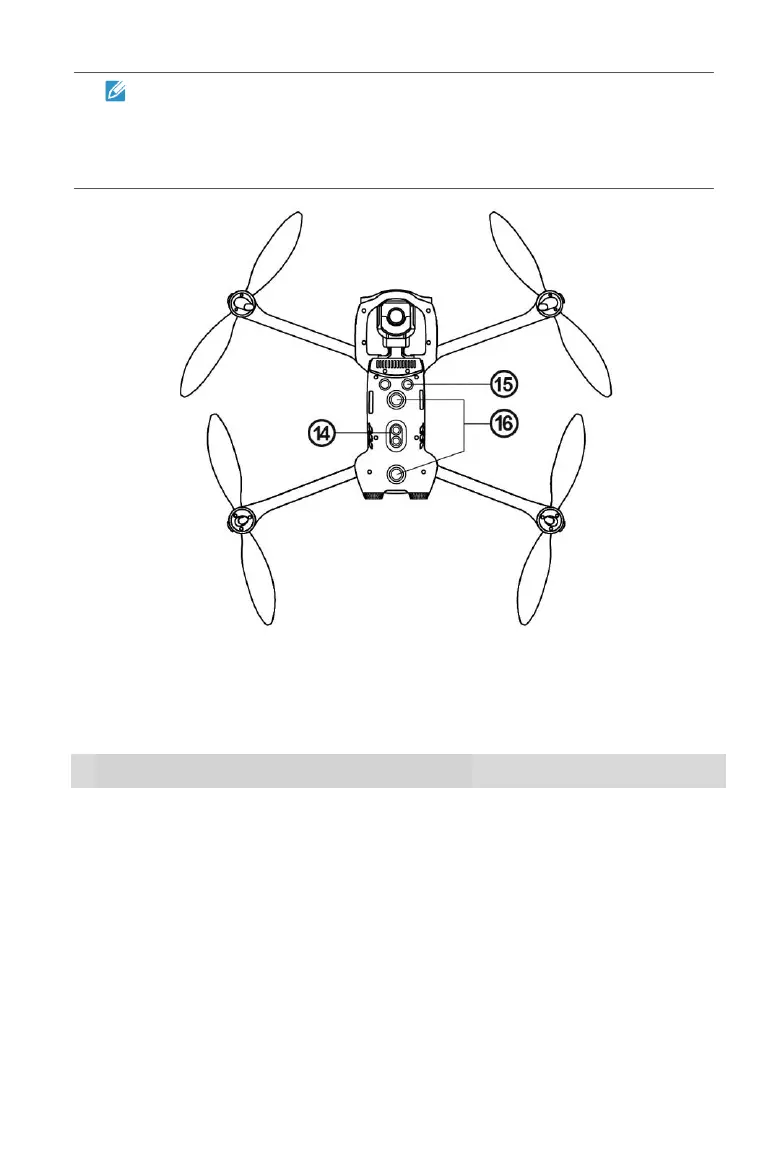
Bottom Side
⑭ Downward Vision Lighting LED
⑮ Ultrasonic Sensor ⑯ Downward Vision System
2.1.2 Flight LED Indicators
An LED indicator is located on the end of each aircraft arm. The front LEDs will
light up solid red to help you identify the direction of the aircraft's nose. The
rear LEDs will display the current flight status of the aircraft. The chart below
shows the meaning of each status indicator.
Slow Flashing: Flashes once every 2s
Fast Flashing: Flashes twice per second
Double Flashing: Flashes twice and then pauses and
repeats
Alternate Flashing: Alternates among different colors
Example: “R - Solid Light” means solid red light.



 To Next Page