37
General Settings
1. Language: Select the displayed language.
2. Units: Choose the unit of measurement displayed in Flight Control Settings:
Metric (m/s), Metric (km/h) or Imperial.
3. Format SD Card: Use this to ensure that your SD card is in an acceptable
format.
4. Reset Camera: Use this to restore all the camera settings to default.
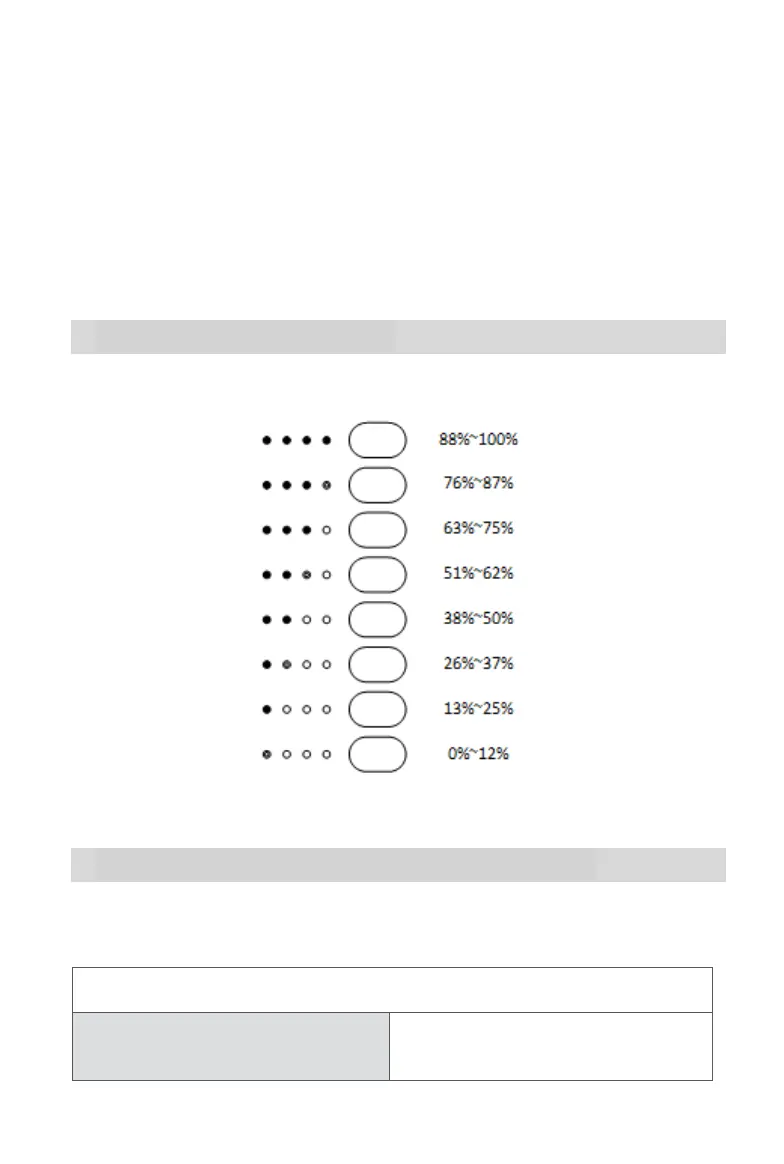
2.2.3 Indicator Lights
To check the remote control's remaining power level without powering it on, press
the power button quickly.
2.2.4 Remote Control Buzzer Alerts
The table below describes the various buzzer alerts and their corresponding
meanings.
Remote Control Buzzer Alerts
Aircraft Low Battery Warning
(about 25%)
1 quick beep every second for 5s, with 2
remote control vibrations



 To Next Page