34
Image Transmission Mode
Press the Screen Navigation Button (DISP) on the remote control when you
want to enter the Image Transmission Mode. Then follow these steps:
1. Scroll the Screen Navigation Dial to highlight the different setting options.
2. Press the Screen Navigation Dial to enter the highlighted option.
3. Scroll the Screen Navigation Dial again to set different values.
4. Press the Screen Navigation Dial to confirm this value, or press the Screen
Navigation Button (DISP) to go back.
5. Press the Shutter Button to take a photo.
6. Press the Record Button to start or stop recording video.
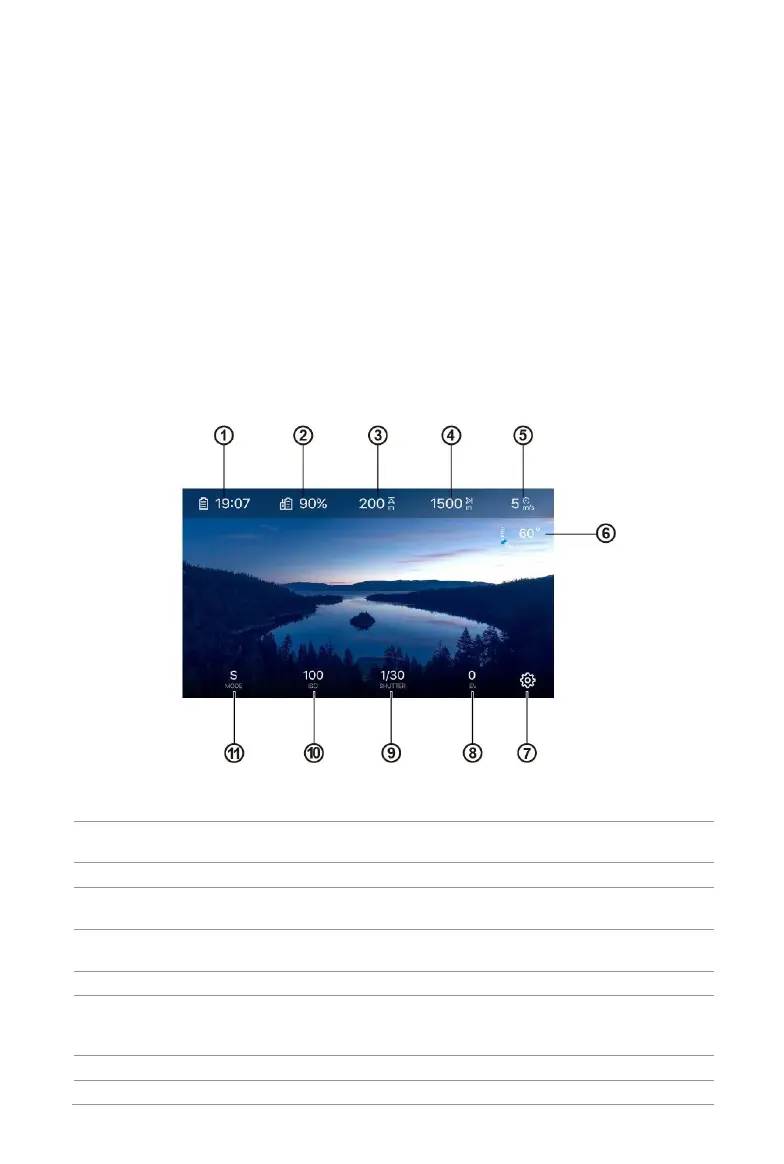
Image Transmission View
Estimates how much longer the aircraft can stay in
the air based on remaining battery level
Displays the remaining battery level
Displays the aircraft altitude relative to the home
point
Displays the horizontal distance between the aircraft
and the home point
Displays the current speed of the aircraft
The number indicates the angle of the gimbal in
degrees. The blue arrow will move as the gimbal
angle changes
Press to access the Settings page
The Exposure Value (EV) is a combination of both



 To Next Page