44
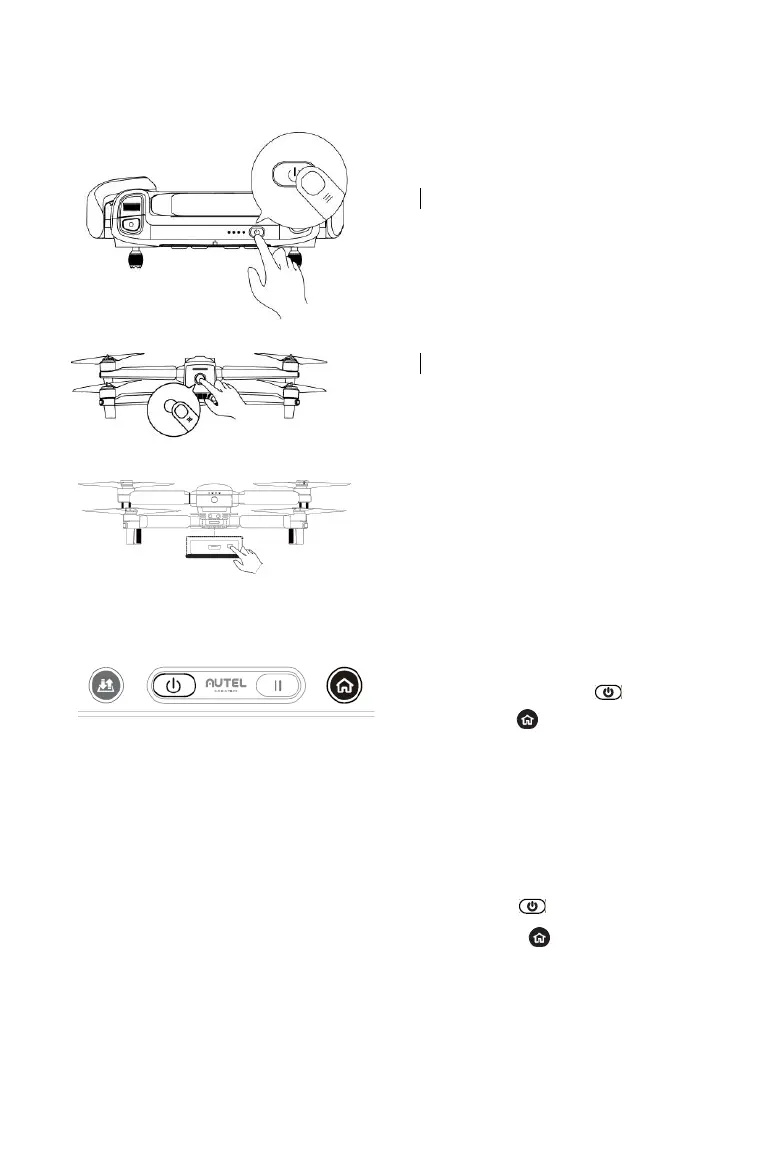
1. Turn off the remote control.
2. Remove the gimbal guard first, and
then turn on the aircraft .
3. Press and hold the Remote
Control Pairing Button on the
lower right side of the aircraft for 3
seconds. The Pairing Indicator
will flash quickly, indicating the
aircraft is ready to pair with the
remote control.
4. Simultaneously press and hold the
Power Button ( ) and Go
Home Button ( ) simultaneously
for 2 seconds until “Autel” appears
on the Flight Information Panel.
The Pairing Indicator on the
aircraft will turn off once pairing is
successful.
5. To pair a secondary remote control,
simultaneously press the Power
Button ( ) and Customizable
Button B ( ) until "Autel"
appears on the Information Panel.



 To Next Page