17
① Mobile Device Holder
With a 180° adjustable viewing angle for optimum
visibility
② Flight Information Panel
Displays the ight status, warning messages and
real-time live view
③ Command Sticks Control the orientation and movement of the aircraft
④ Hand Grips These are foldable to allow for compact storage
⑤ Take-off/Landing Button Commands the aircraft to take off or land
⑥ Power Button
Press and hold the button for 3 seconds to turn on/off
the remote control
⑦ USB Ports
The two ports can be used for charging or connecting
to your mobile device
⑧ Pause Button
Tells the aircraft to pause autonomous ight operations
and hover in place (press it a second time, and
autonomous mode will resume)
⑨ Go Home Button Commands the aircraft to return to the home point
⑩ Antennas
Communicate with the aircraft at 2.4GHz or 900MHz
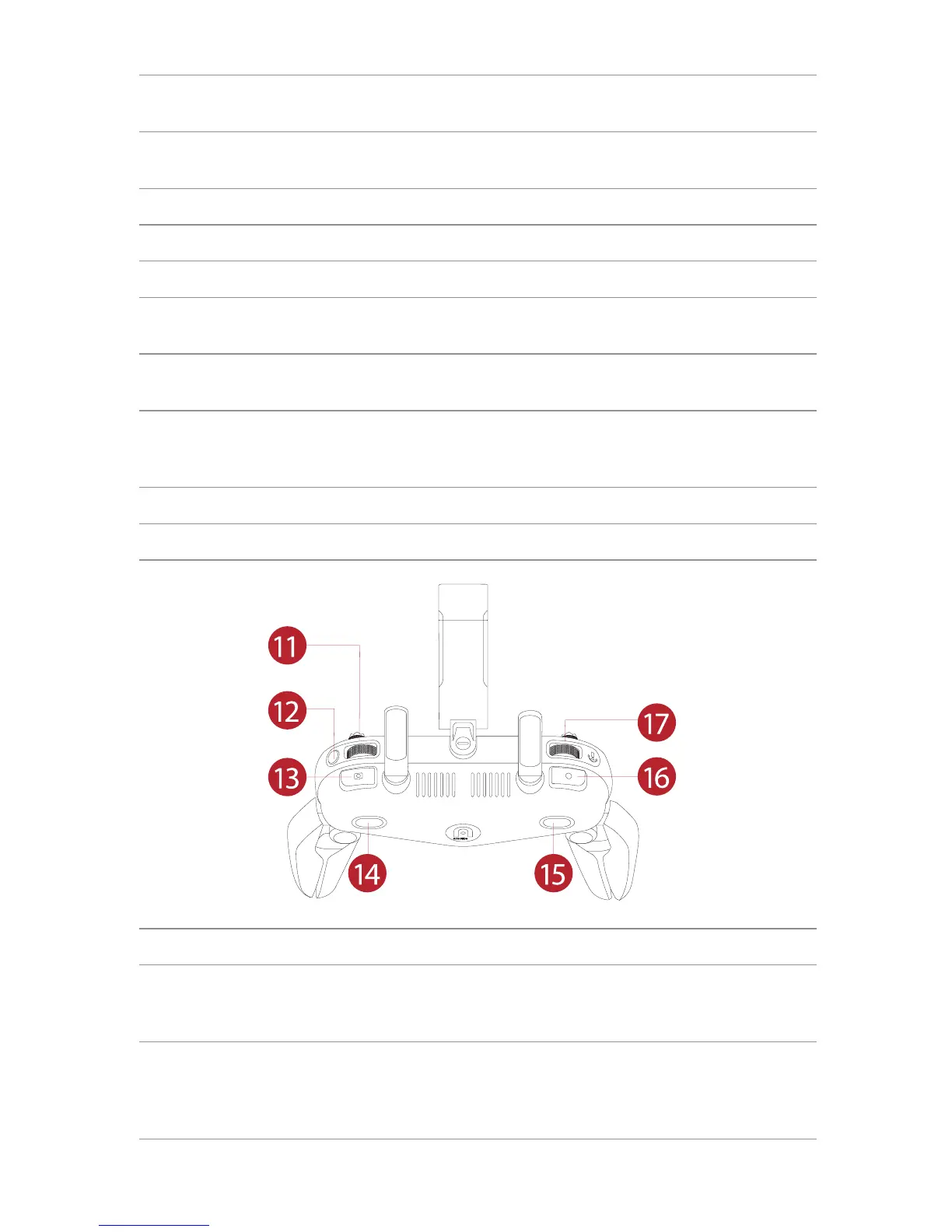
⑪ Screen Navigation Dial Scrolls the OLED screen
⑫ Screen Navigation Button
When the mobile device is disconnected, press
this button for one second to enter/exit the Image
Transmission screen on the remote control
⑬ Shutter Button
Takes photos. When Burst Mode is turned on,
several images will be taken with one press. More
details on this function can be found in the App
Manual



 To Next Page