67
When the injection volume adjustment is completed, select [3] and OK to store
the new value in the control units; or select [4] and OK to retain the old value.
5.6.3 Injector Rate Adjustment
This function is used to adjust the injector rate for individual cylinders.
1. Tap Injection rate adjustment from the service functions menu.
2. The tool communicates with the vehicle and reads the fault codes memory.
Follow the on-screen instructions to enter the service function.
3. Tap the corresponding number button to enter new value for each cylinder.
4. Follow the on-screen instructions to tap on the corresponding number [1]
[2] [3] [4] to enter the new value for the cylinder, restore the old value, and
exit after finish the function.
5.6.4 Particle Filter Regeneration
This function is used to perform the particle filter regeneration.
1. Tap Particle filter regeneration from the service functions menu.
2. The tool communicates with the vehicle and reads the fault codes memory.
Follow the on-screen instructions to check the prerequisites before particle
filter regeneration, such as the fuel, the time and driving style.
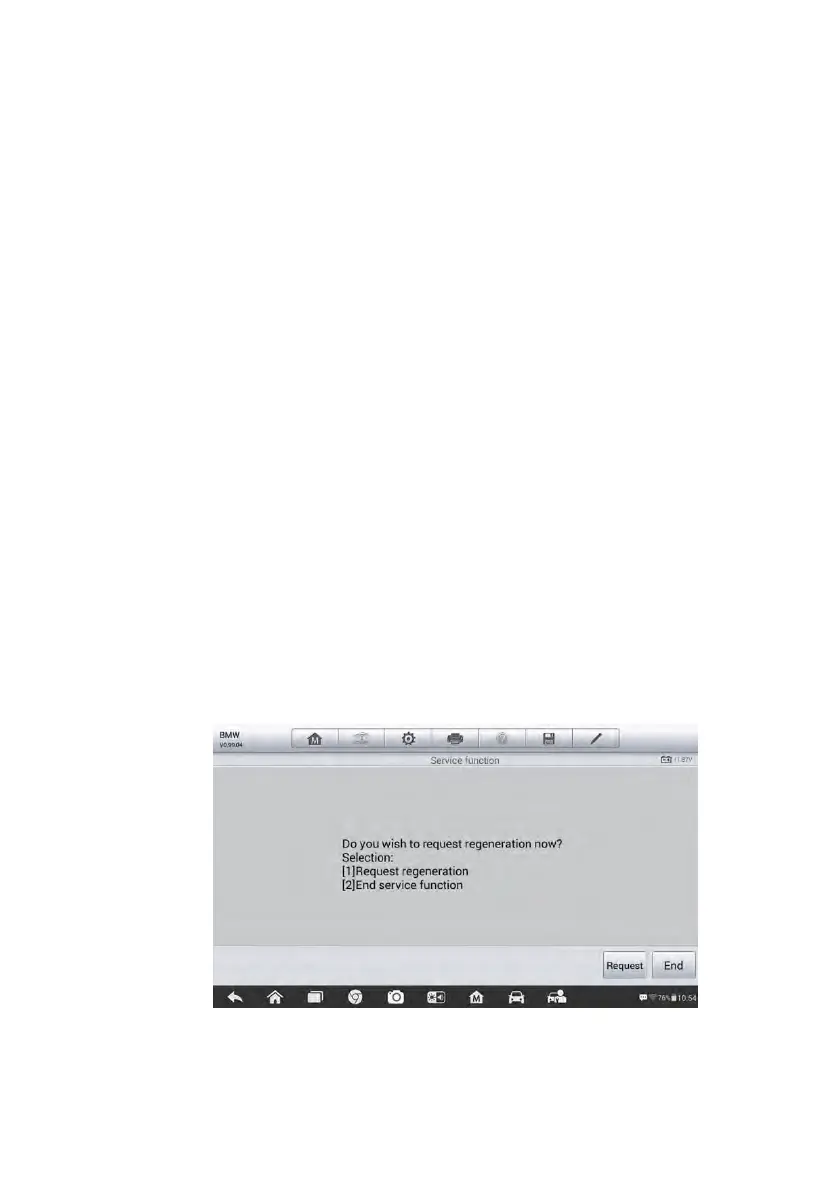
3. If prerequisites are met, the tool will ask your confirmation to proceed as
below. Tap Request to begin a regeneration or End to end the service
function and exit.
Figure 5-26 Sample Regeneration Confirmation Screen













 To Next Page