2. Using the Auto Computer
2.1 Tool Descriptions
○
1
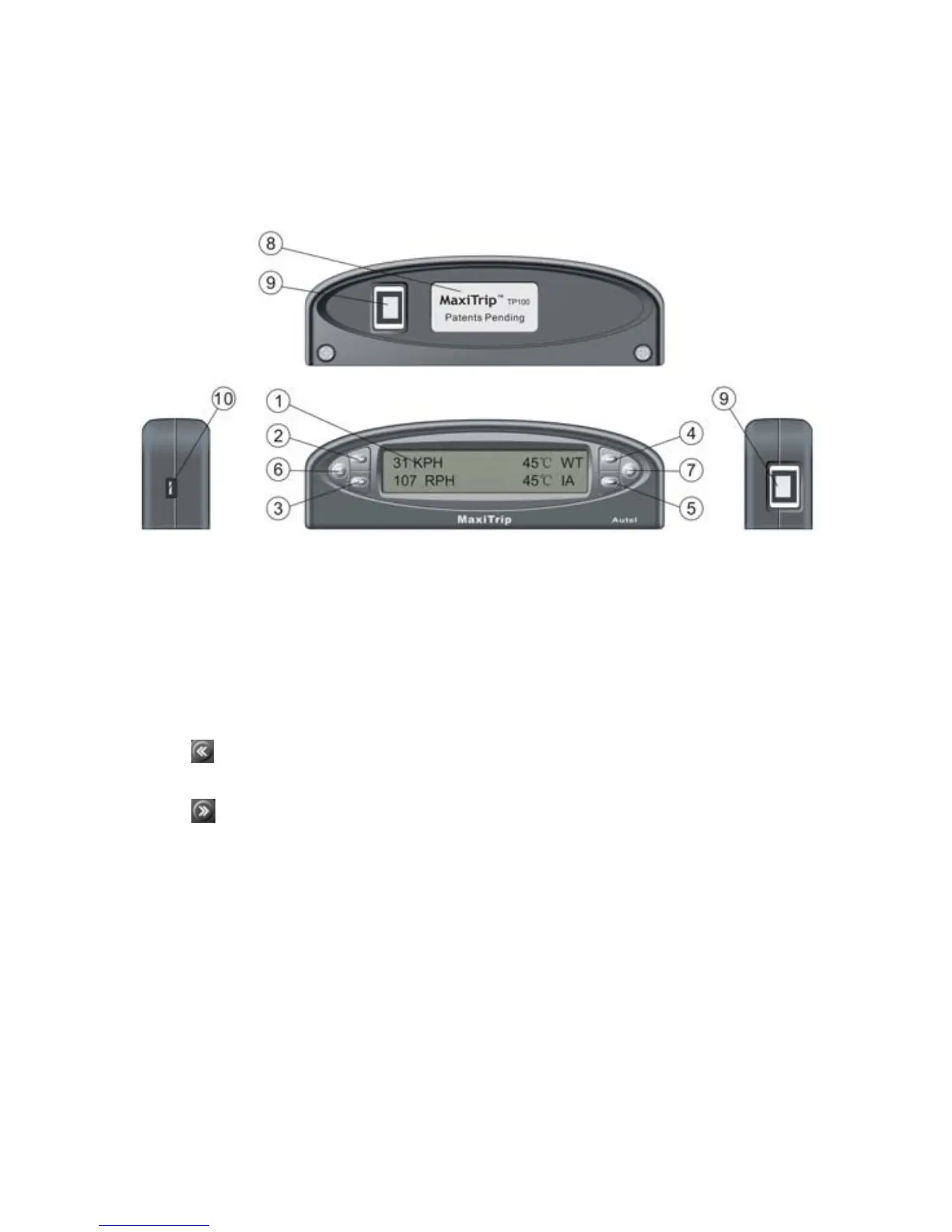
LCD Display – Displays retrieved data.
○
2
○
3
○
4
○
5
Menu Selection Buttons -- When there is ► or ◄ icon
on the screen next to the button, press it to do what is displayed next
to it or to change to next available items. When viewing trip
information or gauge readings, the ► or ◄icon may not show.
○
6
Button -- Returns to previous screen, exit a menu or wake up
the tool from sleep mode.
○
7
Button -- Moves to next screen; it is also used to enter time
setup screen, and to reset CURRENT and VBB (Vehicle Black Box)
data.
○
8
Rear Label -- Provides model number of products.
○
9
OBDII Connector Port -- Connects the tool to vehicle’s DLC
with the OBDII cable supplied.
○
10
USB Port -- Connects the tool to a computer with the USB cable
supplied to update the tool.
2


 To Next Page