© 2007 Directed Electronics—all rights reserved 13
NOTE: When the activation pulse count can be programmed to 1, 2, or 3 pulses when changed it will
affect both activation inputs; the White/Blue, White/Red wire and the remote control activation.
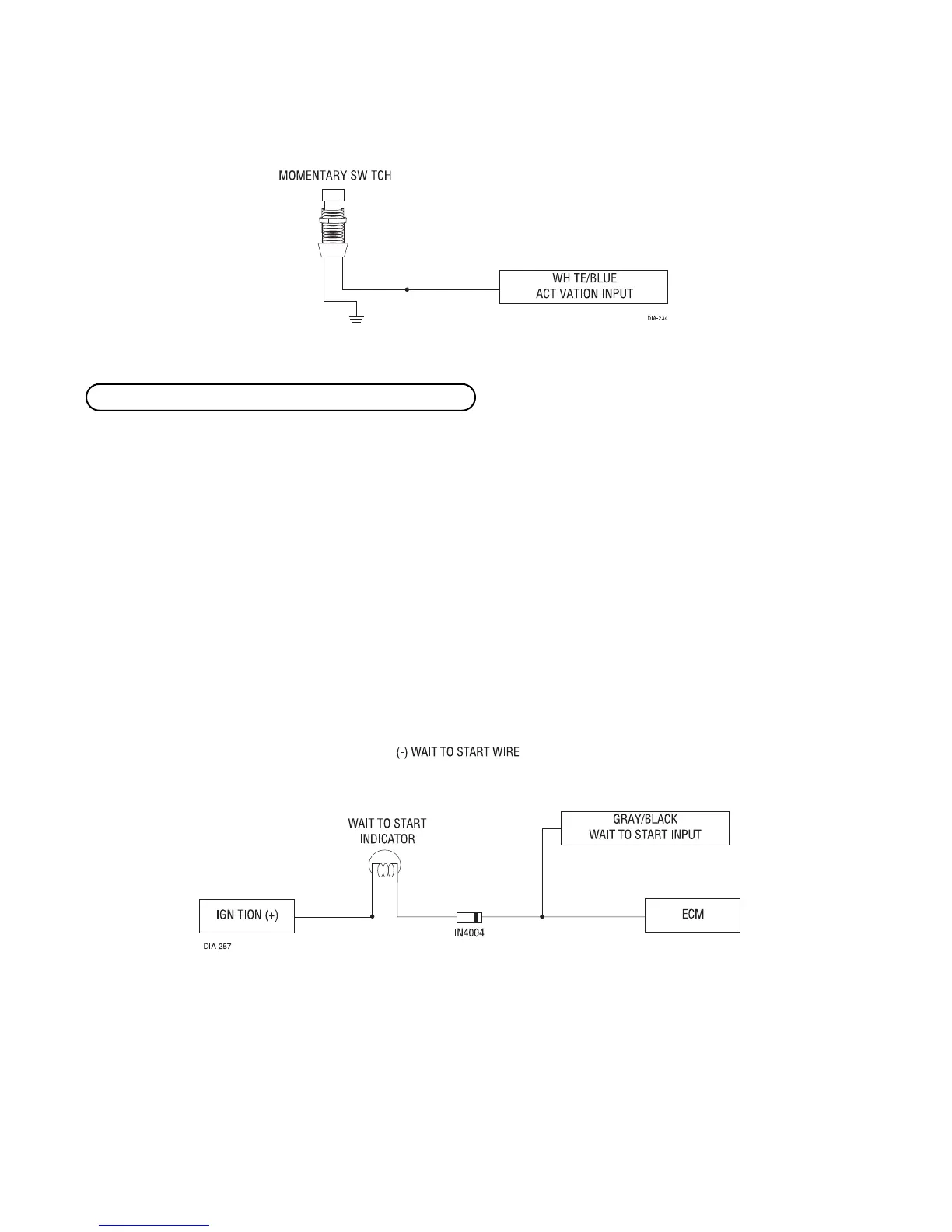
Connect this wire to the wire in the vehicle that sends the signal to turn on the WAIT-TO-START bulb in the dash-
board. In most diesels the wire is negative (ground turns on the bulb) and the GRAY/BLACK can be directly
connected to the wire in the vehicle. If the vehicle uses a positive wire (12V to turn on the bulb) a relay must
be used to change the polarity. (See Finding the Wires You Need section for testing procedures.) Here are some
common colors of this wire:
■ Chevrolet and GMC trucks: Light Blue or Dark Blue
■ Ford Trucks: Black/Pink
■ Dodge Ram Trucks: Orange/Black or Black/Orange
NOTE! A 1-amp diode must be installed in line on the factory wire between the wait-to-start indi-
cator and the ECM. (See the following diagram for details.)
H1/5 GRAY/BLACK (-) diesel wait-to-start bulb input


 To Next Page