KITCHEN APPLIANCES
19 TOGETHER WE’RE GOING PLACES For more information visit www.auto-trail.co.uk 20
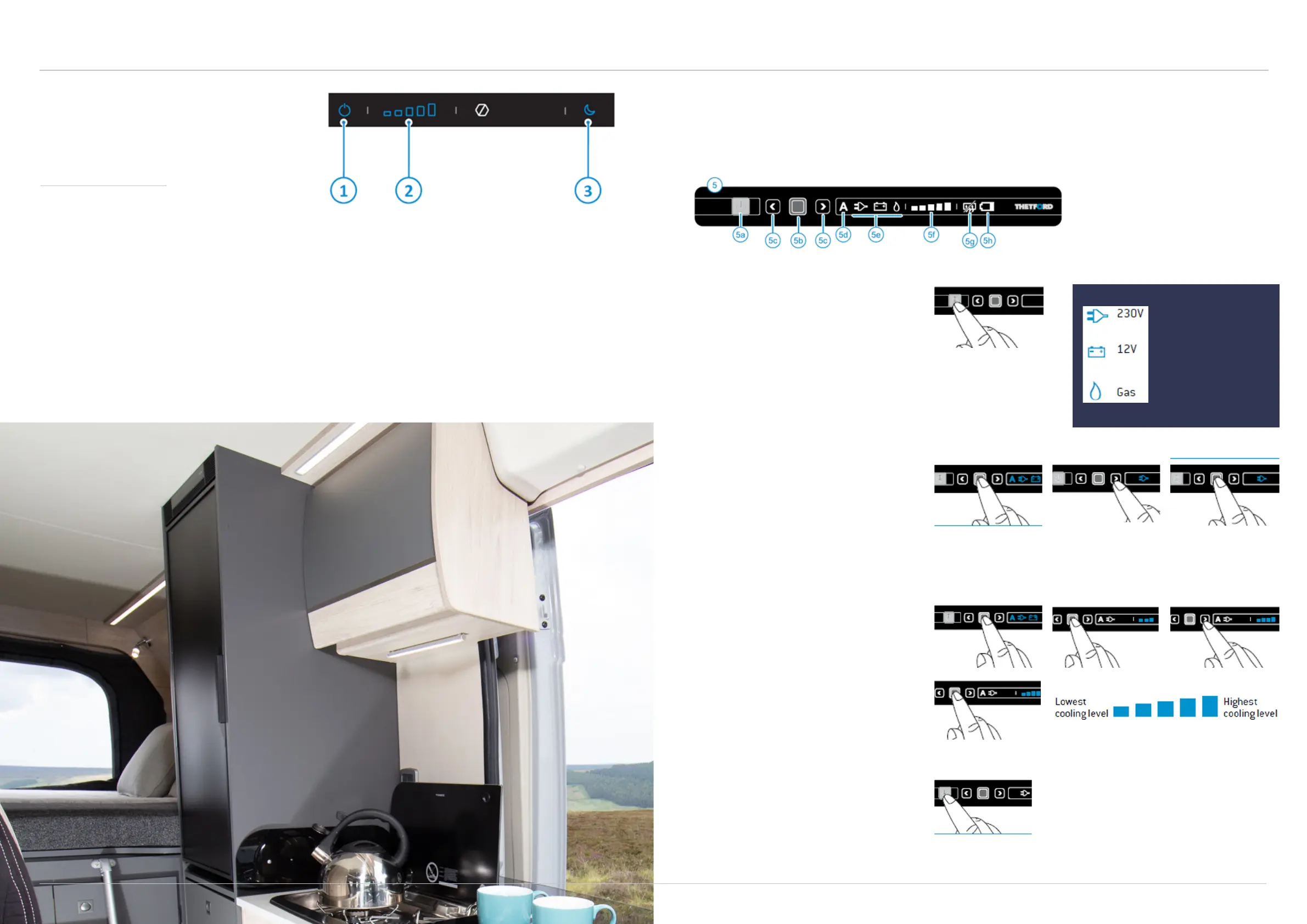
Thetford refrigerator (T2090)
These instructions apply to the Expedition 68 model
only. Please see the Thetford N4080 instructions for
Expedition 66, 67 and 67 Flex.
Night modeOn/O Temperature
Using the fridge
To switch on the refrigerator, press the on/o button and hold it for a few seconds. For optimal performance,
switch it on at least four hours before placing food inside.
The cooling level can be altered by pressing and holding the temperature icon and holding for a few seconds
until the icons start blinking. Slide or press the temperature icons to select the desired cooling level. After a few
seconds, the panel will save the setting and go to the locked standby mode.
Night mode helps to reduce the noise made by the refrigerator and a blue light appears when this is activated.
This can be switched on by pressing the night mode button, and will automatically switch back o after 12 hours.
To switch o the refrigerator, press and hold the on/o button for a few seconds.
Thetford refrigerator (N4080)
These instructions apply to the Expedition 66, 67 and
67 Flex models only. Please see the Thetford T2090
instructions for Expedition 68.
Setting up your refrigerator
To switch on the refrigerator, push the on/
o switch and hold it for one second, as
illustrated. A light on the on/o switch will
turn green. After ten seconds the settings
will dim. The green light indicated the
refrigerator is still operating. To check the
settings, push the on/o switch. The last
selected setting will light up.
Selecting the source
After switching on the refrigerator, push
the confirmation button and hold it for two
seconds. The symbols for the sources light
up and start to blink. Choose the desired
source by pushing the arrow buttons.
Confirm your choice with the confirmation
button.
Selecting the cooling level
After switching on the refrigerator, push the
confirmation button for two seconds. The
symbols for the sources start to blink. Push
the confirmation button again. The cooling
level indicators start to blink. Use the arrow
buttons to choose the desired cooling level.
Confirm your choice with the confirmation
button.
Switching o the refrigerator
Before defrosting your refrigerator or storing
your vehicle, switch o the refrigerator.
Push the on/o switch as illustrated, and
hold it for two seconds to switch o the
refrigerator. All lights will go out.
5. Control panel
5a. On/o switch
5b. Confirmation button
5c. Arrow buttons
5d. Automatic function (not
present on all models)
5e. Energy sources
5f. Cooling level indicator
5g. Anti-condensation (only
model B)
Refrigerator is powered
from mains supply.
Refrigerator is powered
from vehicle battery.
Refrigerator is powered
from on-board gas bottle.



 To Next Page