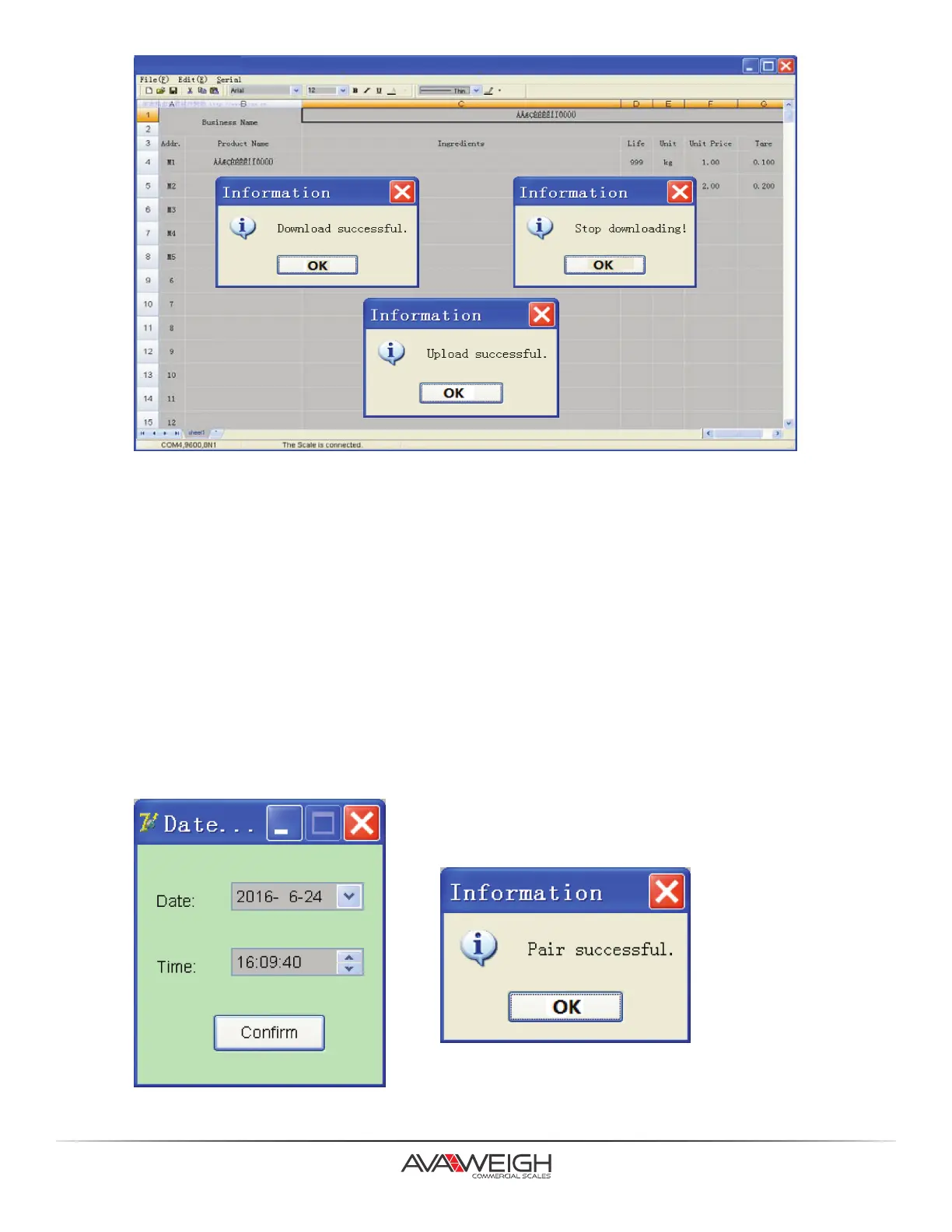
5. Choosing “Download” in “Serial” menu or F8, the scale will display “DNLOAD”, the status bar will display
the present download informaon, if it displays “downloading business name”, it means it’s downloading the
store name. If it displays “Downloading Mxx”, it means it’s downloading the informaon of M1~M9 (direct
unit price). If it displays “Downloading No. xxx”, it means it’s downloading the informaon of PLU1~265.
“Download successful” will be displayed aer downloading is finished. To stop acve downloads, use “Serial/
Download/Stop” or F9.
6. Choose “Upload” in “Serial” menu, the scale will display “UPLOAD”. The status bar will display the present
upload informaon, if it displays “uploading business name”, it means it is uploading the store name. If it
displays “uploading Mxx”, it means it is uploading the informaon of M1~MXX. if it displays “uploading
No. xxx”, it means it is uploading the informaon of PLU1~265. “Upload successful” will be displayed aer
uploading is finished.
7. Date and Time Seng
Choose ”Pair” in “Serial” menu to open the date and me seng dialog box, it will display the system clock
of PC, press “Confirm” or exit the dialogue box directly. Aer the soware sends date and me seng data
to the scale, it will display “Pair successful.”.
16.



 To Next Page