ERX-B75 User’s Manual
30 ERX-B75 User’s Manual
(OS/S4 Sleep State). This option may be not
effective with some OS.
Suspend Disabled
S1 only(CPU Stop Clock)
S3 only(Suspend to RAM)
[Default]
Select ACPI sleep state the system will enter
when the SUSPEND button is pressed.
Disabled
Enabled[Default]
Enable or Disable Lock of Legacy Resources.
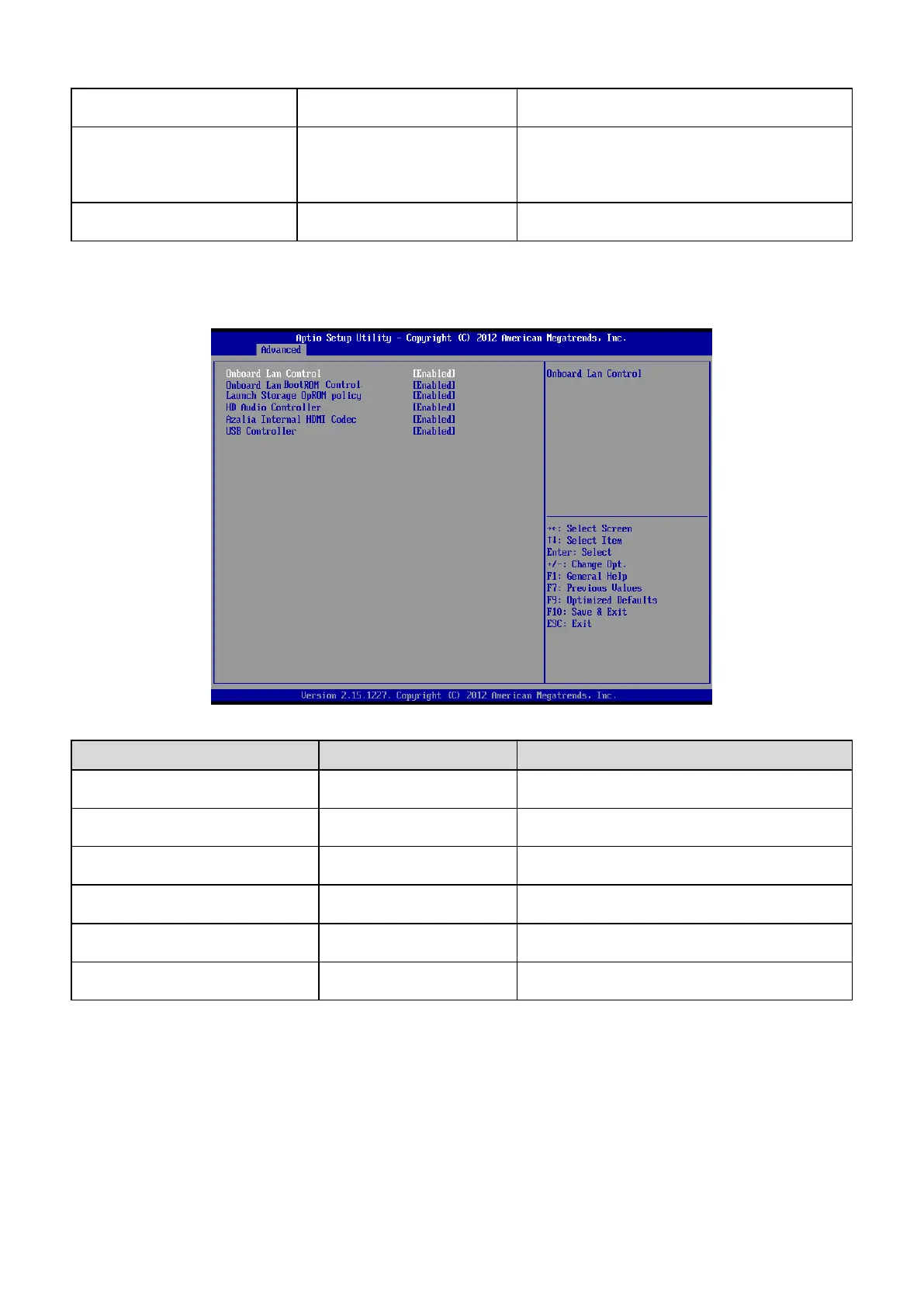
3.6.2.2 Onboard Device Configuration
Disabled
Enabled[Default]
Onboard Lan BootROM Control
Disabled[Default]
Enabled
Controls the execution of UEFI and Legacy
PXE OpROM.
Launch Storage OpROM policy
Disabled[Default]
Enabled
Controls the execution of UEFI and Legacy
Storage OpROM.
Disabled
Enabled[Default]
Control of the Azalia audio.
Azalia Internal HDMI Codec
Disabled
Enabled[Default]
Enable or disable internal HDMI codec for
Azalia.
Disabled
Enabled[Default]













 To Next Page