EasyManua.ls Logo

Avalue Technology ERX-B75 - Boot Settings

Avalue Technology ERX-B75
56 pages
Print Icon
To Next Page IconTo Next Page
To Previous Page IconTo Previous Page
Loading...
ERX-B75 Users Manual
40 ERX-B75 User’s Manual
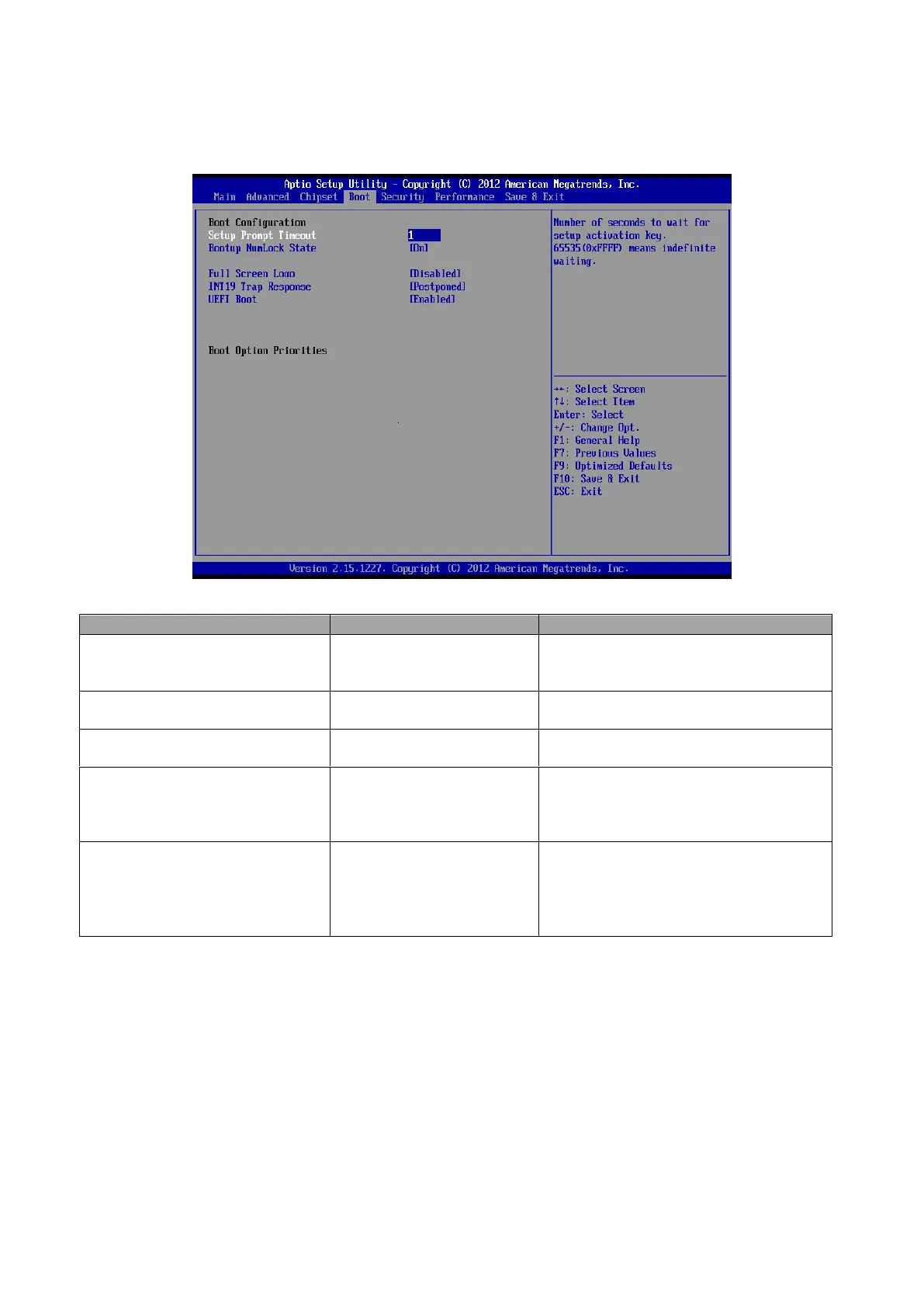
3.6.4 Boot settings
Item
Option
Description
Setup Prompt Timeout
1~65535
Number of seconds to wait for setup
activation key. 65535(0xFFFF) means
indefinite waiting.
Bootup NumLock State
On
Off[Default]
Select the keyboard NumLock state.
Full Screen Logo
Disabled[Default]
Enabled
Enables or disables Quiet Boot option.
INT19 Trap Response
Immediate
Postponed[Default]
BIOS reaction on INT19 trapping by
Option ROM: IMMEDIATE execute
the trap right away; POSTPONED
execute the trap during legacy boot.
UEFI Boot
Auto[Default]
Disabled
Enabled
Auto: If the 1
st
boot HDD is GPT then
enable UEFI boot options, otherwise
disable. Enabled: Enable all UEFI boot
options. Disabled: Disabled all UEFI
boot options.

Table of Contents

Related product manuals