WARNING
ELECTRICAL SHOCK HAZARD
DO NOT OPEN!
110 – 240V ~ 50/60HZ
MAX POWER CONSUMPTION – 550W
POWER OUTPUT – 500W RMS
FUSE 4.0 A SLOW
CLIP
VOL
VOL
SIG
SERVICE USE ONLY
12V DC
ENGAGED
FUSE
OUT IN
INPUT
SPEAKER LEVEL INPUT
OUTPUT
BALANCED SIGNAL
SPKR
RESET
MODE
XLR
MUTE
INPUT SELECTE FUSE
GROUND
POWER
TOGGLE
DIMMER
TRIGGER
DSP
DSP PROGRAMMING
A D
B C
SERIAL NO.
BASSAMP-G3-500
MADE IN GERMANY
MODEL NO.
ORIGIN
SPEAKER TYPE
UNO SD DUO SD
only to be used with marked speaker type
SERVICE USE ONLY
FUSE
PUSH
OPERATION – SUBWOOFER DSP AMP
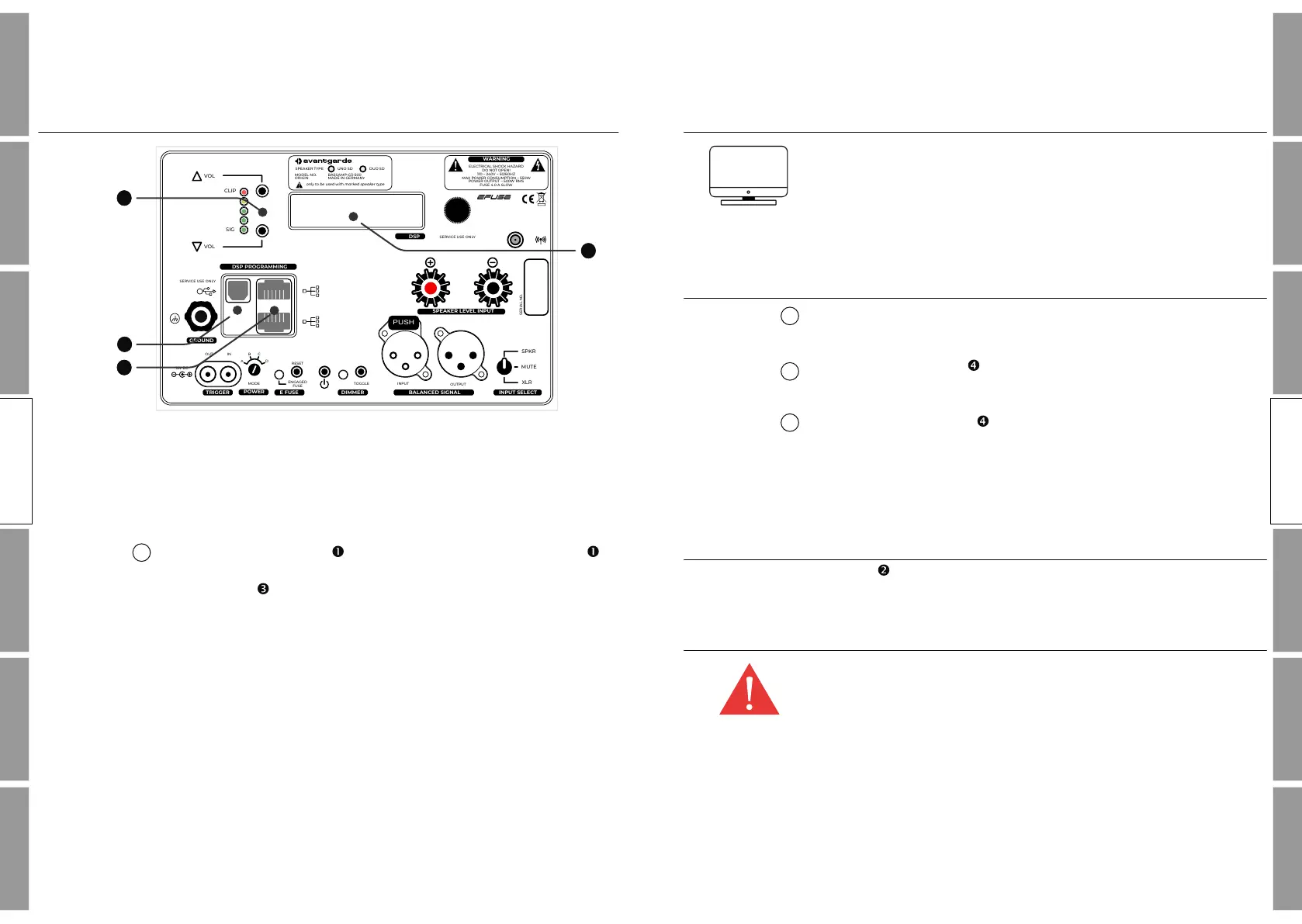
DSP VOLUME SETTINGS
The bass response of the speaker will be influenced by the room and
the position of the speaker. This might cause the bass response of
the speaker to be strengthened or weakened. Thus as the first step,
the overall bass volume needs to be aligned to compensate these
effects.
Press the VOL –button to increase or the VOL –button to
reduce the volume of the bass response. The set volume is indicated
in the display .
26 27
SAFETYINSTALLATIONOPERATION SUBFINE TUNING
MISC
WARRANTY
OPERATION
SAFETYINSTALLATIONOPERATION SUBFINE TUNING
MISC
WARRANTY
OPERATION
1
12
11
14
13
OPERATION SUB
OPERATION SUB
OPERATION – SUBWOOFER DSP AMP
DSP SOFTWARE INSTALLATION
Additional settings can be programmed with the Avantgarde
Control software.
The corresponding software, for Windows and MacOS can be
downloaded f rom the website: www.avantgarde-acoustic.de
LAN CONNECTION TO PC
Each SPACEHORN amplif ier features 2 x LAN sockets which allow
daisy-chaining of multiple subwoofers via LAN cable..
Connect the LAN ports of all SPACEHORNS with each other using
LAN–cable (type CAT5/6/7/8).
Connect a f ree LAN port of one SPACEHORN with the LAN port of
your computer or with the LAN port of your WIFI router. The
Avantgarde Control software installed on your computer/laptop will
automatically detect and display all available subwoofer amps.
USB CONNECTION TO PC
USB port is reserved exclusively for service application by the
manufacturer.
IMPORTANT!
The LAN and the USB connectors are not suitable for the connection
of music sources!
3
1
2


 To Next Page