28 29
SAFETYINSTALLATIONOPERATION SUBFINE TUNING
MISC
WARRANTY
OPERATION
SAFETYINSTALLATIONOPERATION SUBFINE TUNING
MISC
WARRANTY
OPERATION
11
16
13
12
14
15
OPERATION – SUBWOOFER DSP AMP
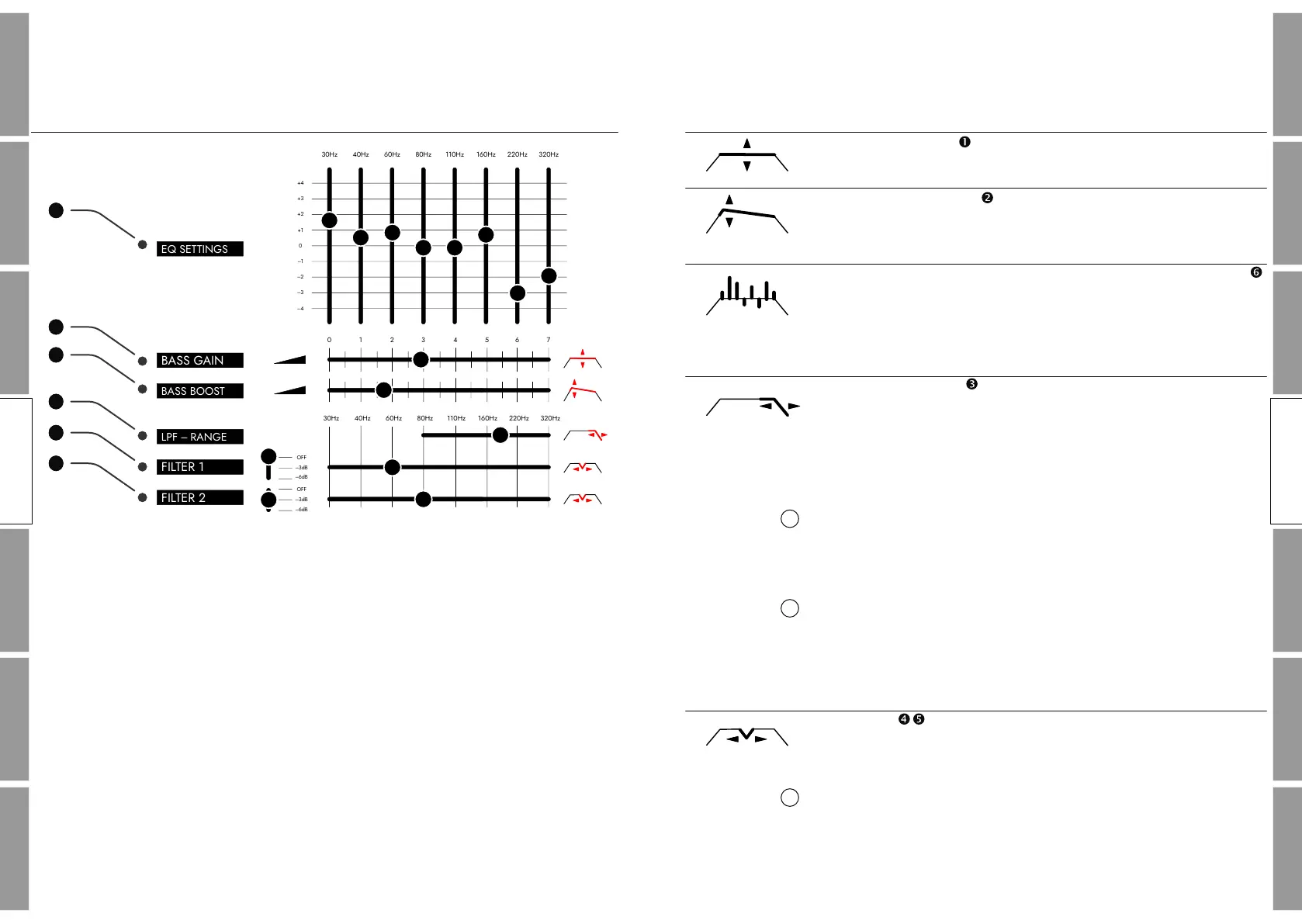
DSP USER INTERFACE
The above picture shows the graphical user interface that is
available for each of the subwoofers individually after installing and
starting the software.
Please note that all changes in the Avantgarde control software
immediately become audible in the speaker. This way it is easy
to verify the changes by listening and f ine adjust if required.
OPERATION – SUBWOOFER DSP AMP
DSP SETTINGS
The BASS GAIN slider sets the overall volume of the subwoofer.
The BASS BOOST slider increases the low f requency response
below 45 Hz. This allows to tailor the bass response f rom “linear” to
“fat”.
For individual f requency settings use the 8 x band equalizer .
Each of the 8 x bands can be increased or decreased by up to 4dB.
This can be used to tailor your bass response to specif ic sounds
(linear, techno, disco, pop, etc.) or to reduce some wide–band room
resonances.
The LPF–RANGE slider sets the upper crossover f requency of the
subwoofer. In the factory setting the crossover f requency is
optimized for a linear transition, the f requency response of the
subwoofer blends seamlessly into the frequency response of the
midrange horn. The crossover frequency can be used to adjust the
“tonal balance” of the system.
When set to a higher f requency, the subwoofer will partly overlap
with the midrange horn response. This will add “warmth” and give
a richer “body” to the sound character of certain voices and
instruments.
If the crossover frequency is purposely set to a lower frequency,
subwoofer and midrange f requency response will have a small gap.
The tonal balance of the system will shift to a more horn typical
“dynamic” and “punchy” sound.
FILTER 1 & 2 are narrow band “notch” f ilters with a negative
gain of –3dB or –6dB. These f ilters can be used to elimante/reduce
unwanted narrow band resonance frequencies of the room.
Use commonly available f requency sweep apps to detect the
position (Hz) of possibly occuring room resonances. Or play bass
heavy music through your system and slowly slide the FILTER set at
–6dB upwards until the “boominess” improves.
1
1
2
OPERATION SUB
OPERATION SUB
EQ SETTINGS
BASS BOOST
LPF – RANGE
FILTER 1
FILTER 2
OFF
–3dB
–6dB
OFF
–3dB
–6dB
0
+1
+2
+3
–4
–3
–2
–1
+4
30Hz 40Hz 60Hz 80Hz 110Hz 160Hz 220Hz 320Hz
0 1 2 3 4 5 6 7
30Hz 40Hz 60Hz 80Hz 110Hz 160Hz 220Hz 320Hz
BASS GAIN
�


 To Next Page