EN
HT4186
User Manual
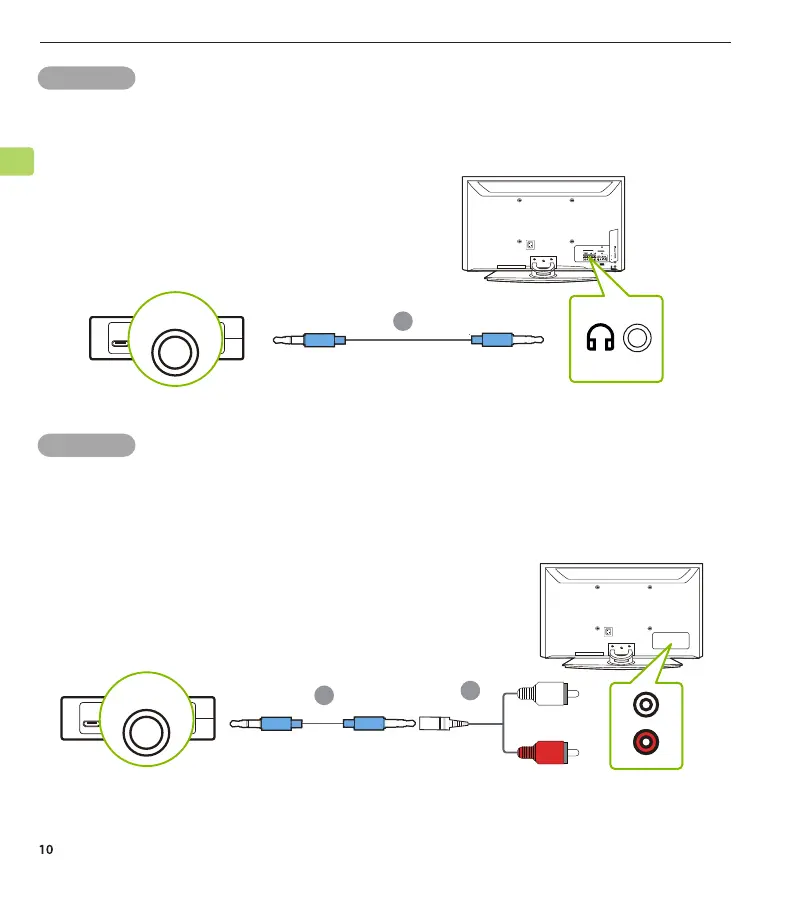
OPTION 3 RCA port
Connect the provided RCA adapter to the AUX 3.5mm audio cable. Plug
the red & white RCA connectors into the TV’s “AUDIO OUT” ports, then
plug the other end into the transmitter’s AUX 3.5mm port.
OPTION 2 AUX 3.5mm port
Plug the provided AUX 3.5mm audio cable into the TV’s AUX 3.5mm
output port, then plug the other end into the transmitter’s AUX 3.5mm
port.
RGB IN
COMPONENT IN
AUDIO
(RGB/DVI)
RGB(PC)
ANTENNA/
CABLE IN
1
2
RS-232C I
(CONT
ROL & SE
VIDEO
AUDIO
VIDEO
OPTICA
LCOAXIAL
S
-VI
DEO
DIGI
TAL AUDIO OUT
HDMI/DVI IN
3
2
1
REMOTE
CONTROL IN
L
/
MONO
R
A
U
DIO
USB
IN
HDMI
I
N 4
F
DC IN
ON/OFFAUX
AUX IN
RGB IN
COMPONENT IN
AUDIO
(RGB/DVI)
RGB(PC)
ANTENNA/
CABLE IN
1
2
RS-232C I
(CONT
ROL & SE
VIDEO
AUDIO
VIDEO
OPTICA
LCOAXIAL
S-VIDEO
DIGI
TAL AUDIO OUT
REMOTE
CONTROL IN
L/MONO
R
AU
DIO
USB IN
HDMI IN 4
DC IN
ON/OFFAUX
AUX IN
F
HDMI/DVI IN
3
2
1
G



 To Next Page