HT4186
User Manual
EN
Product Introduction (Transmitter)
Product Overview
A
A
B
C
1
4
2
3
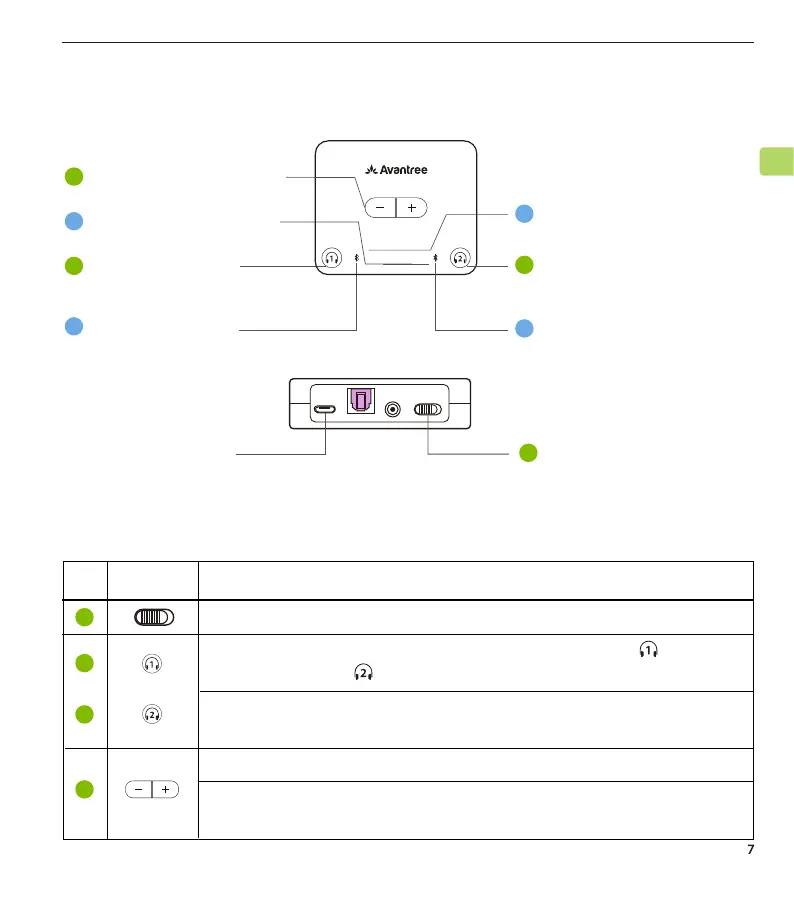
Switch to "ON / OFF" position to turn the transmitter on / o
No. Button
Power port
Functions
Press & hold for 5 seconds to enter paring mode ( for
NB16T earbuds, for additional headphones)
Once connected, press & hold for 10 seconds to lock the
headphones to the transmitter
Tap once to increase / decrease volume
Press & hold both for 7 seconds simultaneously to clear the
pairing history
Button Functions
3
4
2
ON/OFFAUX
1
ON/OFF
OPTICAL
DC IN
Audio codec indicators
Volume control buttons
Pairing button for
NB16T earbuds
Audio input indicators
AUX OPT
LL
FS APTX
SBC
USB
Device connection
indicators
Device connection
indicators
Pairing button for 2
headphones
nd



 To Next Page