User Manual
10
Opera plus
EN
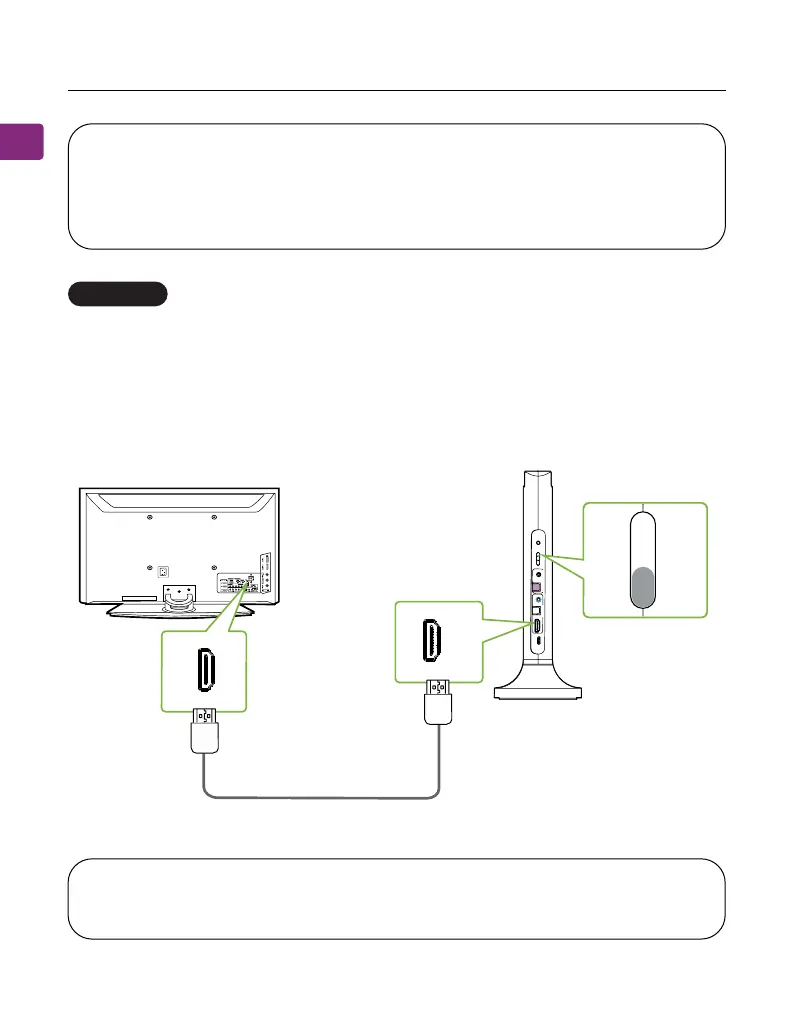
HDMI ARC port (Recommended)
NOTE 1: The HDMI ARC port only supports TV HDMI ports labeled “ARC”
NOTE 2: The HDMI cable should be HDMI 1.4 or above.
Plug your HDMI cable (not provided) into the TV’s “HDMI ARC” port, then plug
the other end into the transmitter’s HDMI ARC port in the “INPUT FROM TV”
section.
On your transmitter, switch the “AUDIO INPUT SELECTOR” to the “HDMI ARC”
position.
OPTION 2
reka
epSoTtupt
uOs
sa
p
yBVTm
o
rFt
u
p
n
I
VOL Boost
DC IN
OPT
AUX
HDMI
ARC
Input
Selector
OPT
AUX
CRA
IMDH
OPT
AUX
Input From TV
TV
AUX
HDMI
ARC
CRAIMDH
not inclucded
OPT
NOTE: Most TVs support audio output through only one digital output port
at a time, so if your TV’s HDMI ARC port is in use, the optical port may be
disabled. You can either unplug the HDMI ARC cable, or try connecting the
transmitter via RCA / AUX.



 To Next Page