User Manual Opera plus
11
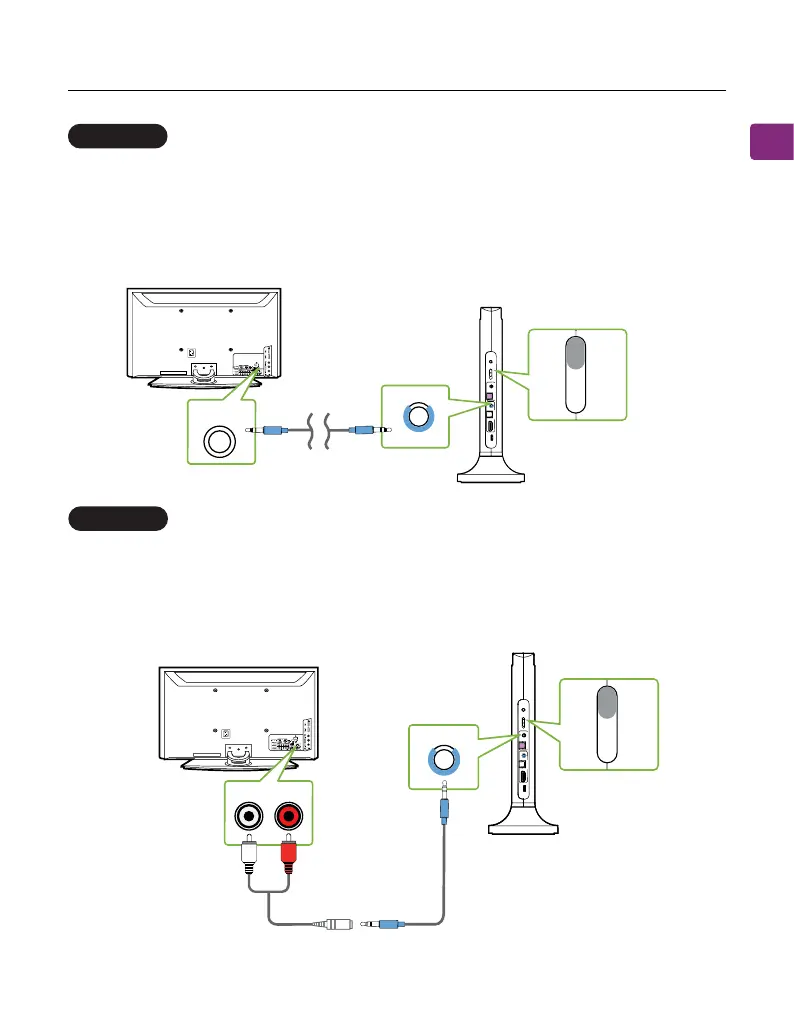
AUX 3.5mm port
RCA port
Plug the provided AUX 3.5mm audio cable into the TV’s AUX 3.5mm output
port, then plug the other end into the transmitter’s AUX 3.5mm input port in
the “INPUT FROM TV” section.
On your transmitter, switch the “AUDIO INPUT SELECTOR” to the “AUX” position.
Connect the RCA adapter to the AUX 3.5mm audio cable. Plug the red & white
RCA connectors into the TV’s “AUDIO OUT” ports, then plug the other end into
the transmitter’s AUX 3.5mm input port in the“INPUT FROM TV” section.
On your transmitter, switch the “AUDIO INPUT SELECTOR” to the “AUX” position.
OPTION 3
OPTION 4
p
yB
a
u
p
t
u
O
ss
t
So
T
k
p
a
e
re
u
I
pn
VT
mor
F
t
V
O
L
B
oost
D
C IN
O
P
T
AU
X
H
DM
I
A
RC
I
n
p
ut
S
e
l
ecto
r
OP
T
A
UX
IMD RH
C
A
O
PT
A
UX
Input FromTV
AUX
AUX 3.5mm
TV
AUX
DMI
R
OPT
B
ypas
s
O
utput T
o S
p
eake
r
Inp
ut From
T
V
V
O
L
Bo
os
t
D
C IN
O
PT
A
U
X
H
D
M
I
A
R
C
Inp
u
t
Se
le
cto
r
O
P
T
A
U
X
H
D
M
I A
RC
O
P
T
A
U
X
AUDIOOUT
TV
AUX
R
P
Input From TV
AUX


 To Next Page