3
Product Introduction
Overview
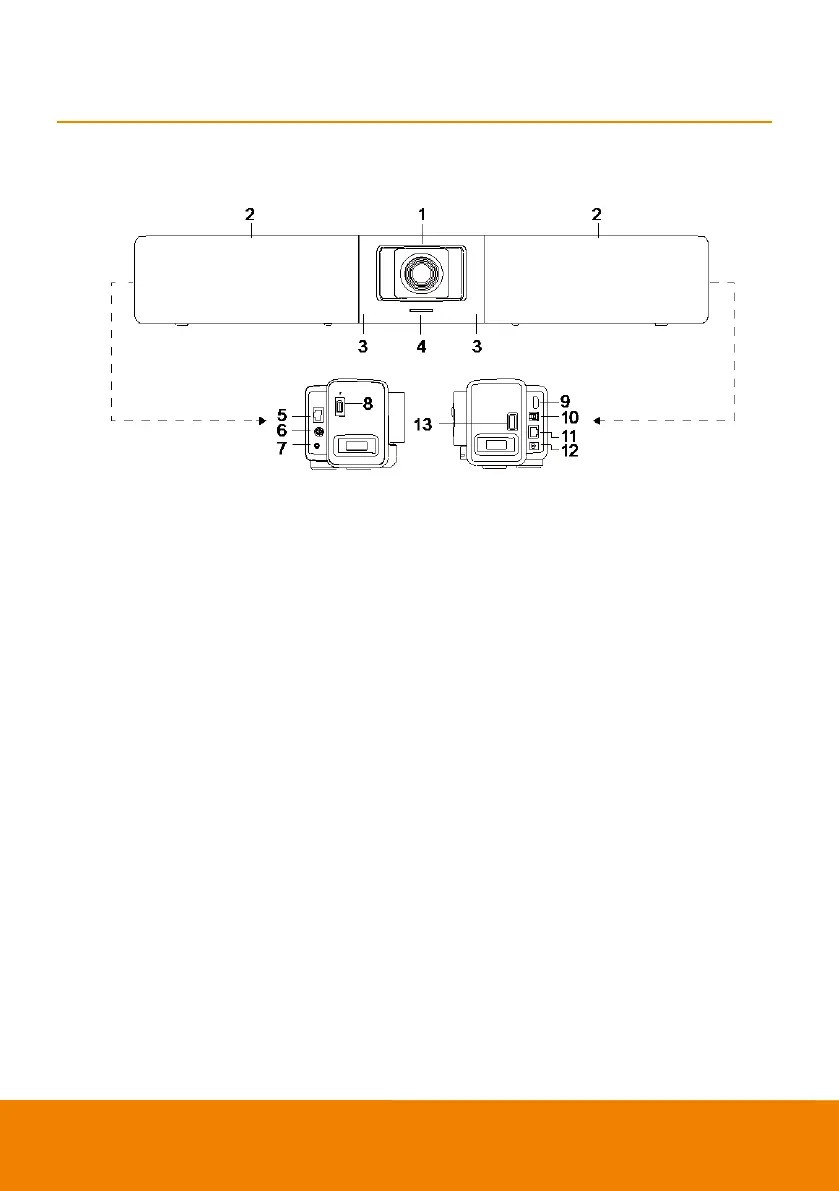
Lens
Microphone Array Area
(10 Built-in Microphones)
IR Sensor
LED Indicator
Expansion Audio
(for Speakerphone/
Microphone)
RS232 Port
(7)
(8)
(9)
(10)
(11)
(12)
(13)
Phone In/Audio Out Port*
USB 2.0 Type A Port**
(only for BT Dongle)
HDMI Output Port (to TV) ***
USB 3.0 Type B Port (to PC)
RJ-45 Ethernet Port
DC 12V Power Jack
USB 2.0 Port****
* The default is phone in function. To support audio out function for HA system, please set it up via
PTZApp 2 and purchase audio-out convert (TRS female to TRRS male) from AVer.
** BT dongle is an optional item in certain countries. Please contact your local dealer for purchasing.
*** Support DisplayLink technology.
**** If using MAC latest Monterey OS version and want to use this USB 2.0 port, please don’t use USB
extender cable, otherwise, MAC PC can’t detect the VB342 Pro and system instability issue may occur.



 To Next Page