AVerMedia
®
DVB-T STB5 / STB7
6
2.3.8 Connecting the TV Set or Video Device
You can connect the AVerMedia
®
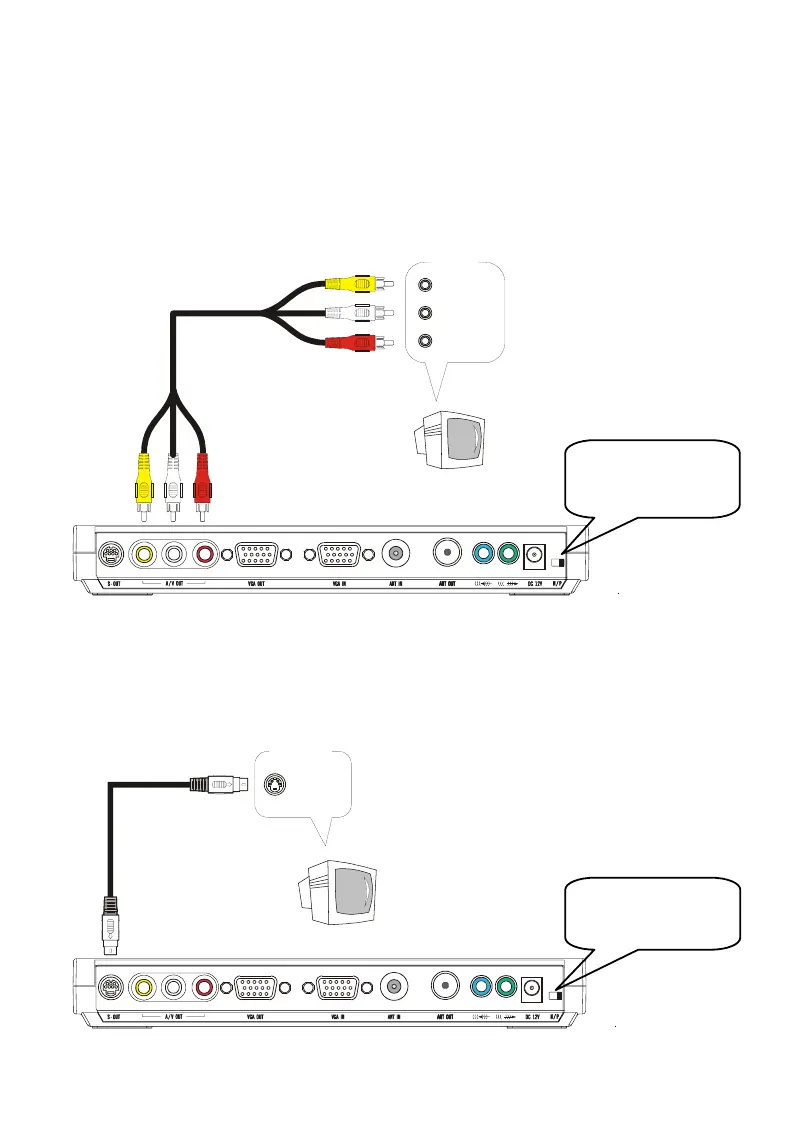
DVB-T STB5/STB7 to the TV set or any video
input device, such as a VCR, for viewing digital terrestrial programs. There are two
ways to make the connections: A/V (RCA) jacks or S-Video port. S-Video port
delivers better picture quality than composite A/V jacks.
Composite AV (RCA) connection
VIDEO
AUDIO (L)
AUDIO (R)
AV (RCA) Cable
(Yellow)
(Yellow)
(White)
(White)
(Red)
(Red)
INPUT
Tele v i si o n
(Not Supplied)
S- Video connection
If you connect to the TV set, you need to switch to the appropriate video mode to
access the digital TV/Radio programs. For instructions on changing the video mode,
refer to your TV’s user manual.
S-Video Cable
(Not supplied)
INPUT
S-Video
Television
Use the “N/P” switch
to select the NTSC
or PAL system.
Use the “N/P” switch
to select the NTSC
or PAL s
stem.









 To Next Page