User’s Manual
3
English Deutsch Français Italiano Español Português
2.3 Rear View
The ports allow connecting to your TV antenna, PC, VGA monitor, LCD projector,
speakers, video, or S-Video source etc. (For more information, please see description
below.)
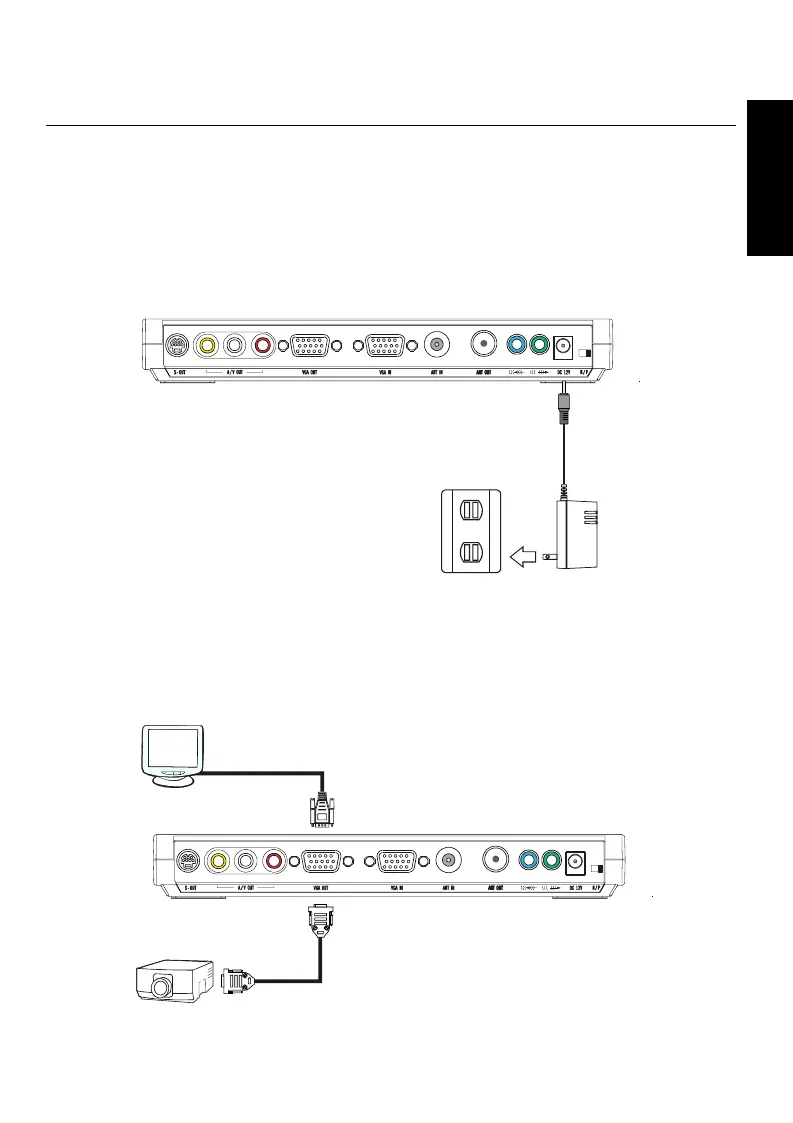
2.3.1 Connecting the Power Adapter
Connect the power adapter to the power jack of AVerMedia
®
DVB-T STB5/STB7 and
the power outlet. AVerMedia
®
DVB-T STB5/STB7 will be automatically turned on.
Power Outlet
Power Adapter
2.3.2 Connecting a VGA Monitor or LCD Porjector
Connect the product’s VGA OUT port to a VGA monitor or LCD projector.
VGA / LCD Monitor
LCD Projector









 To Next Page