AVerMedia
®
DVB-T STB5 / STB7
16
4.2.1 Set your Preference
You can set the OSD properties, transparent and so on. First press Menu to enter
the menu. Choose “User Settings” → “Preference” setup page and you can see the
items listed in the following table.
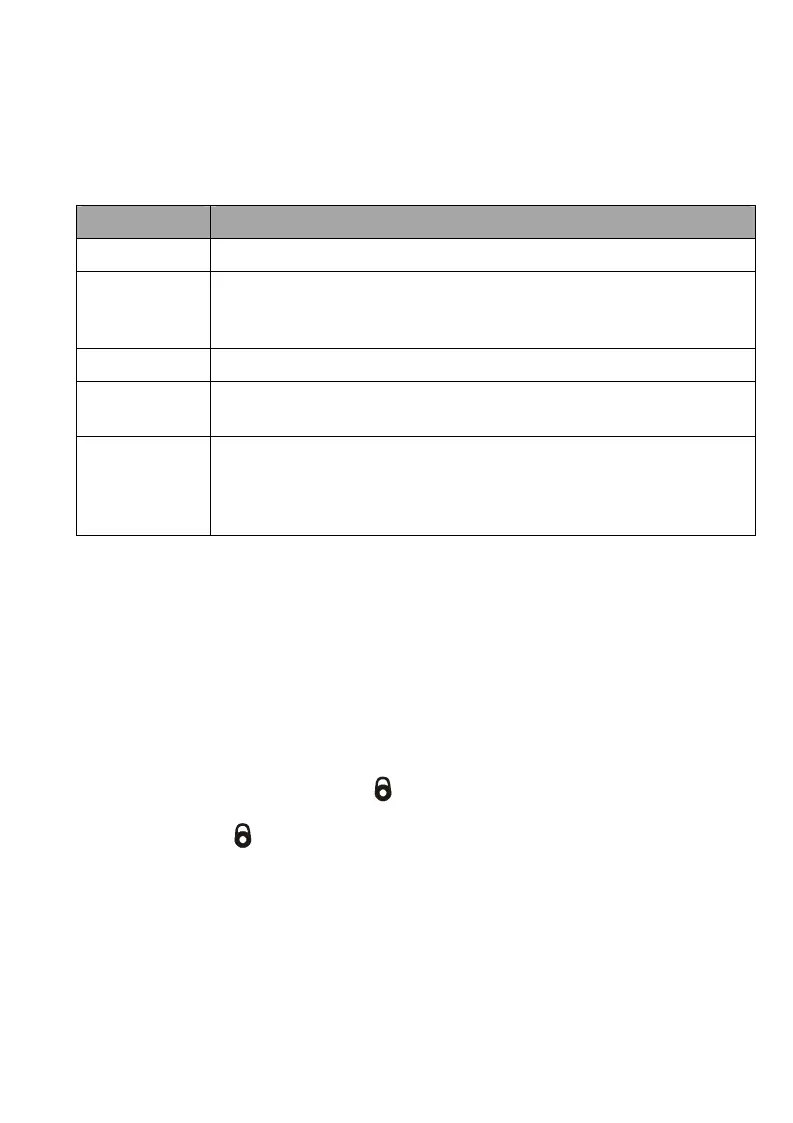
Item Description
Menu Color Press ◄ or ► to choose the desired color.
Transparent
Level
Press ◄ or ► to set the OSD transparency.(The smaller
number you specify, the more transparent will be the OSD
menu.)
Border Pattern Press ◄ or ► to select the deisred border of the OSD menu.
Banner
Timeout
Press ◄ or ► to set the period of the time (in seconds) that OSD
information remains on the screen when switching.
Transition
Style
Press ◄or ► to select the desired transition style. Transition
style feature takes effect when the unit has detected the selected
TV or Radio program has no signal. It automatically displays the
preset transition effect on your screen.
4.2.2 Parental Lock
You can prevent others from watching some programs such as the adult movie.
1. Press MENU to enter the menu. Choose “User Settings” → “Parental Lock”
setup page.
2. Select “Program Lock” and select “YES” to enable this feature. Then press
LIST/OK.
3. Next, select “Program Control” and the “Program Control” box will appear.
Press
▲/▼ to highlight the program that you want to lock and press LIST/OK
on the remote control. The mark
will appear, indicating that the program
has been selected for locking. To abort the selection, press LIST/OK again to
make the mark
disappear.
4. Repeat step 3 to select more programs.
5. Press Menu to save the setting.
6. From now on, you need to enter your passwaord first before watching that
program, rescanning channels and unlocking the program. Besides, when you
revert to factory settings, remember the default password is 0000 (four zeros).









 To Next Page