User’s Manual
9
English Deutsch Français Italiano Español Português
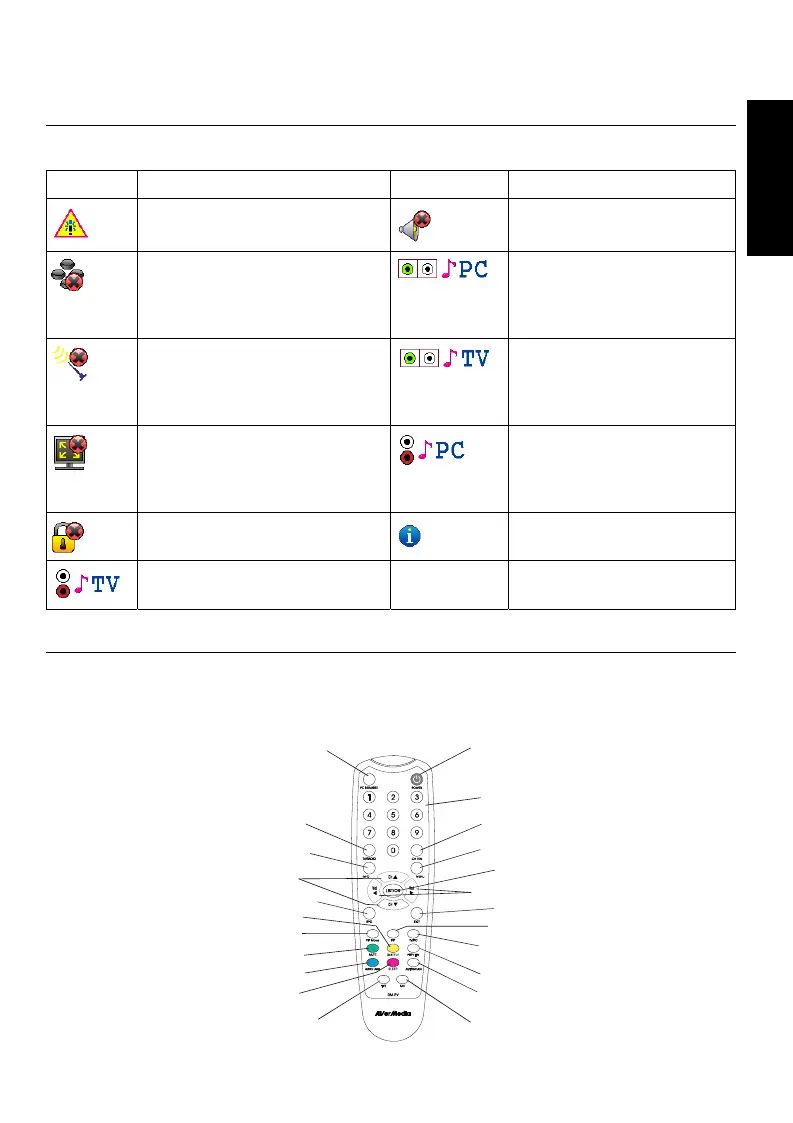
3.3 Introducing Main Icons
The following table explains the meanings of main icons when using the device.
Icon Description Icon Description
Attention
Mute
The button on the remote
control doesn’t work for this
model.
The device delivers the
audio of PC by the
external speaker or the
headphone.
No signal or no programs.
The device delivers the
audio of programs by the
external speaker or the
headphone.
The resolution and the
frequency (Hz) of your PC
monitor cannot support the
PIP feature.
The device delivers the
audio of PC by audio
output.
This program is locked
(Parental Lock).
Tips for remote control
buttons.
The device delivers the audio
of programs by audio output.
3.4 Remote Control
The accompanying remote control allows you to switch between various TV/Radio
channels, adjust the volume, change the OSD menu settings, switch between PC
graphics and digital terrestrial broadcasts, etc.
1
2
3
4
5
6
7
8
9
10
20
19
17
16
15
14
13
12
11
18
21
22
23









 To Next Page