AVerMedia
®
DVB-T STB5 / STB7
2
Chapter 2 Identifying Each Part
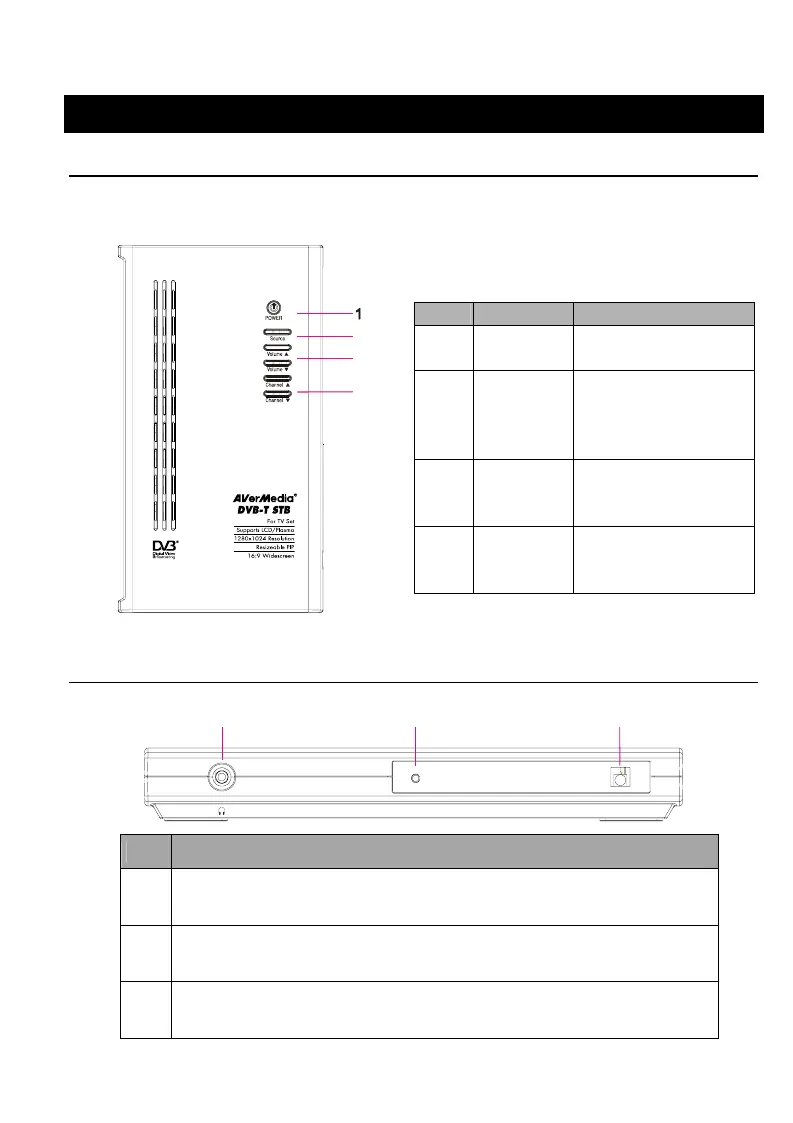
2.1 Touch Buttons
Touch buttons on the top panel of the product provides quick access to
frequently-used functions.
2
3
4
No. Button Function
1 POWER Turns on/off the
device
2 SOURCE Toggles between live
TV/Radio broadcasts
and computer
graphics.
3 VOLUME Increases (UP) or
decreases (DOWN)
the volume.
4 CHANNEL Goes to the preceding
(UP) or succeeding
(DOWN) program.
2.2 Front Panel
12
3
No. Description
1 Headphone Jack. By plugging in mini stereo mini jack, you can listen
to the audio with headphone.
2 The LED Indicator lights when the DVB-T STB5/STB7 is turned
on.
3 Infrared Sensor. When using the remote control, please aim it at
the Infrared Sensor.









 To Next Page