AVerMedia
®
DVB-T STB5 / STB7
4
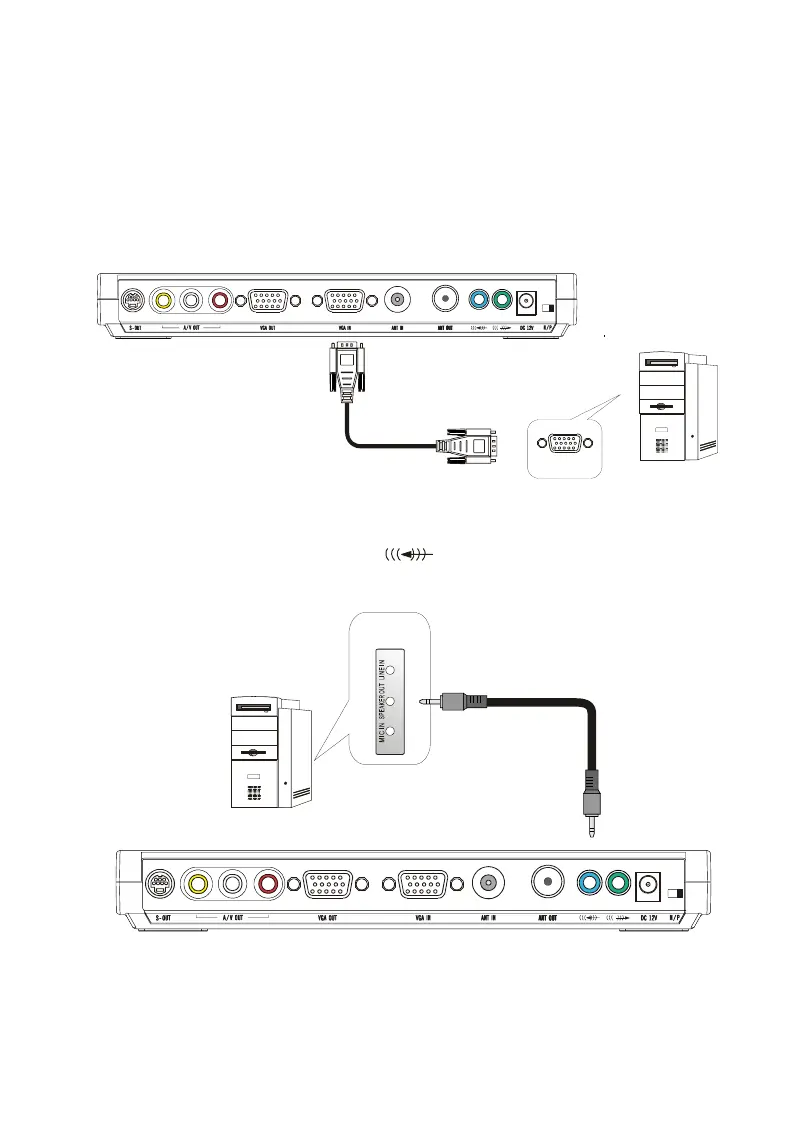
2.3.3 Connecting the PC
To share the VGA monitor with a PC, or to work on the PC and enjoy the digital terrestrial
programs at the same time (Press the SOURCE button on the front panel or the TV/PC
button on the remote control), you should attach the AVerMedia
®
DVB-T STB5/STB7 to
the PC. Connect the product’s VGA IN port to the PC's VGA output port using the supplied
VGA cable.
VGA Cable
VGA Port
IBM compatilbe PC
2.3.4 Connceting a PC’s Audio
Connect the product’s jack marked as to the PC’s LINE OUT or SPEAKER
jack.
Audio Cable
Audio Jacks
on your PC
IBM Compatible PC









 To Next Page