CRANECO.
280N.MIDLANDAVE.,STE258,SADDLEBROOK,NJ07663WWW.AVIDCONTROLS.COM
12/17/12 TECH-440/D.W.O. 23135 Page 41 of 55
Appendix B
Procedure to Remove Electronics Cover and Electronic Canister
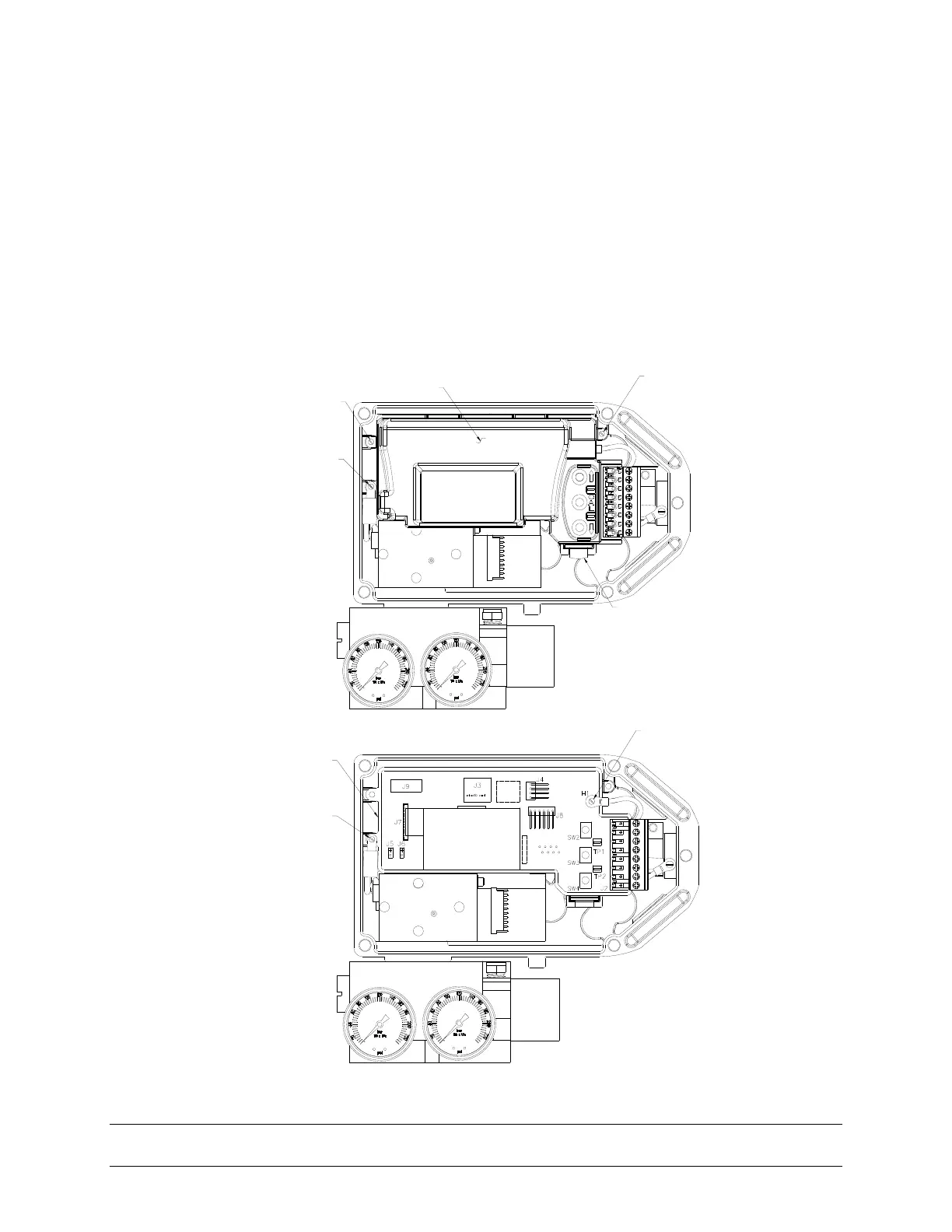
1. Remove the two screws that secure the inner canister cover, unlock the latch by pulling it
up and remove the canister cover (see figures below).
2. Disconnect all connectors from electronics canister; make sure to note connector locations.
Remove the screw that secures canister housing and ground cable. Remove the screw
that secures ground cable (see figures below).
3. Remove the canister with electronics from SmartCal enclosure.
INDICATED SCREW
SECURES COVER
AND HOUSING OF
CANISTER
LATCH
INDICATED SCREW
SECURES COVER
AND HOUSING OF
CANISTER
INDICATED SCREW
SECURES HOUSING OF
CANISTER AND GROUND
CABLE
CANISTER COVER
INDICATED SCREW
SECURES GROUND
CABLE
INDICATED
SCREW SECURES
CANISTER HOUSING AND
GROUND CABLE
CANISTER
HOUSING WITH
ELECTRONICS


 To Next Page