
 Need help?
Do you have a question about the Avigilon 2.0C-H5A-BO1-IR and is the answer not in the manual?
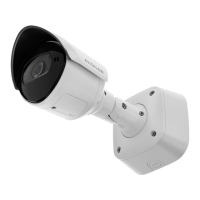
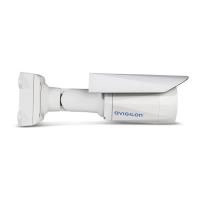
The Avigilon H5A Bullet Camera is a sophisticated surveillance device designed for robust outdoor and indoor security applications. It offers advanced video analytics capabilities, making it suitable for environments where intelligent monitoring is crucial. The camera is built to withstand various environmental conditions and provides high-quality image capture, even in challenging lighting scenarios, thanks to its integrated IR illuminator.
The primary function of the Avigilon H5A Bullet Camera is to capture and transmit high-definition video streams for security and surveillance purposes. It connects to a network via an Ethernet port, allowing for server communication, image data transmission, and Power over Ethernet (PoE) functionality. This means the camera can receive both data and power through a single cable when connected to a PoE-enabled network, simplifying installation.
The camera is equipped with an IR illuminator, which provides scene illumination in the infrared spectrum. This feature enables the camera to capture clear images in low-light or no-light conditions, ensuring continuous surveillance around the clock.
For local storage, the camera includes an SD card slot, allowing for onboard recording of video footage. This is particularly useful for maintaining recordings even if network connectivity is temporarily lost. The device also features a micro USB port, which can be used with an Avigilon USB Wi-Fi Adapter for mobile web interface access, offering flexible configuration options.
The camera's design incorporates a mount arm that allows for adjustable positioning, enabling users to aim the camera precisely to cover the desired surveillance area. Adjustment screws on the mount arm provide a locking mechanism to secure the camera's position once aimed.
The Avigilon H5A Bullet Camera is designed for straightforward installation and configuration, though it requires qualified personnel for setup to ensure compliance with local codes. The installation process involves mounting a bracket to a surface, connecting necessary cables, and then securing the camera to the bracket. A mounting template sticker is provided to assist with drilling holes accurately.
For cable management and protection, a protective cable boot is included, which should be installed over the Ethernet port to shield connections from dust and moisture. The camera also features mounting hook slots, allowing the camera to temporarily hang from the bracket while cables are being connected, which eases the installation process.
The camera's video analytics capabilities are a key feature, and specific mounting and aiming recommendations are provided to maximize their effectiveness. These include guidelines for installation height, tilt angle, and ensuring the camera image is level with the horizon line. Mounting to a stable surface is also recommended to minimize physical movement and maintain consistent analytics performance.
Configuration of the camera can be done through several methods:
For cameras manufactured after January 1, 2020, a crucial initial step is to create a username and password, as these cameras ship in a factory default state without default credentials. This ensures immediate security upon deployment.
Aiming the camera is facilitated by loosening adjustment screws on the mount arm, allowing for rotation and movement. Users can reference the camera's live video stream during this process to ensure correct aiming. The sun shroud, an adjustable cover, helps protect the lens from glare and can be positioned forward or backward as needed.
Zooming and focusing are managed through the camera's web interface or the Avigilon Control Center software. Users can utilize zoom buttons for magnification and an "Auto Focus" function for quick lens adjustment. Manual focus controls (near and far buttons) are also available for fine-tuning.
The Avigilon H5A Bullet Camera incorporates several features and guidelines to support maintenance and troubleshooting.
The device includes a Connection Status LED indicator, which provides visual feedback on the camera's operational status and network connectivity. Different LED behaviors (e.g., one short flash per second for "Obtaining IP Address," two short flashes per second for "Discoverable," or solid "On" for "Connected") help users quickly assess the camera's state. There is also a Link LED indicator that shows if there is an active connection in the Ethernet port.
For troubleshooting network connections and LED behavior, a table of suggested solutions is provided. This includes checking for power, ensuring a good network cable, and performing a factory reset if necessary.
In cases where the device is not functioning as expected, a factory reset option is available. This involves gently pressing and holding a physical firmware revert button on the configuration panel for 3 seconds. This action resets the device to its factory default settings, which can resolve various operational issues. It's important to note that for models with an SD card slot, resetting the camera does not affect video recorded to the SD card.
The configuration panel cover, which protects the SD card slot, Link LED, Connection Status LED, and Micro USB port, can be unscrewed for access during installation or maintenance.
The manual also provides guidance on cleaning the device body, recommending against the use of strong or abrasive detergents to prevent damage. All device servicing, beyond basic installation and configuration, should be referred to qualified personnel. This includes situations where the device has been damaged by liquid, impact, or is not operating normally.
The camera's design emphasizes durability and protection, with warnings against exposing it directly to high levels of x-ray, laser, or UV radiation, which could permanently damage the image sensor. The minimum usage distance of 205 mm or greater is also specified for safety and optimal performance.
Overall, the Avigilon H5A Bullet Camera is designed for reliable performance with features that support both initial setup and ongoing operational maintenance, ensuring a secure and effective surveillance solution.
 General
| Model | 2.0C-H5A-BO1-IR |
|---|---|
| Category | Security Camera |
| Camera Technology | IP |
| Maximum Resolution | 1920 x 1080 |
| Sensor Type | CMOS |
| Lens Type | Varifocal |
| Focal Length | 2.8 - 12 mm |
| Aperture | F1.6 |
| Video Compression | H.264, H.265 |
| Form Factor | Bullet |
| Environment | Indoor/Outdoor |
| Frame Rate | 30 fps |
| Operating Temperature | -40°C to 60°C |
| Power Supply | PoE (802.3af) |
| IR Range | 30 m (98 ft) |


 To Next Page