With the VGA mode supported up to 1024*768@75Hz, and speakers built in, you can use
this unit as a multimedia PC monitor. When this unit works in VGA mode, the following setup
can be done.
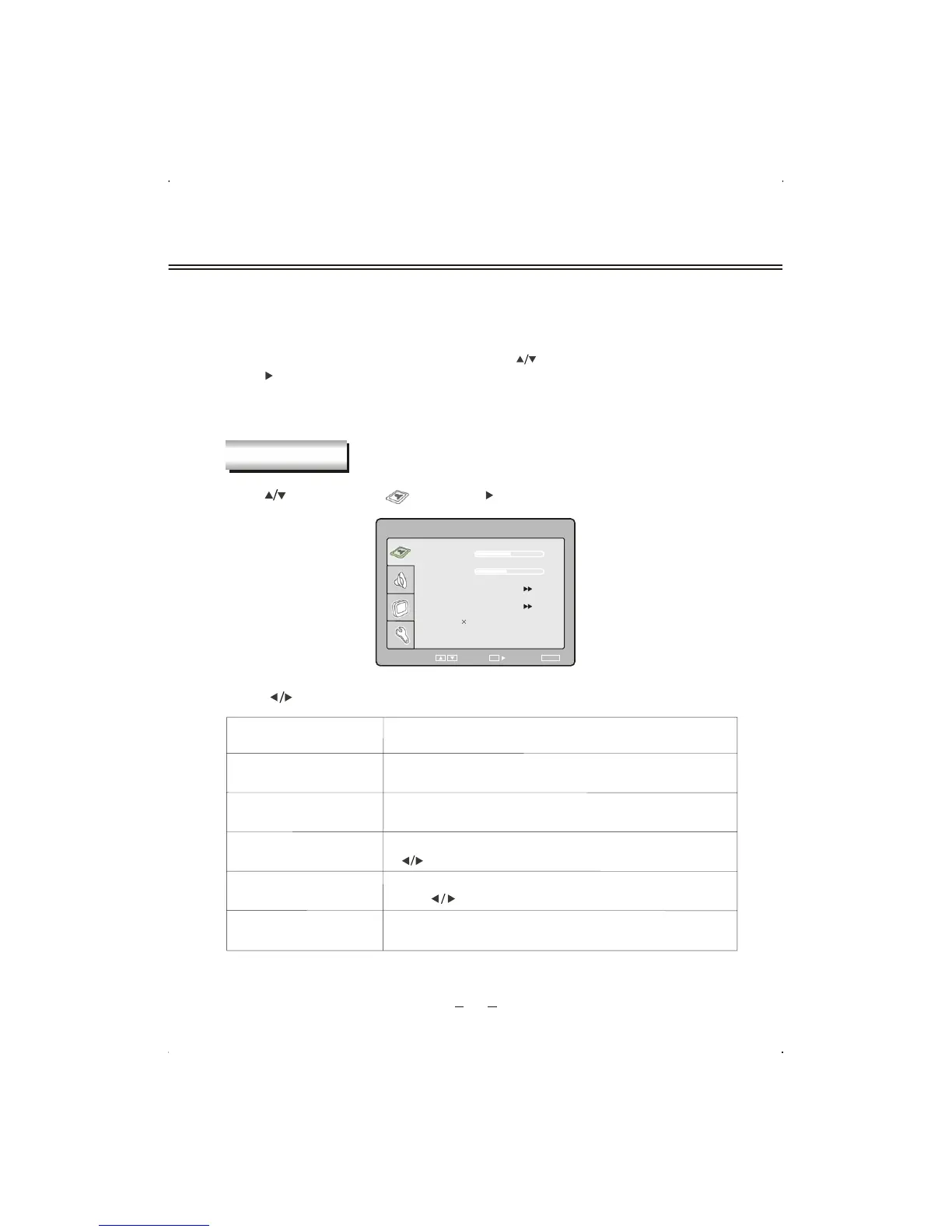
Press [SETUP] button to enter main section. Press [ ] button to select sections and then
press [ ] button or [OK] button to enter. If all is done, please press [SETUP] button twice to
exit and your setup data will be saved automatically
.
Press [ ] button to select " ", and press [ ] or [OK] button to enter.
To adjust brightness of picture .
Item
Description
BRIGHTNESS
COLOR TEMPERATURE
CONTRAST
AUTO CONFIG
STATUS
Press [ ] button to adjust value of item.
To adjust contrast of picture .
Enter sub menu to adjust color temperature of picture. Press
[ /OK ] button to enter.
Auto config horizontal/vertical position, phase and frequency.
Press [ /OK] button to activate.
You can see some information about
the input video here.
18
VGA SETUP
P I CTURE
SELECT RETURN
SETUP
BRIGHTNESS
COLOR TEMPERATURE
CONTRAST
AUTO CONFIG
PICTURE
50
40
1024 768 V:75HZ
ENTER
OK


 To Next Page