Page 14 AXIS 225FD Installation Guide
Adjusting the image
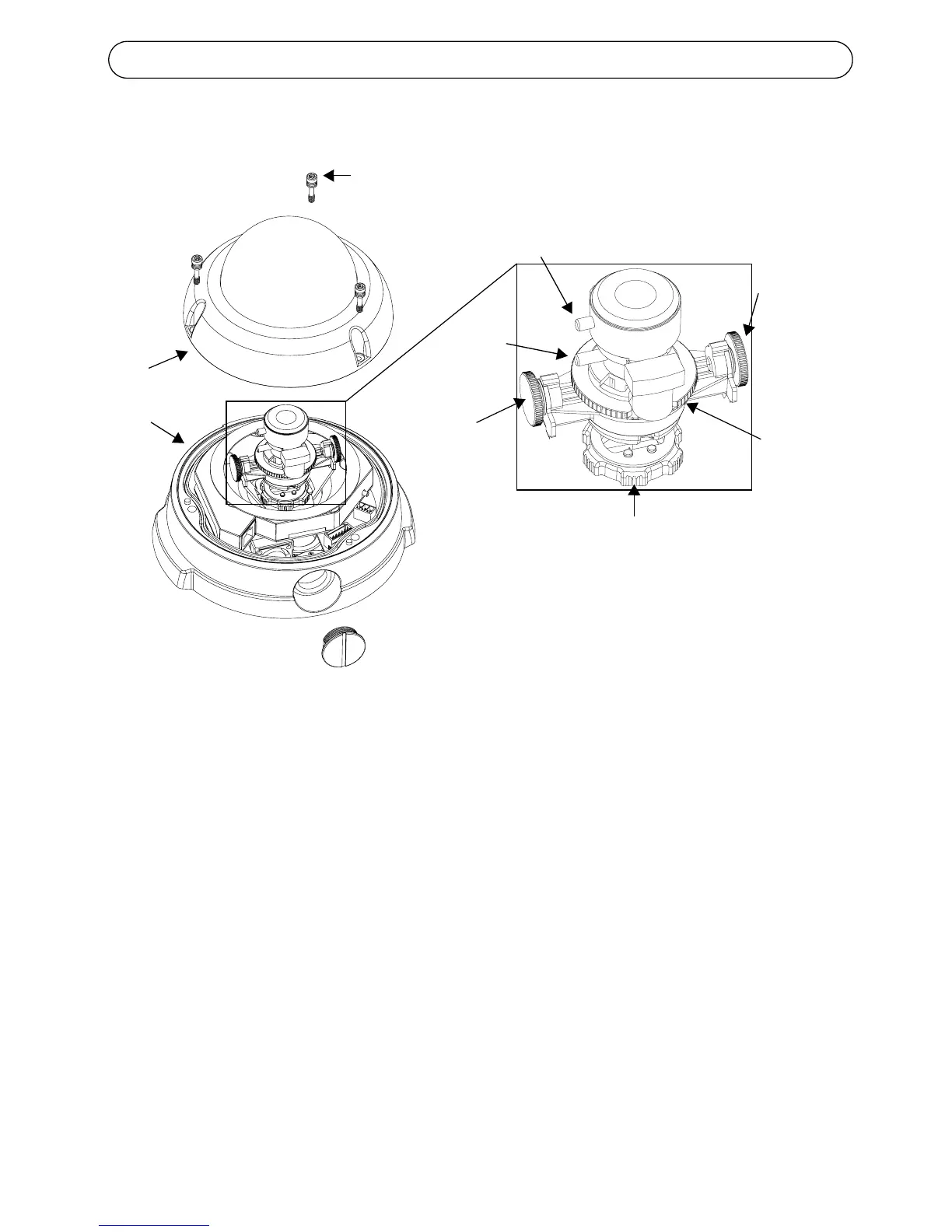
1. Open the Live View page in the Web interface and make the following
adjustments:
2. Loosen the pan adjustment ring and tilt adjustment screws. Hold the lens
while turning the pan adjustment ring, otherwise the lens may rotate
with the lock ring and damage or disconnect the cable.
3. Turn the lens to the desired direction. Do not turn the lens more than
360° as this may cause the internal cables to disconnect.
4. Once satisfied, gently tighten the pan adjustment ring and tilt adjustment
screws to secure the camera’s position.
5. Turn the image balance ring to set the image to the correct angle.
6. Loosen the zoom puller counterclockwise, rotate the zoom ring and
determine the desired zoom position.
Pan adjustment ring
Image
Zoom
Focus puller
Tilt
screw
3 tamper-proof
screws
Unit casing
Dome casing
balance
ring
adjustment
Tilt
screw
adjustment
puller



 To Next Page