
EasyManua.ls Logo

Axis 233D - User Manual

Axis 233D
81 pages
Print Icon
To Next Page IconTo Next Page
Loading...
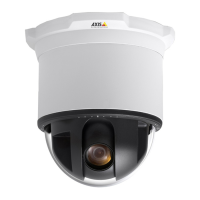
AXIS 233D
Network Dome Camera
User’s Manual

Other manuals for Axis 233D

Questions and Answers

Axis 233D Specifications

General IconGeneral
ModelAxis 233D
Image Sensor TypeCCD
Lens TypeVarifocal
Day/NightYes
Audio SupportTwo-way audio
EthernetYes
Resolution640x480
Optical Zoom18x
Digital Zoom12x
LensVari-focal
Minimum Illumination0.7 lux
CompressionMotion JPEG, MPEG-4
Network Interface10/100Base-T
Power over EthernetYes
Power Supply12 V DC
Operating Temperature-10 to 50 °C
FeaturesPrivacy Masking
Shutter Speed1/50 - 1/10000 s

Summary

About This Document and Safety

Safety Notices

General safety warnings and precautions to be observed when using the product.

Support Services

Information on how to obtain technical assistance and access online resources.

Battery Replacement Safety

Specific safety guidelines and warnings for handling battery replacement.

Using the Network Dome Camera

Accessing the AXIS 233 D

Step-by-step instructions to connect to the camera via a web browser.

Video Streams

Configuring the Network Dome Camera

Accessing Setup Tools

Instructions on how to enter the camera's configuration interface.

Video & Image Settings

Image Settings and Appearance

Basic image adjustments like resolution, compression, and rotation.

Advanced Camera Settings

Detailed lighting, IR filter, and other advanced image adjustments.

Audio Configuration

Basic Audio Settings

Microphone and speaker setup, including audio mode selection.

Live View Configuration

Dome Configuration

Preset Positions Management

Saving and recalling specific camera views for quick access.

Event Configuration

Event Types and Triggered Events

Setting up event triggers and defining associated actions.

System Options

Security and User Management

Access control, user roles, IP filtering, and authentication.

Resetting to Factory Default Settings

Factory Reset Procedure

Step-by-step instructions to restore the camera to its default settings.

I;O Terminal Connectors

Troubleshooting

Firmware Management

Checking the current firmware version and performing upgrades.

Emergency Recovery Procedure

Steps to recover the camera from failed firmware upgrades.

Common Problems and Solutions

Addressing typical operational issues, causes, and remedial actions.

Technical Specifications

Related product manuals





