AXIS P1368-E Network Camera
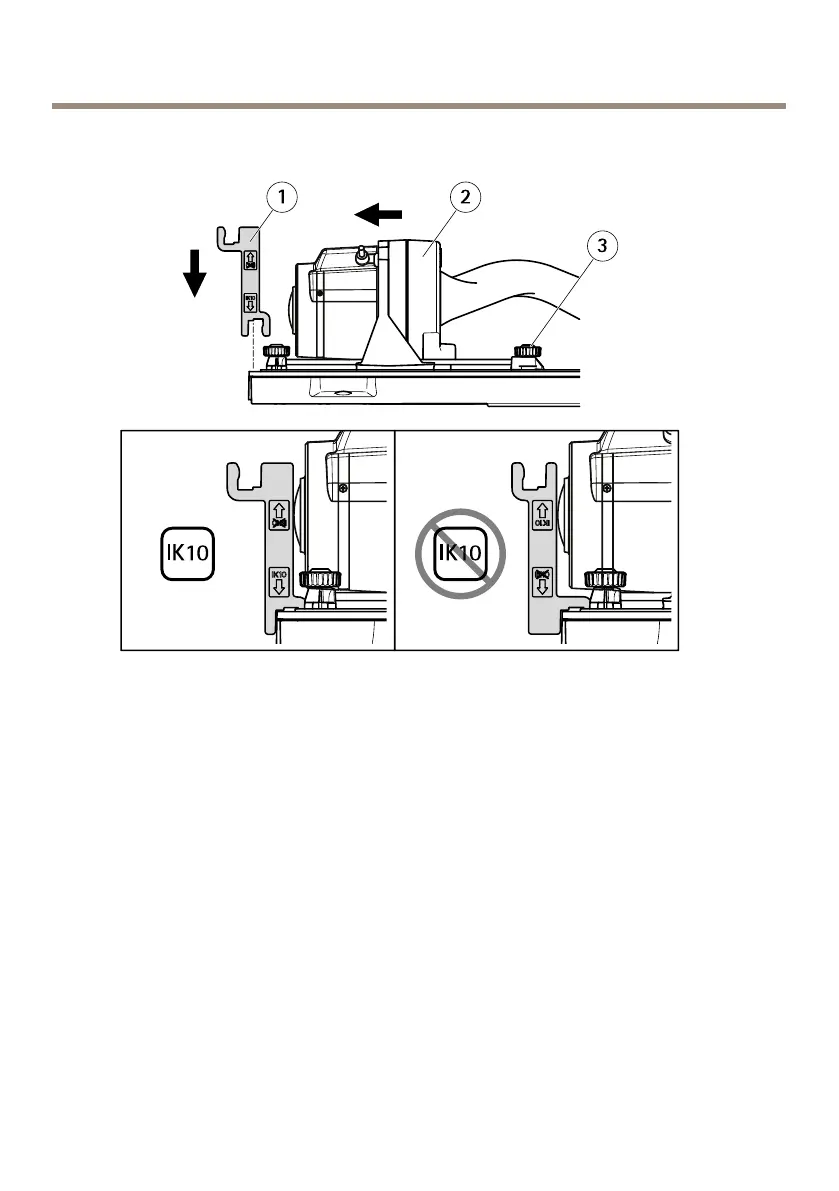
How to position the lens for IK10
1
IK10 tool
2
Optic unit
3
Spring loaded thumb screw (4x)
1. Zoom the lens to its widest position.
2. Attach the IK10 tool to the bottom cover.
3. Loosen the spring loaded thumb screws.
4. Move the lens so that it touches the tool.
5. Tighten the thumb screws.
How to access the product
AXIS IP Utility and AXIS Camera Management are recommended methods for nding Axis products
on the network and assigning them IP addresses in Windows®. Both applications are free and can
be downloaded from www.axis.com/support
The product can be used with the following browsers:
20
Available from A1 Security Cameras
www.a1securitycameras.com email: sales@a1securitycameras.com



 To Next Page