AXISP9106-VNetworkCamera
Additionalsettings
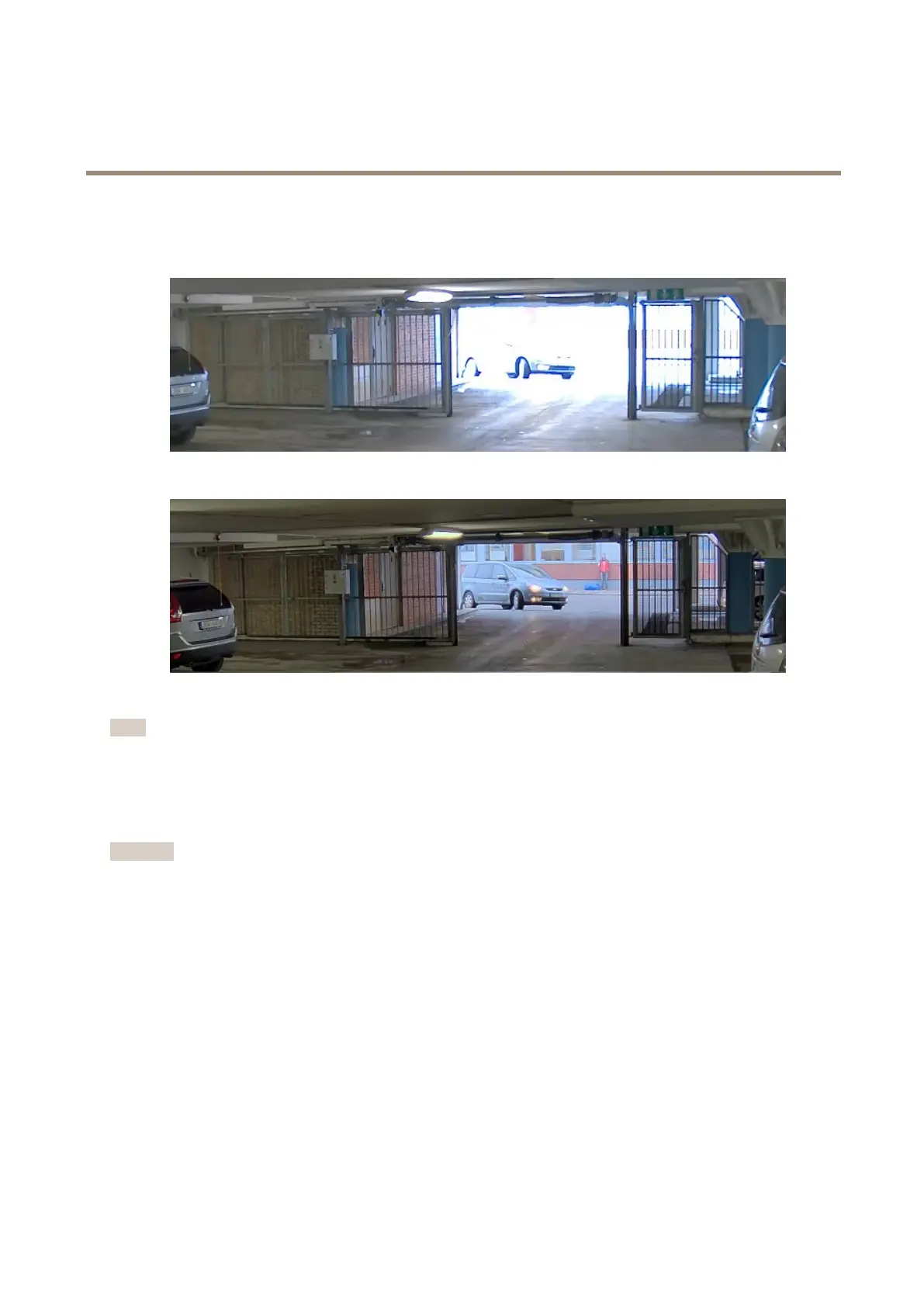
1.GotoSettings>Image>Widedynamicrange.
2.Ifrequired,turnonWDR.
ImagewithoutWDR.
ImagewithWDR.
Note
WDRmaycauseartifactsintheimage.
FindoutmoreaboutWDRandhowtouseitataxis.com/web-articles/wdr.
Maximizedetailsinanimage
Important
Ifyoumaximizedetailsinanimage,thebitratewillprobablyincreaseandyoumightgetareducedframerate.
•Makesuretoselectthecapturemodethathasthehighestresolution.
•Setthecompressionaslowaspossible.
•SelectMJPEGstreaming.
•TurnoffZipstreamfunctionality.
Overlays
Overlaysaresuperimposedoverthevideostream.Theyareusedtoprovideextrainformationduringrecordings,suchasatimestamp,
orduringproductinstallationandconguration.Youcanaddeithertextoranimage.
Showatextoverlayinthevideostreamwhenthedevicedetectsmotion
Thisexampleexplainshowtodisplaythetext“Motiondetected”whenthedevicedetectsmotion:
8


 To Next Page