AXISQ1775NetworkCamera
Technicalspecifications
SDcardslot
NO NO
NO
TICE TICE
TICE
•RiskofdamagetoSDcard.Donotusesharptools,metalobjectsorexcessiveforcewheninsertingorremovingthe
SDcard.Useyourngerstoinsertandremovethecard.
•Riskofdatalossandcorruptedrecordings.DonotremovetheSDcardwhiletheproductisrunning.Disconnectpoweror
unmounttheSDcardfromtheAxisproduct’swebpagesbeforeremoval.
ThisproductsupportsSD/SDHC/SDXCcards(notincluded).
ForSDcardrecommendations,seewww.axis.com
Buttons
ControlButton
Forlocationofthecontrolbutton,seeHardwareoverviewonpage7.
Thecontrolbuttonisusedfor:
•Resettingtheproducttofactorydefaultsettings.Seepage62.
•Ensuringthecameraislevel.Pressthebuttonfornotmorethantwosecondstostartthelevelingassistantandpress
againtostop.ThestatusLEDandbuzzersignal(seepage67)assistlevelingofthecamera.Thecameraislevelwhenthe
buzzerbeepscontinuously.
•ConnectingtoanAXISVideoHostingSystemservice.Seepage53.Toconnect,pressandholdthebuttonforabout3
secondsuntiltheStatusLEDashesgreen.
•ConnectingtoAXISInternetDynamicDNSService.Seepage53.Toconnect,pressandholdthebuttonforabout3seconds.
Connectors
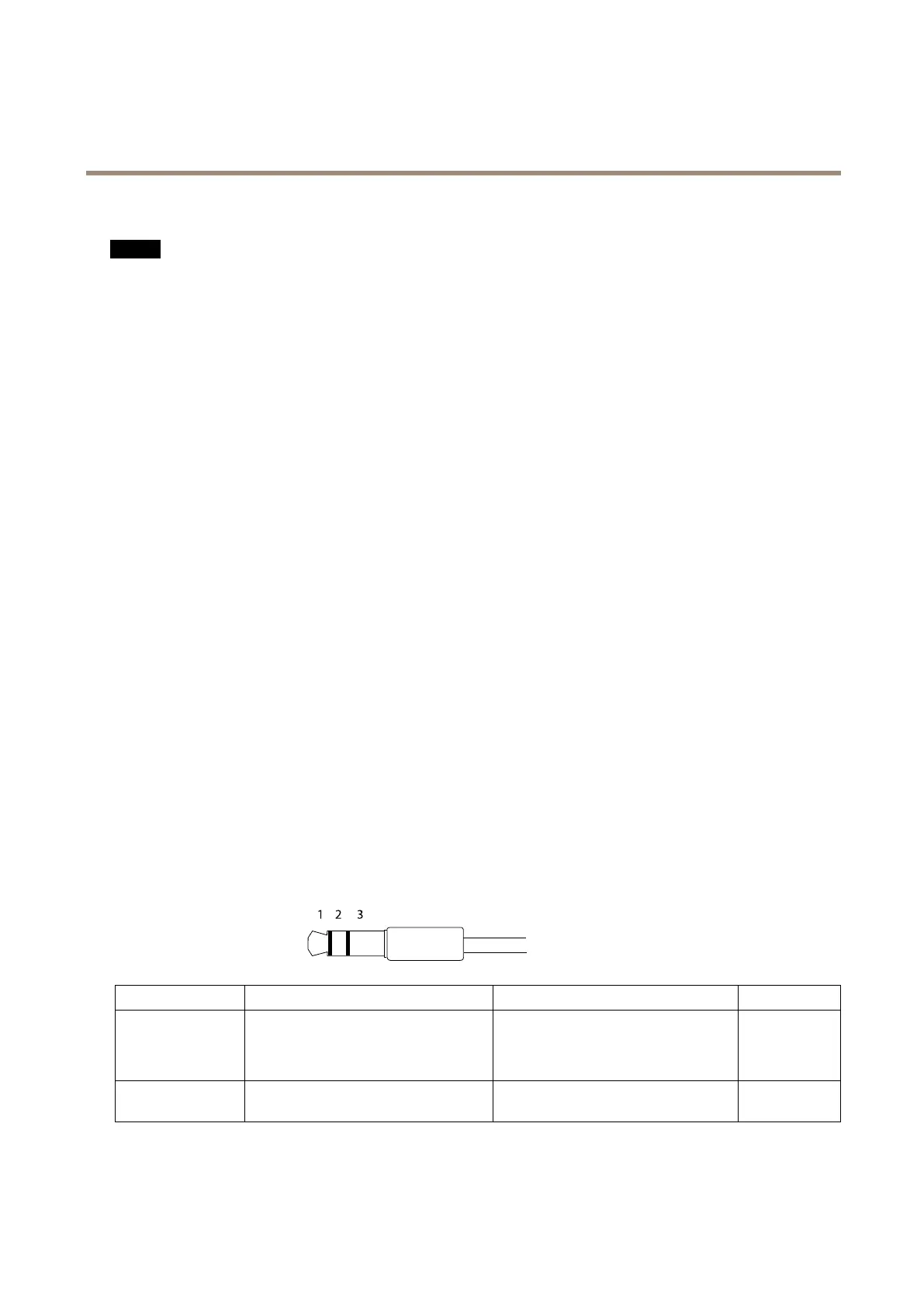
Audioconnector
TheAxisproducthasthefollowingaudioconnectors:
•Audioin(pink)–3.5mminputforamonomicrophone,oraline-inmonosignal.
•Audioout(green)–3.5mmoutputforaudio(linelevel)thatcanbeconnectedtoapublicaddress(PA)systemoran
activespeakerwithabuilt-inamplier.Astereoconnectormustbeusedforaudioout.
3.5mmaudioconnectors
(stereo)
1Tip2Ring
3Sleeve
AudioInput
Balanced:‘Hot’signalMicrophone/Linein
Unbalanced:Microphone/Linein
Balanced:‘Cold’signalMicrophone/Line
in
Unbalanced:Unused
Ground
AudioOutput
Lineout,mono(stereoconnector
compatible)
Lineout,mono(stereoconnector
compatible)
Ground
Theinternalmicrophoneisusedbydefault;theexternalmicrophoneisusedwhenconnected.Itispossibletodisabletheinternal
microphonebyconnectingaplugtothemicrophoneinput.
68



 To Next Page