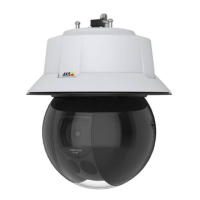
AXISQ6315-LEPTZCamera
Learnmore
Towatchthisvideo,gotothewebversionofthisdocument.
help.axis.com/?&piaId=57873§ion=about-applications
Howtodownloadandinstallanapplication
Towatchthisvideo,gotothewebversionofthisdocument.
help.axis.com/?&piaId=57873§ion=about-applications
Howtoactivateanapplicationlicencecodeonadevice
Autotracking
Withautotracking,thecameraautomaticallyzoomsinonandtracksmovingobjects,forexampleavehicleoraperson.Youcan
manuallyselectanobjecttotrack,orsetuptriggerareasandletthecameradetectmovingobjects.Theapplicationisbestsuitedfor
openareaswithnoobscuringobjectsandwheremovementisunusual.Whenthecameradoesn'ttrackanobject,itreturnstoits
connectedpresetposition.
Important
•Autotrackingisdesignedforareaswithalimitedamountofmovement.
•Autotrackingdoesnottrackobjectsbehindprivacymasks.
•Ifbothautotrackingandguardtourareenabled,guardtourtakespriorityoverautotracking.Thismeansautotracking
stopsifaguardtourstarts.
SetupAutotracking2
Thisexampleexplainshowtosetupthecameratotrackmovingobjectsinanareaofinterest.
Inthedevice’swebinterface:
1.GotoPTZ>Presetpositions.
2.Directthecameraviewtotheareayouwanttotrack,andclick
Addpresetpositiontocreateapresetposition.
3.GotoApps>AXISPTZAutotracking.
4.Startandopentheapplication.
Intheapplicationinterface:
1.GotoSettings>Proles.
52


 To Next Page