16 AB-6650
Setting Operations
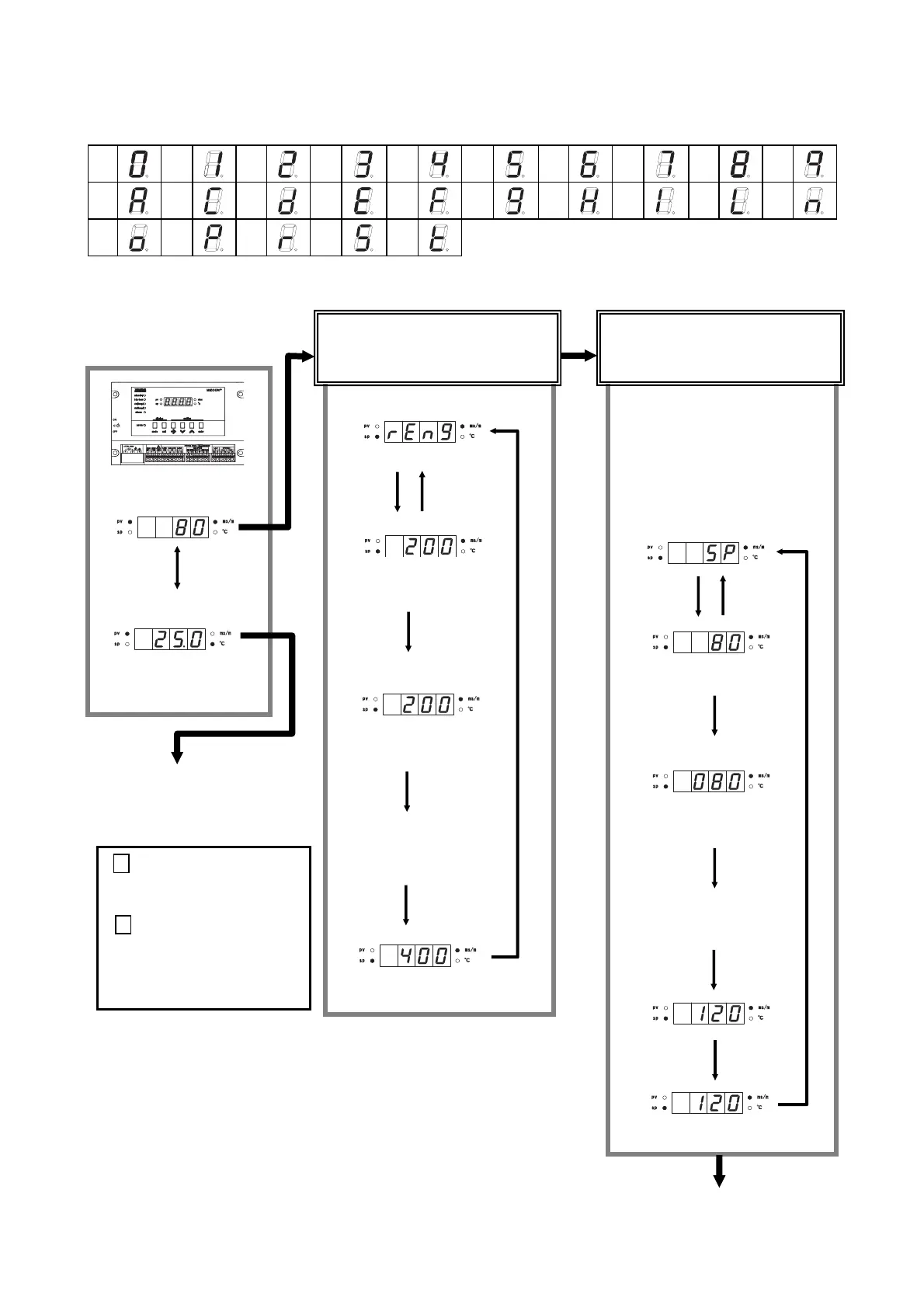
7-segment LEDs indication
0
1
2
3
4
5 6 7
8
9
A
a
C
c
D
d
E
e
F
f
G
g
H
h
I
i
L
l
N
n
O
o
P
p
R
r
S
s
T
t
The settings on this page are available for all the models of MIZCON Plus series.
When power is
turned on…
Press
[mode]
key.
Press [mode] key.
Conductivity PV
Temperature PV
Indication changes by
pressing [unit] key
Continued to P.18.
Press [mode] key.
Conductivity PV range setting menu
The PV range currently set is
displayed.
PV range setting mode
All the digits flash.
Change the range (200 mS/m
or 400 mS/m) with [↑] and [↓]
keys.
The PV range newly set is displayed.
∗
If setpoint (SP) smaller than differential
(DIF) is entered, SP equal to DIF is
automatically set regardless of the
entered SP.
If SP greater than OHSP (high limit
alarm SP) is entered, SP equal to
OHSP is automatically set regardless
of the entered SP.
Conductivity SP setting menu
The SP currently set is displayed.
SP setting mode
The first digit (left ‘0’ in this case)
flashes.
Select the digit to change with
[→] key, and change the value
with [↑] and [↓] keys.
The range newly set is displayed.
Press [mode] key.
Continued to the following page.
Changeover of PV range
: conductivity
(To change 200 to 400 mS/m)
Setting of blow-down SP
:conductivity
(To change 80 to 120 mS/m)
unit :
Changes over between conductivity.
enter :
Displays the conductivity range.
(The range 200.mS/m or 400 mS/m
currently set is displayed for 2
Press
[enter]
key.
Press
[enter]
key.
Press
[→]
key.
Press
[enter]
key.
Press [enter] key.
Press
[→]
key.
Press
[enter]
key.
Press
[enter]
key.
Press
[enter]
key.
Press [enter] key.



 To Next Page