Azbil Corporation Operation with Field Communication software (CFS100)
Model PTG60/70/71/72 - Smart Pressure Transmitter 6-13
5DQJH&RQ¿JXUDWLRQ=HURDQG6SDQ$GMXVWPHQWVDFFRUGLQJWR
Input Pressure
7KHUDQJHFDQEHFRQ¿JXUHGVRWKDWWKHFXUUHQWSUHVVXUHLQSXWLQWRWKHSUHVVXUH
WUDQVPLWWHUEHFRPHVP$RUP$
CAUTION: If this operation is performed while the pressure transmitter process is under
automatic control, outputs may fluctuate, making pressure transmitter
operation dangerous. Before performing this operation, make sure that you
switch the process control loop to manual control.
e following describes how the range can be changed according to input
pressure.
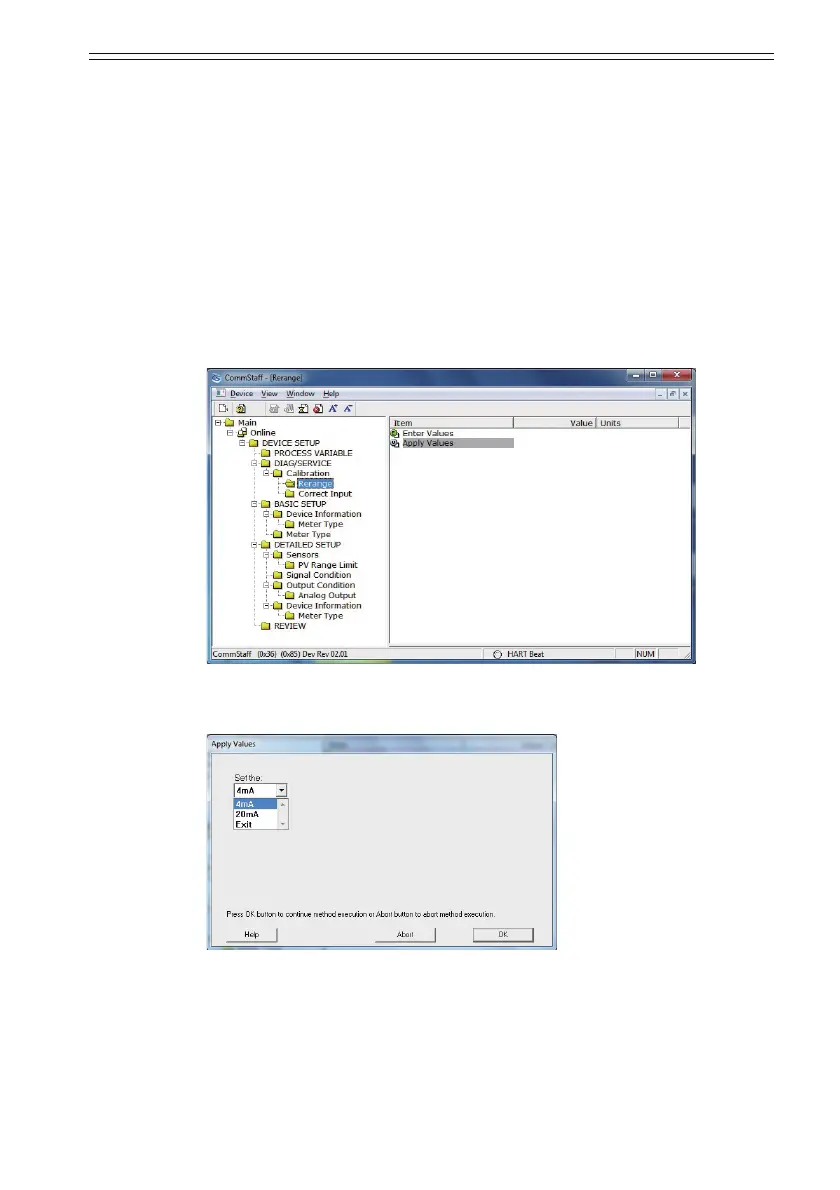
Select DEVICE SETUP o DIAG/SERVICE o Calibration o Rerange o Apply
Values.
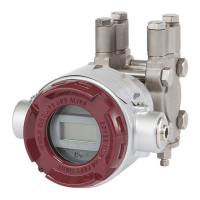
'RXEOHFOLFN$SSO\9DOXHVDQGDZDUQLQJLVGLVSOD\HG¿UVWDQGWKHQWKH
following screen.
• 6HOHFWP$DQGFOLFN2.
The range is reconfigured so that the current input pressure becomes the 4 mA output
pressure (zero adjustment).
• 6HOHFWP$DQGFOLFN2.
The range is reconfigured so that the current input pressure becomes the 20 mA output
pressure (span adjustment).
• 6HOHFW([LWDQGFOLFN2.
7KLVFRPSOHWHVWKHFRQ¿JXUDWLRQSURFHVV


 To Next Page