EN-13
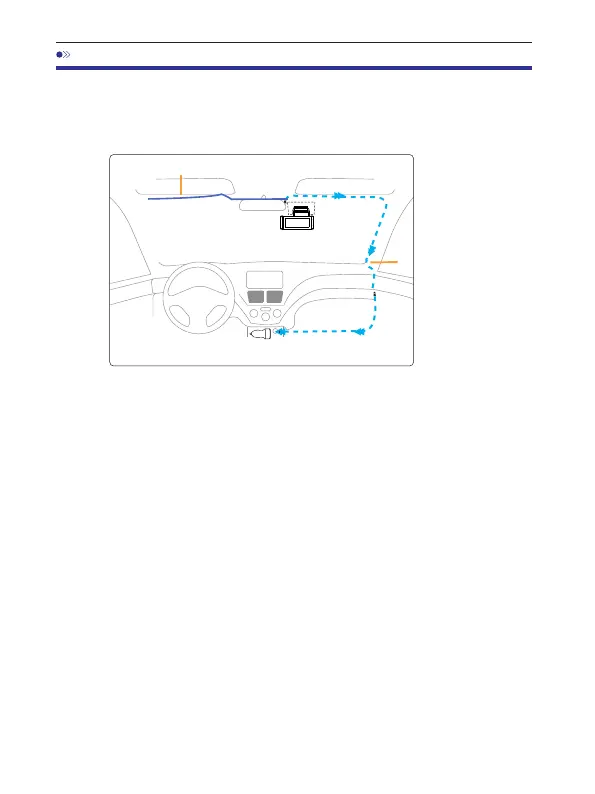
7.Installation
1.CorrectlyconnectthemagneticbracketandM550dashcamthrough
thestrongmagneticattraction.Plugthecabincamera.
2.InsertthemicroSDcardintothemicroSDslotofthedashcamand
formatyourSDcardforthefirsttimeuse.
3.Sticktheelectrostaticfilmonyourwindshield,thenstickthe
magneticbracketontopoftheelectrostaticfilm.
4.Turnoffthecarengine.
5.ConnectthechargingcabletotheminiUSBportofthemagnetic
bracket.Usetheprytooltolifttheedgesofthewindshield
trim/moldingandtuckinthepowercord.
6.Adjusttheangleofthelensbythebracketofthefrontcamera.We
recommendpointingthelensslightlydownwards(≈10°below
horizontal),soastorecordvideowitha6:4roadtobackgroundratio.
7.Turnontheengine.Thedashcamwillpowerupandstartrecording.
VideofilesarestoredonthemicroSDcard.WhenthemicroSDcardfills
up,thenewestvideofileswillstarttoreplacetheoldestvideofiles
(calledlooprecording)‒soyouwillalwayshavethemostrecentvideo
files.
CarCharger12-24VDC
Rearcameracable
Installthefrontandcabincameraatthetopofthefrontwindshield.
Removeanyforeignmatterandcleananddrythewindshieldbefore
installation.InstalltheRearCamera(IP68waterproof)outsidethecar.
chargingcable



 To Next Page