EN-27
11.PlayingVideoFilesUsingYourComputer
1.RemovethemicroSDcardfromthedashcam.
2.InsertthecardintothemicroSDcardreaderandconnectittoacomputer.
.2 DownloadAZDOMEGPSPlayerfromwww.azdomes.com>Support>
Downloadsandinstallitonyourcomputer.
3.InstalltheAZDOMEGPSPlayeronyourcomputer.(Note:Pleasecloseor
ignorethepromptoftheanti-virussoftware,weconfirmthatitwillnotbring
anysecurityimpacttoyourcomputer.)
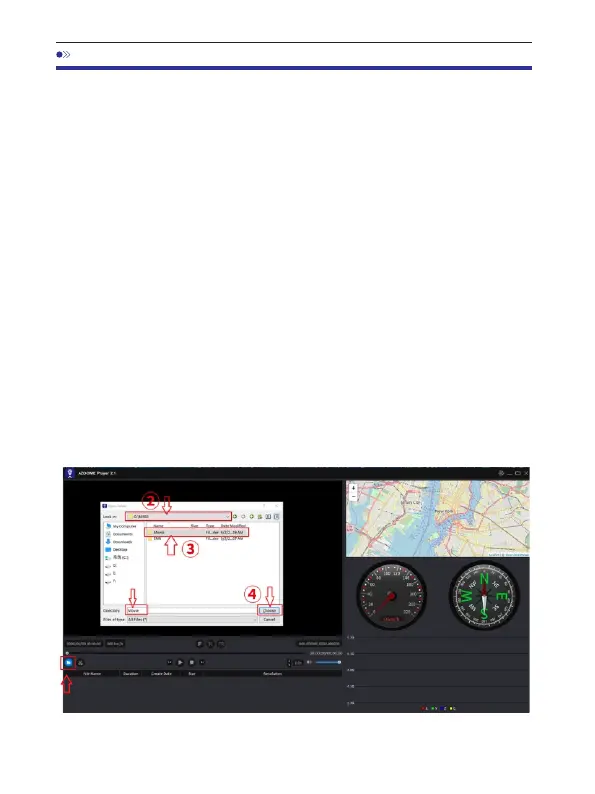
. ‘ ’buttontobrowseandselecttheMovieor4 Youcanclickthe OpenFiles
EMRfolderofthemicroSDcardontheAZDOMEGPSPlayer.
ItwillshowallfilesintheMovieorEMRfolder.Oryoucanalsodragthe
videofilesdirectlytothelauncherscreen.
5.Therearetwowaystoplayvideo.
A,ClickFile-Openicontochoosethefolderwhichyouwanttoplay,clickto
startplay.
(NotethatyoucanONLYselectonefoldertoplayandseenovideofiles)
①



 To Next Page