EasyManua.ls Logo

B. Braun Vista basic - Staff Call; Special Functions

B. Braun Vista basic
55 pages
Print Icon
To Next Page IconTo Next Page
To Previous Page IconTo Previous Page
Loading...
3
|
Service
Program
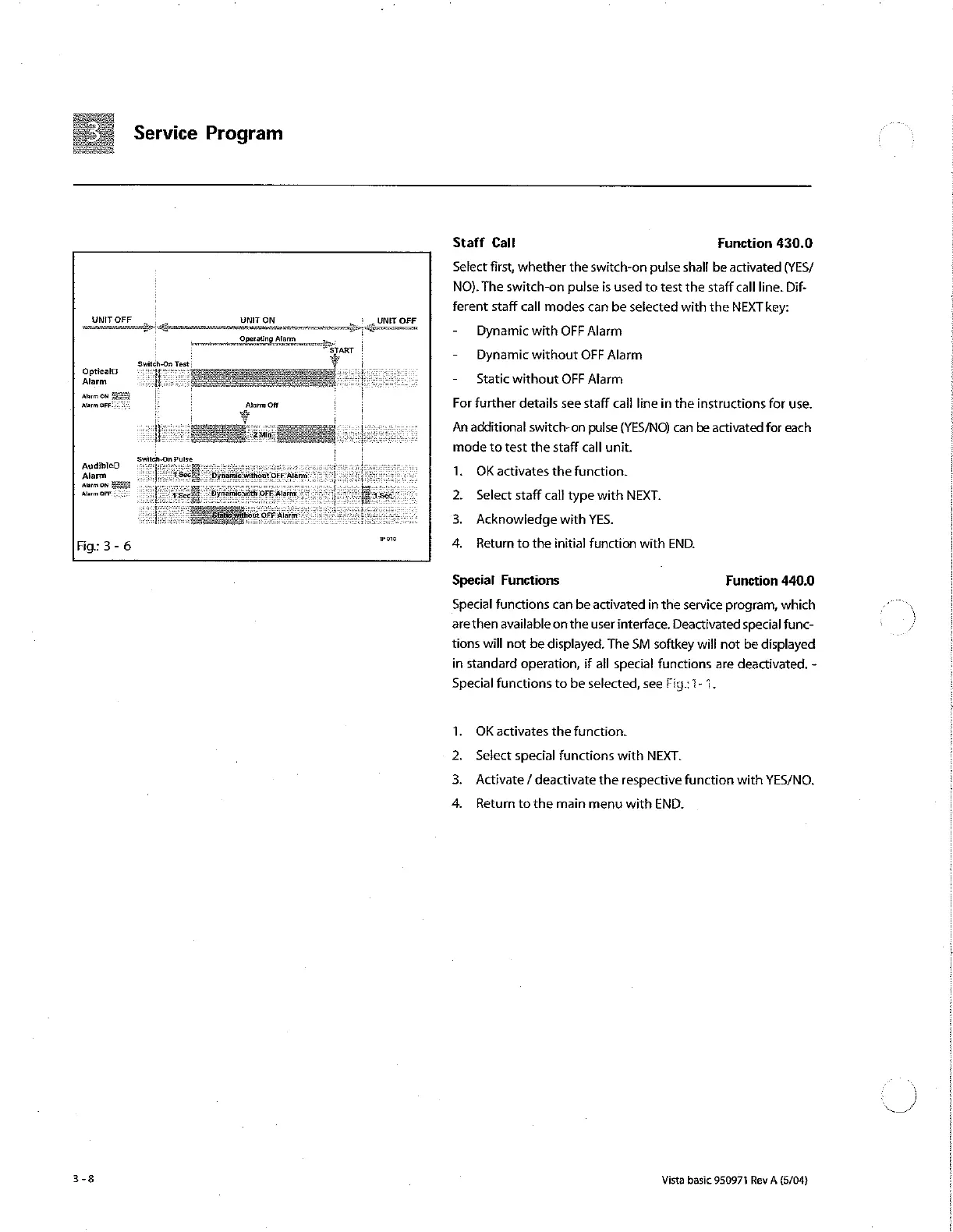
UNIT
OFF
a
UNIT
ON
„UNIT
OFF
и
Operating
Alarm,
Zinet
“START
ade
Optical?
Alarm
Alarm
ON
FERE
Alarm
DEF:
+ i
Alarm
Off
AudibleO
Alarm
‘ures
on
SESE
Alarm
OFF.
oo
Fig:
3-6
Staff
Cal!
Function 430.0
Select
first,
whether
the
switch-on
pulse
shall
be
activated
(YES/
NO).
The
switch-on
pulse
is
used
to
test
the
staff
call
line.
Dif-
ferent
staff
call
modes
can
be
selected
with
the
NEXT
key:
-
Dynamic
with
OFF
Alarm
-
Dynamic
without
OFF
Alarm
-
Static
without
OFF
Alarm
For
further
details
see
staff
call
line
in
the
instructions
for
use.
An
additional
switch-on
pulse
(YES/NO)
can
be
activated
for
each
mode
to
test
the
staff
call
unit.
1.
OKactivates
the
function.
2.
Select
staff
call
type
with
NEXT.
3.
Acknowledge
with
YES.
4.
Return
to
the
initial
function
with
END.
Special
Functions
Function
440.0
Special
functions
can
be
activated
in
the
service
program,
which
are
then
available
on
the
user
interface.
Deactivated
special
func-
tions
will
not
be
displayed.
The
SM
softkey
will
not
be
displayed
in
standard
operation,
if
all
special
functions
are
deactivated.
-
Special
functions
to
be
selected,
see
Fig:
1-4.
1.
OK
activates
the
function.
Select
special
functions
with
NEXT.
Activate
/
deactivate
the
respective
function
with
YES/NO,
»
Return
to
the
main
menu
with
END.
Vista
basic
950971
Rev
A
(5/04)
Se

Other manuals for B. Braun Vista basic

Related product manuals