♦ The control panel
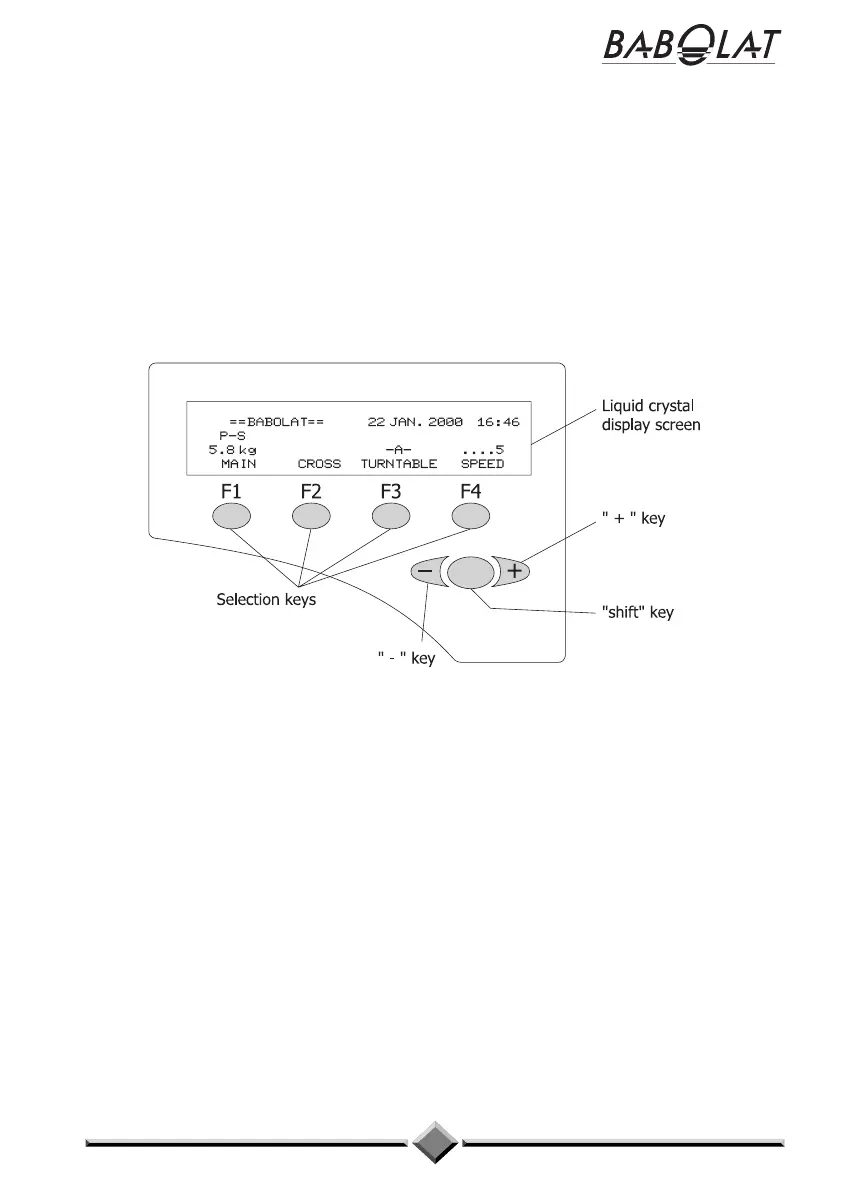
The control panel allows you to communicate with the machine. It has a liquid crystal
display screen with 4 lines of 40 characters. Using its 4 selection keys and 3 scrolling keys,
the control panel allows you to change the user settings on the machine and to view the
current values to find out its status. The factory settings and those entered by the user are
stored in an EEPROM memory so that they are not deleted when the machine is turned off.
Using the keys on the control panel you can shift between the various screens and change
the options or values associated with the menus in order to adapt the machine's functions to
your demands.
There are 3 ways of changing the machine data:
- by activating/deactivating a setting,
- by changing a digital setting,
- by selecting an option on a menu.
It is very straightforward to use the control panel and change the options or values assigned
to the menus. Read the following paragraphs carefully and try it out for yourself. Do not
worry about making a mistake as there is no danger for the machine - you will just need to
start again from scratch.
15


 To Next Page