7
BF-UM-C-DP C13-EN November 2019
USER MANUAL FOR DISPLAY
7.7 SETTINGS
After the display is turned on, press and hold
(>2S) the and button at same time to
access the “Setting” interface. pressing the
or button, you can select and reset
the items.
Briefly press (<0.5S) the button your can
confirm your selected option or access the
next “Setting” interface, you can also press
and hold (>2S) the and button at
the same time to save them and exit to the
“Setting” interface.
If no button is pressed within 1 minute
in “Setting” interface, the display will
automatically exit setting and no data will be
saved.
7.7.1 Setting
7.7.1.1 Reset mileage
When the system is on, press and hold (>2S)
the
and button at same time to ac-
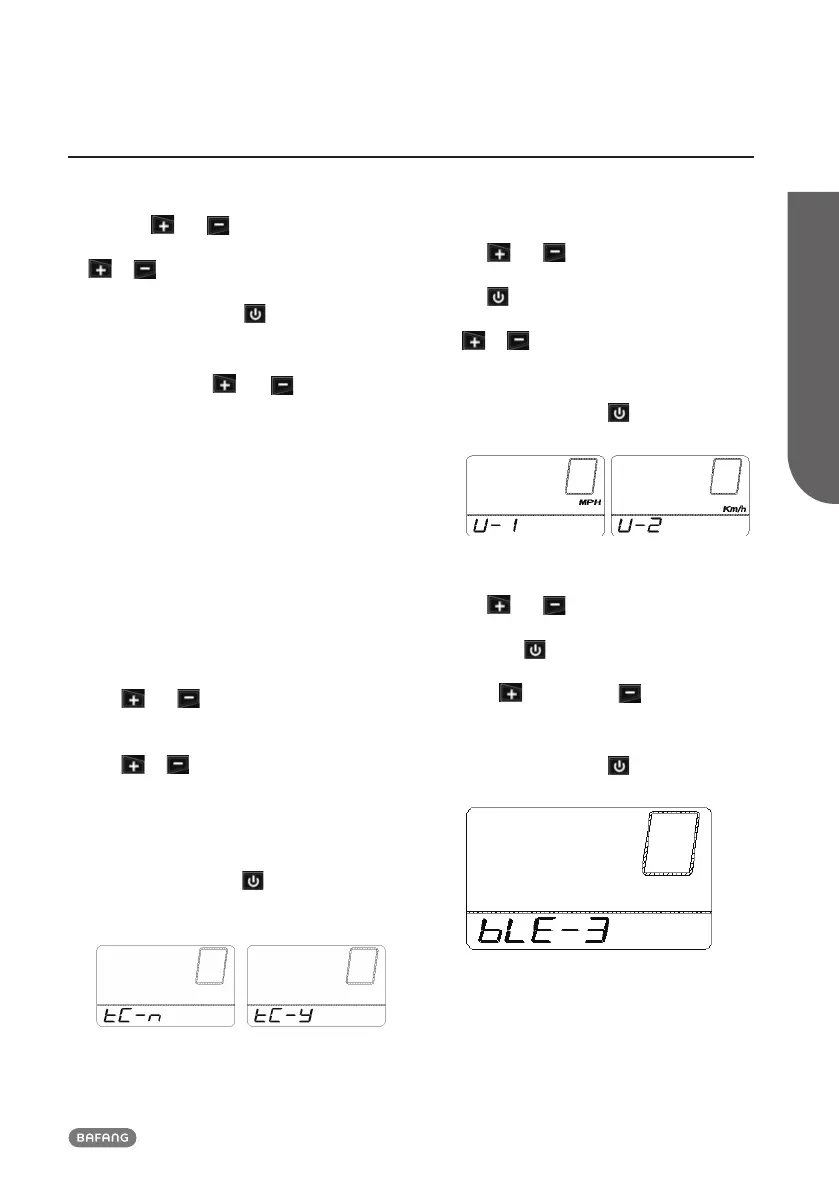
cess the “Setting” interface and “tC” appears
on the display (as shown below). Now using
the or button, choose between “y”
or “n”. If choose “y”, will the Daily kilome-
ters (TRIP), Maximum speed (MAX), Average
speed (AVG) and time(TIME) be reset.
Once you have chosen your desired selec-
tion, press (<0.2S) the
button to save
and to enter next item "Selections in km/
Miles".
7.7.1.2 Selections in km/Miles
When the system is on, press and hold (>2S)
the
and button at same time to ac-
cess the “Setting” interface, repetitively press
the button until the “U” appears on the
display (as shown below). Now using the
or button, choose between “mile/h”
or “km/h” (U-1 or U-2).
Once you have chosen your desired selec-
tion, press (<0.2S) the
button to save
and to enter next item "Set light sensitivity".
7.7.1.3 Set display brightness
When the system is on, press and hold (>2S)
the
and button at same time to
access the “Setting” interface, repetitively
press the
button until the “bLE” appears
on the display (as shown below). And then
press to increase or to reduce
(brightness for 1-8).
Once you have chosen your desired selec-
tion, press (<0.3S) the
button to save
and to enter next item "Set Auto Off".











 To Next Page