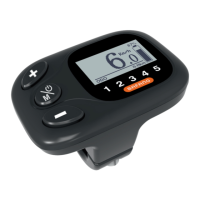
The BAFANG DP C15.UART is an intelligent display designed for electrically power-assisted cycles (pedelecs) that complies with EN15194 standards. This display provides a comprehensive interface for monitoring and controlling various aspects of your e-bike.
Function Description
The DP C15.UART offers a wide range of functions to enhance your riding experience:
- Intelligent Battery Capacity Indication: Displays the remaining battery capacity as a percentage of the total.
- Power Assistance Level Indication: Shows the current assistance level, ranging from 1 to 5. If no number is displayed, it indicates no power assistance.
- Speed Indication: Provides real-time speed in km/h or MPH, along with maximum speed (MAX) and average speed (AVG). The unit can be switched between kilometers and miles.
- Motor Output Power Indication: Displays the motor's current output power (POWER).
- Time Indication for Single Riding: Tracks the duration of a single trip (TIME).
- Trip Indication: Includes single-trip distance (TRIP), total distance (ODO), and remaining distance (RANGE).
- Control and Indication for Push Assistance: Activates a 6KM/H push assistance mode.
- Control and Indication for the Headlight: Allows turning the headlight on and off, which also adjusts the display backlight luminance.
- Battery Information Check: Provides detailed battery information, including current temperature (b01), total voltage (b04), average current (b06), remaining capacity (b07), full capacity (b08), relative state of charge (b09), absolute state of charge (b10), cycle count (b11), maximum not charging time (b12), recently not charging time (b13), number of battery cells (d00), and individual cell voltages (d01 to dn).
- Error Information Record and Indication: Records and displays error codes, with a history of the latest ten errors.
- Energy Consumption Indication (CALORIES): If supported by the display, it shows the energy consumed in KCal.
- Remaining Distance Indication: If supported by the display and if it receives remaining range data, it shows the remaining distance.
Important Technical Specifications
- Rated Voltage: 36V / 43V / 48V DC
- Rated Current: 10mA
- Maximum Operating Current: 30mA
- Power-off Leakage Current: ≤1uA
- Operating Current Supplied to Controller: 50mA
- Operation Temperature: -20 ℃ to 45 ℃
- Storage Temperature: -30 ℃ to 70 ℃
- IP Level: IP65
- Storage Ambient Humidity: 30% - 70%
Usage Features
The DP C15.UART features a user-friendly interface with three main buttons: ON/OFF/Mode, Up (+), and Down (-).
- Power On/Off: Press and hold the ON/OFF/Mode button to power on the display. Press and hold again to turn it off.
- Navigation: Briefly press the Up (+) or Down (-) buttons to navigate through menus or adjust settings.
- Mode Switching: Briefly press the ON/OFF/Mode button to cycle through different display interfaces (TRIP, ODO, MAX, AVG, RANGE, CALORIES/CAL, TIME, POWER).
- Headlight Control: Press and hold the Up (+) button to turn the headlight on or off. Turning the headlight on decreases display backlight luminance, and turning it off increases it.
- Push Assistance: Press and hold the Down (-) button to activate 6KM/H push assistance. Release the button to exit this mode.
- Menu Access: Press and hold both the Up (+) and Down (-) buttons simultaneously to enter the main menu, which includes "Display Setting," "Information," and "EXIT."
- Display Settings:
- TRIP Reset: Resets single-trip distance, riding time, average speed, and maximum speed.
- Unit Switch: Toggles between Metric (km/h) and Imperial (MPH) units for all displayed information.
- Brightness: Adjusts the display backlight luminance to 100%, 75%, 50%, 30%, or 10%.
- Auto Off: Sets the automatic power-off time (OFF, 1-9 minutes).
- Information Menu:
- Wheel Size: Displays the configured wheel size (e.g., 26 INCH).
- Speed Limit: Shows the current speed limit (e.g., 25 km/h).
- Battery Info: Provides detailed battery parameters.
- Error Code: Displays a history of the latest ten error codes.
Maintenance Features
The DP C15.UART assists in identifying and troubleshooting potential issues with your e-bike through its error code indication system.
- Error Code Display: When a failure occurs, the display will show an error code and flicker. The error code will remain displayed until the issue is resolved.
- Error Code Table: The manual provides a detailed table of error codes and their corresponding explanations and troubleshooting steps.
- 03 (Brakes enabled): Check if a brake cable is stuck.
- 07 (High voltage protection): Bring your Pedelec to your dealer or a specialist.
- 08 (Fault with motor hall sensor inside): Bring your Pedelec to your dealer or a specialist.
- 10 (The motor temperature reaches to the max protection value): Stop the e-bike for a rest. If the user continues, the motor will automatically cut off power.
- 12 (Fault with current sensor inside controller): Bring your Pedelec to your dealer or a specialist.
- 13 (Fault with temperature sensor inside battery): Bring your Pedelec to your dealer or a specialist.
- 21 (Fault with wheel speed detecting sensor): Bring your Pedelec to your dealer or a specialist.
- 22 (BMS communication fault): Bring your Pedelec to your dealer or a specialist.
- 25 (Torque sensor torque signal fault): Bring your Pedelec to your dealer or a specialist.
- 26 (Torque sensor speed signal fault): Bring your Pedelec to your dealer or a specialist.
- 30 (Communication fault): Bring your Pedelec to your dealer or a specialist.
- Troubleshooting Guidance: For most errors, the recommended action is to take the pedelec to a dealer or specialist for repair. For error code 10, the user is advised to stop riding and allow the motor to cool down.

 Need help?
 General











 To Next Page