8
DISPLAY MANUAL DP C15.UART
FUNCTIONS SETTING
Press and hold “+”button & “-”button at
the same time to enter into the menu list
(“Display Setting”, “Information”, “EXIT”).
Briefly press “+”button or “-”button to
select “Display Setting”, “Information” or
“EXIT”, and then briefly press the “ON/
OFF” to select it.
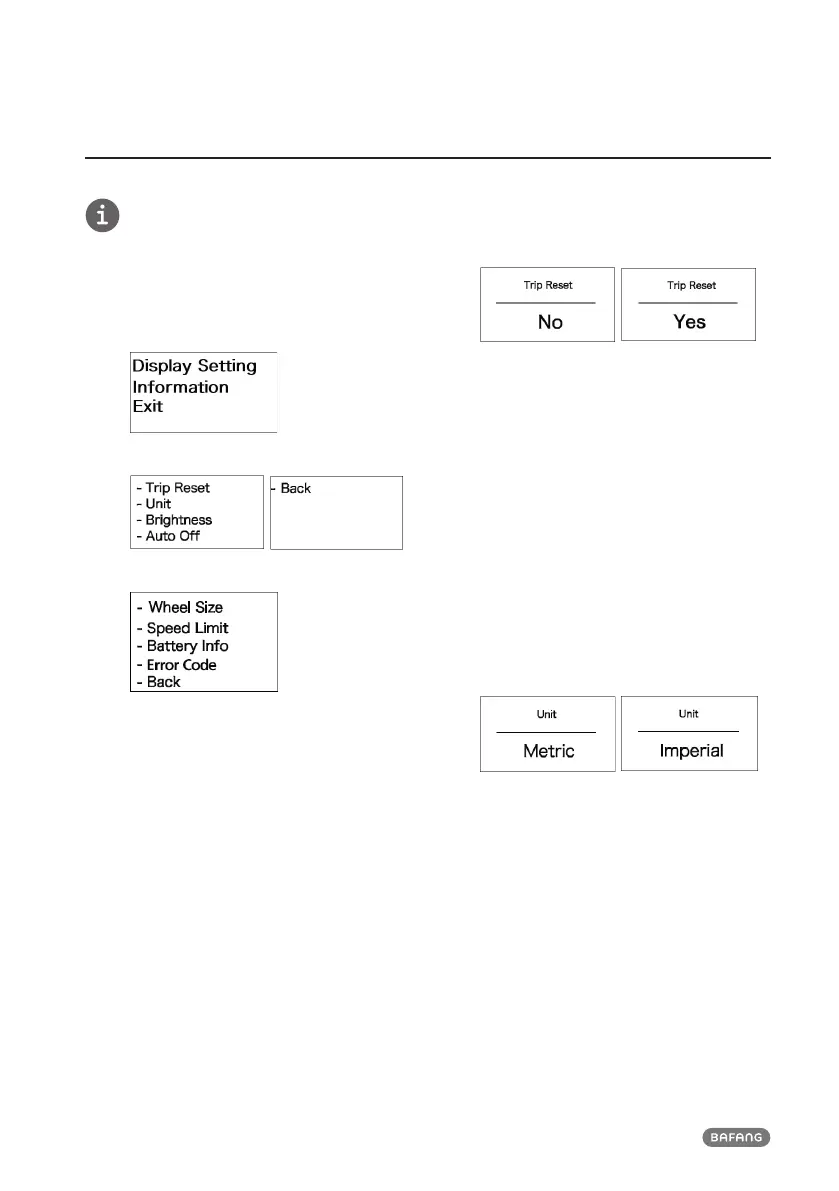
(Interface for the functions selection)
(Interfaces for “Display Setting” selection)
(Interfaces for “Information” selection)
• Reset single-trip distance
Enter into “Display Setting” menu and briefly
press “+” or “-” to select “TRIP Reset” and
briefly press “ON/OFF”. And then, briefly
press “+” or “-” to select “NO”/ “YES” (“YES”
means reset, “NO” means no reset). Briefly
press “ON/OFF” to save the setting and exit
back to the “TRIP Reset”. Press and hold
“+”&“-” at the same to save and exit back to
main interface or select “BACK” → “EXIT” to
exit back to main interface. (Note: after set-
ting, pressing and holding “+” and “-” at the
same time means saving setting and exiting
back to main interface). When resetting the
single-trip distance, it resets the riding time,
average speed, maximum speed at the same
time.
(“YES” means resetting,“NO” means no resetting)
• Unit switch between Metric and Impe-
rial
Enter into “Display Setting” menu and briefly
press “+” or “-” to select “Unit”, and then
briefly press “power” to confirm selection.
Briefly press “+” or “-” to select “Metric”/
“Imperial” and then briefly press “power”
to save the setting and exit back to “Unit”.
Press and hold “+” & “-” at the same time to
exit back main interface or select “BACK” →
“EXIT” to exit main interface. (Note: If select-
ing the metric interface, the all information
will be metric; if selecting the imperial, the
all information will be imperial.)
(“Metric”unit / “Imperial”unit)
• Backlight luminance setting
Enter into “Display Setting” interface and
briefly press“+” or “-” to select “Brightness”
and then briefly press “power” to confirm
selection. Briefly press “+” or “-” to select as
“100%”/ “75%”/ “50%”/ “30%”/ “10%”.
After selection, briefly press “power” to save
the setting and exit back to the “Brightness”
interface. Press and hold “+” and “-” at the
same time to exit back to main interface or
select to “BACK” → “EXIT” to exit back to
main interface.













 To Next Page